Introduction to Java Parquet (Formerly Parquet MR)
Last updated: September 16, 2026



Mocking is an essential part of unit testing, and the Mockito library makes it easy to write clean and intuitive unit tests for your Java code.
Get started with mocking and improve your application tests using our Mockito guide:
Handling concurrency in an application can be a tricky process with many potential pitfalls. A solid grasp of the fundamentals will go a long way to help minimize these issues.
Get started with understanding multi-threaded applications with our Java Concurrency guide:
Spring 5 added support for reactive programming with the Spring WebFlux module, which has been improved upon ever since. Get started with the Reactor project basics and reactive programming in Spring Boot:
Since its introduction in Java 8, the Stream API has become a staple of Java development. The basic operations like iterating, filtering, mapping sequences of elements are deceptively simple to use.
But these can also be overused and fall into some common pitfalls.
To get a better understanding on how Streams work and how to combine them with other language features, check out our guide to Java Streams:
Explore Spring Boot 3 and Spring 6 in-depth through building a full REST API with the framework:
Yes, Spring Security can be complex, from the more advanced functionality within the Core to the deep OAuth support in the framework.
I built the security material as two full courses - Core and OAuth, to get practical with these more complex scenarios. We explore when and how to use each feature and code through it on the backing project.
You can explore the course here:
All Access is finally out, with all of my Spring courses. Learn JUnit is out as well, and Learn Maven is coming fast. And, of course, quite a bit more affordable. Finally.
>> GET THE COURSE
Spring Data JPA is a great way to handle the complexity of JPA with the powerful simplicity of Spring Boot.
Get started with Spring Data JPA through the guided reference course:
Refactor Java code safely — and automatically — with OpenRewrite.
Refactoring big codebases by hand is slow, risky, and easy to put off. That’s where OpenRewrite comes in. The open-source framework for large-scale, automated code transformations helps teams modernize safely and consistently.
Each month, the creators and maintainers of OpenRewrite at Moderne run live, hands-on training sessions — one for newcomers and one for experienced users. You’ll see how recipes work, how to apply them across projects, and how to modernize code with confidence.
Join the next session, bring your questions, and learn how to automate the kind of work that usually eats your sprint time.
1. Overview
Apache Parquet is a columnar storage format optimized for analytics. It can be used with plain Java and Maven without requiring a distributed framework. However, it remains fully compatible with engines like Spark or Hive.
In this tutorial, we’ll create a small Maven project, add the necessary dependencies, and test Parquet Java with JUnit 5.
Initially, we’ll write and read files using the low-level Example API. Then, we’ll switch to Avro-backed models. Finally, we’ll demonstrate column projection and predicate pushdown. For API details, we can refer to the official Javadocs.
The target in all cases is Java 17 LTS.
2. Key Concept: Columnar vs. Row Storage
Before we start coding, let’s clarify perhaps the most important idea: columnar files store values by column, while row-oriented files group all the fields of a row together. Parquet is columnar, while formats like CSV and JSON are row-oriented:
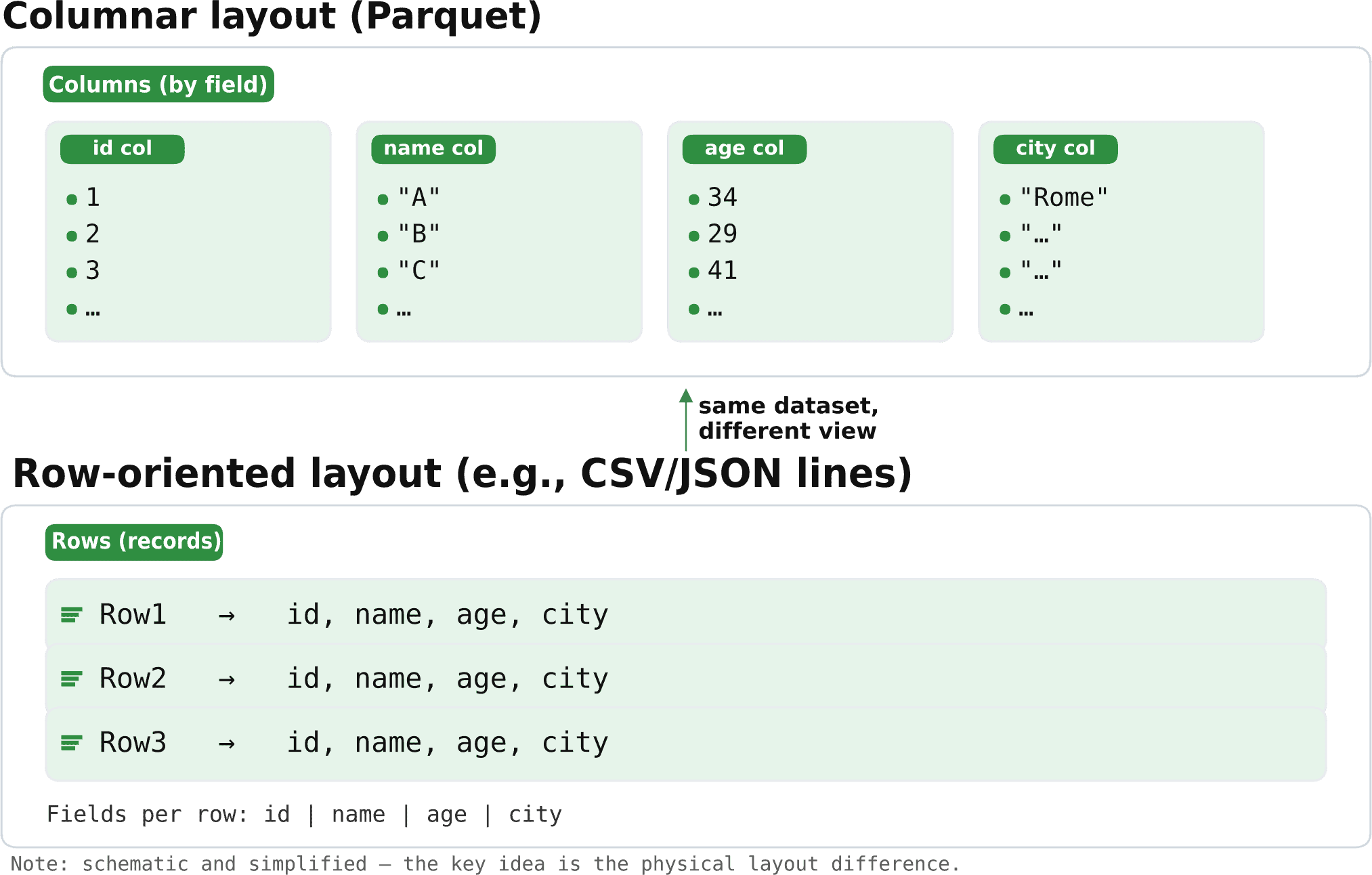
This organization enables Parquet to read only the requested columns and apply filters that skip large portions of the file, eliminating the need to decode every row.
3. Maven Setup
Assuming that JUnit 5 and the Maven Surefire plugin are already configured, let’s declare both parquet-avro and parquet-hadoop. While parquet-avro brings in Parquet’s core modules transitively, we also use the Hadoop-backed I/O and Example API (e.g., HadoopInputFile, HadoopOutputFile, ParquetFileReader, ExampleParquetWriter), which live in parquet-hadoop:
<dependency>
    <groupId>org.apache.parquet</groupId>
    <artifactId>parquet-avro</artifactId>
    <version>1.16.0</version>
</dependency>
<dependency>
    <groupId>org.apache.parquet</groupId>
    <artifactId>parquet-hadoop</artifactId>
    <version>1.16.0</version>
</dependency>
Before copying the snippet, we should check Maven Central for the latest versions.
4. Basic Parquet File With the Example API
Parquet Java provides a small, low-level data model for demonstration and testing purposes, exposed through the org.apache.parquet.hadoop.example package.
4.1. Core Classes
In this case, we use several core classes:
- MessageType / MessageTypeParser: represent and parse a Parquet schema written in the Parquet textual schema notation
- Group and SimpleGroupFactory: generic, untyped row container and a factory to create those rows that conform to a MessageType
- ExampleParquetWriter and ParquetReader<Group>: convenience classes to write and read Group instances
- HadoopOutputFile / Path / Configuration: filesystem abstractions used by the Parquet Hadoop module
Now, let’s consider the data organization.
4.2. Schema
Parquet uses a typed, nested, columnar format, which includes primitive types (e.g. INT32 and BYTE_ARRAY) and logical types (e.g. BYTE_ARRAY read as UTF-8 string). BYTE_ARRAY and BINARY are equivalent, and the case doesn’t matter.
Let’s test a very simple person schema consisting of three fields:
- name
- age
- city
The definition is fairly straightforward:
message person {
    required binary name (UTF8);
    required int32  age;
    optional binary city (UTF8);
}
Of course, the interpretation is also intuitive:
- message person is the root record type
- required vs optional controls repetition
- binary (UTF8) is the Parquet physical type binary with a logical annotation indicating a UTF-8 string
- int32 is a 32-bit integer
In Parquet, every field has a repetition:
- required: exactly one value
- optional: zero or one
- repeated: zero or many, used for lists/maps
As an alternative to the textual schema notation, we can use Java APIs to create an equivalent schema. In fact, we look at these options later.
4.3. Writing and Reading the Schema
Let’s write two rows using the Example API, and then read them back to assert a simple round-trip:
@Test
void givenSchema_whenWritingAndReadingWithExampleApi_thenRoundtripWorks(@TempDir java.nio.file.Path tmp) throws Exception {
    String schemaString = """
        message person {
          required binary name (UTF8);
          required int32 age;
          optional binary city (UTF8);
        }
        """;
    MessageType schema = MessageTypeParser.parseMessageType(schemaString);
    SimpleGroupFactory factory = new SimpleGroupFactory(schema);
    Configuration conf = new Configuration();
    Path hPath = new Path(tmp.resolve("people-example.parquet").toUri());

    try (ParquetWriter<Group> writer = ExampleParquetWriter.builder(HadoopOutputFile.fromPath(hPath, conf))
        .withConf(conf)
        .withType(schema)
        .build()) {
        writer.write(factory.newGroup()
            .append("name", "Alice")
            .append("age", 34)
            .append("city", "Rome"));
        writer.write(factory.newGroup()
            .append("name", "Bob")
            .append("age", 29));
    }

    List<String> names = new ArrayList<>();
    try (ParquetReader<Group> reader = ParquetReader.builder(new GroupReadSupport(), hPath)
        .withConf(conf)
        .build()) {
            Group g;
            while ((g = reader.read()) != null) {
                names.add(g.getBinary("name", 0).toStringUsingUTF8());
            }
    }
    assertEquals(List.of("Alice", "Bob"), names);
}
Let’s use a flowchart to understand how the code works by also commenting on the relevant parts:
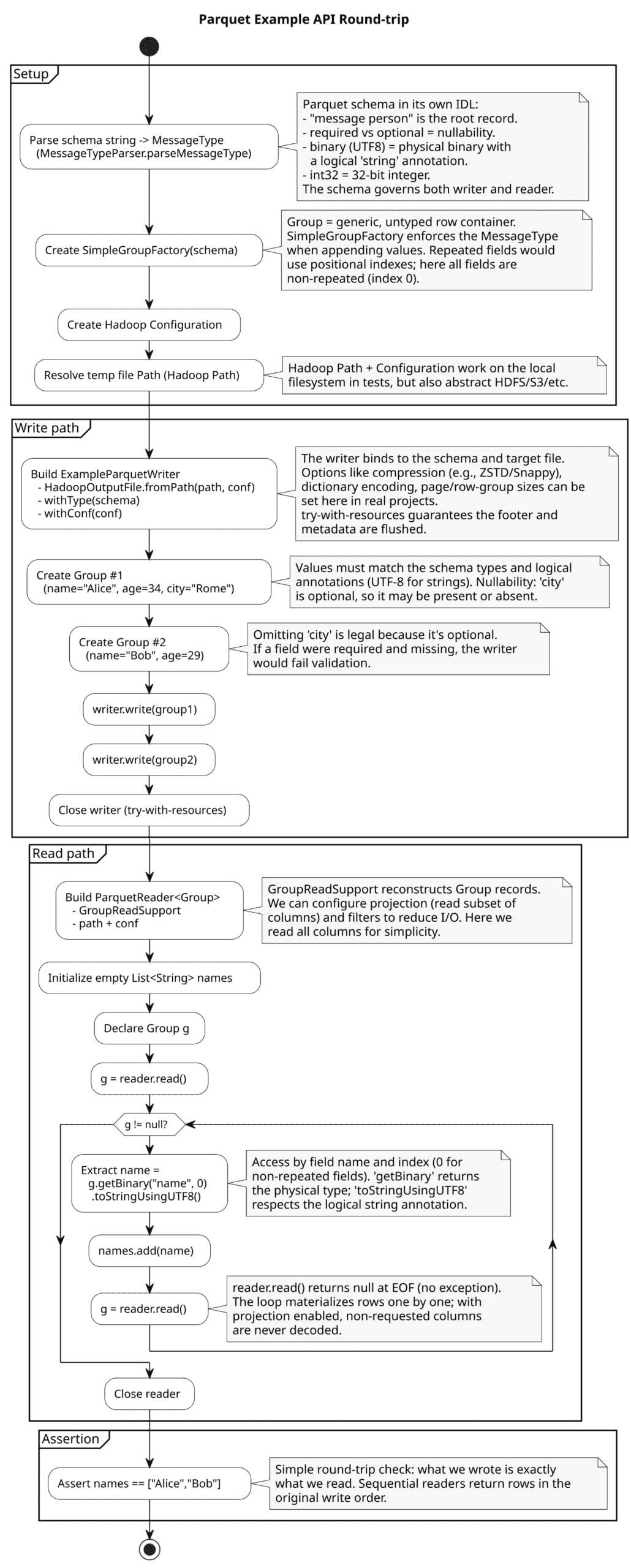
In this case, we used the Parquet textual schema notation. For the next example, by contrast, we use only Java to create the schema.
4.4. FilterPredicate to Skip Row Groups
Predicate pushdown enables us to skip scanning row groups that don’t satisfy a filter. Nested predicates and combinations (and, or, not) are supported. Pushdown applies to REQUIRED or OPTIONAL columns of several types:
- int
- long
- float
- double
- boolean
- binary (UTF8) strings
Parquet stores per-row-group statistics, such as minimum and maximum values, and the reader can use these statistics along with column indexes to skip large portions of the file without decoding values.
For example, let’s see a diagram that shows a Parquet file divided into groups of rows:
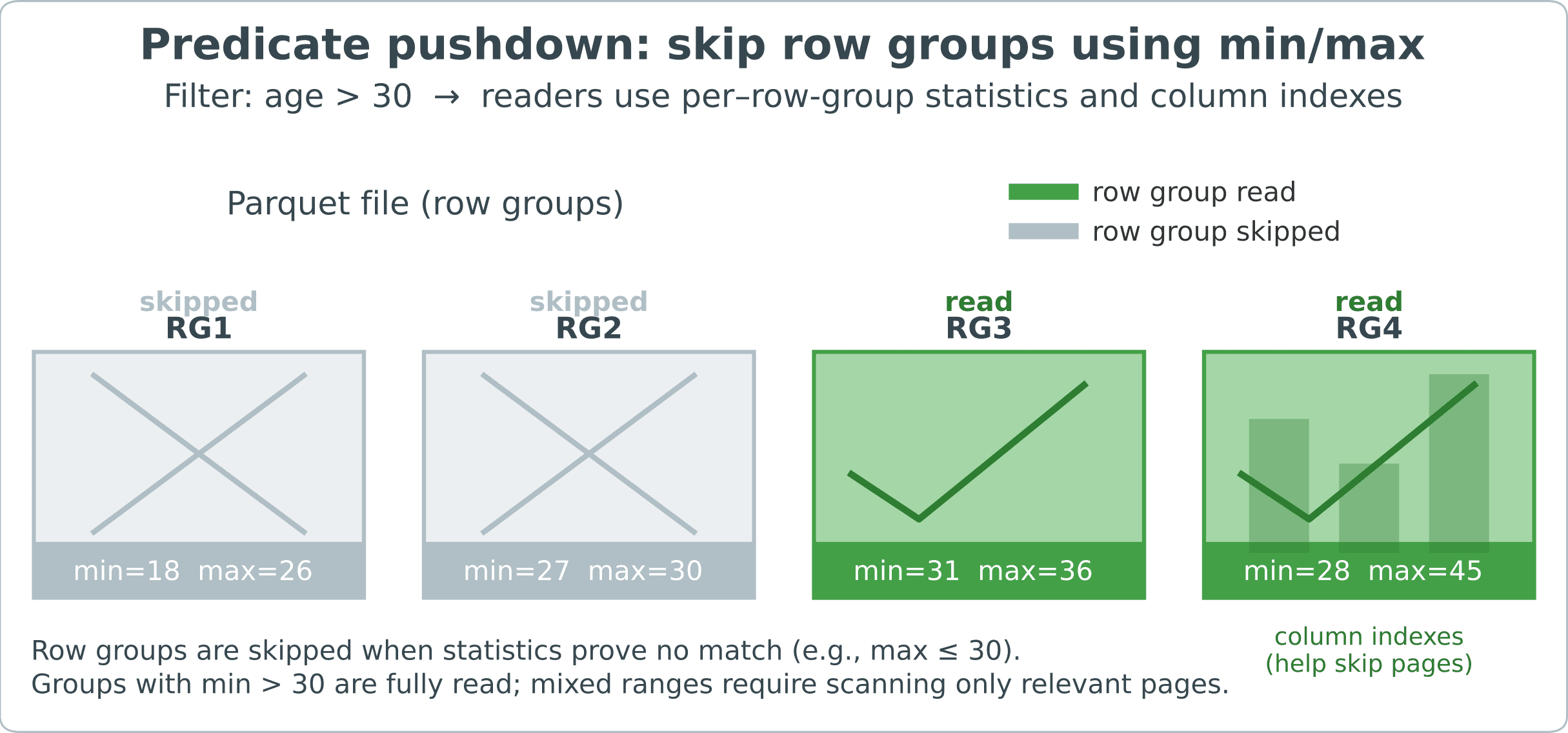
Groups that are proven to be irrelevant are skipped entirely. Within the retained groups, the column indexes can skip specific column pages, which are the internal data pages that comprise a column chunk.
So, let’s define a schema with the Java builder, write two rows, and then attach an age > 30 filter to the reader. The filter is expressed with the FilterApi and passed through FilterCompat when constructing the ParquetReader. After reading, we only collect rows where age satisfies the predicate. For typical datasets, this filtering substantially reduces I/O:
@Test
void givenAgeFilter_whenReading_thenOnlyMatchingRowsAppear(@TempDir java.nio.file.Path tmp) throws Exception {
    Configuration conf = new Configuration();

    MessageType schema = Types.buildMessage()
        .addField(Types.required(PrimitiveTypeName.BINARY)
            .as(LogicalTypeAnnotation.stringType())
            .named("name"))
        .addField(Types.required(PrimitiveTypeName.INT32)
            .named("age"))
        .named("Person");

    GroupWriteSupport.setSchema(schema, conf);
    Path hPath = new Path(tmp.resolve("people-example.parquet").toUri());

    try (ParquetWriter<Group> writer = ExampleParquetWriter.builder(HadoopOutputFile.fromPath(hPath, conf))
        .withConf(conf)
        .build()) {
            SimpleGroupFactory f = new SimpleGroupFactory(schema);
            writer.write(f.newGroup()
                .append("name", "Alice")
                .append("age", 31));
            writer.write(f.newGroup()
                .append("name", "Bob")
                .append("age", 25));
    }

    FilterPredicate pred = FilterApi.gt(FilterApi.intColumn("age"), 30);
    List<String> selected = new ArrayList<>();

    try (ParquetReader<Group> reader = ParquetReader.builder(new GroupReadSupport(), hPath)
        .withConf(conf)
        .withFilter(FilterCompat.get(pred))
        .build()) {
            Group g;
            while ((g = reader.read()) != null) {
                selected.add(g.getBinary("name", 0)
                    .toStringUsingUTF8());
            }
    }

    assertEquals(List.of("Alice"), selected);
}
Even if a predicate matches nothing, the iterator still runs. However, the reader should quickly short-circuit because all row groups can be skipped.
5. Working With Avro Models
With Avro, we have a schema-first workflow. To that end, we start by declaring a schema in JSON that serves as the single source of truth for field names, types, and defaults. As the data evolves, we explicitly update this schema and maintain backward and forward compatibility. Parquet remains the on-disk format, and Avro sits on top of it to define the logical model that we read and write.
Avro provides a stable in-memory record model. Instead of manipulating Parquet primitives, we work with Avro records, which can be of the GenericRecord or SpecificRecord type generated by the schema. These records carry typed values, and Avro applies defaults and schema resolution when reading the data. Thus, the code remains stable even when the file layout or schema version changes.
5.1. JSON Avro Schema
Let’s start by defining a small Avro schema:
private static final String PERSON_AVRO = """
    {
      "type":"record",
      "name":"Person",
      "namespace":"com.baeldung.avro",
      "fields":[
          {"name":"name","type":"string"},
          {"name":"age","type":"int"},
          {"name":"city","type":["null","string"],"default":null}
      ]
    }
    """;
The city field is a union, meaning it may contain one of several types:
{"name":"city","type":["null","string"],"default":null}We most often use unions for nullability. In this case, city can be either null or a string. The order matters because the default must match the first branch. That’s why we list null first and set the default to null. Although unions can have more than two branches, keeping them small simplifies evolution and interoperability.
5.2. Write GenericRecord With AvroParquetWriter
First, let’s create an AvroParquetWriter<GenericRecord> using the schema we already have. Then, we write two GenericRecord instances and read the first record back using an AvroParquetReader.
This setup isolates us from low-level Parquet types. We interact with the Avro GenericRecord, and the writer-reader pair handles the mapping to Parquet columns:
@Test
void givenAvroSchema_whenWritingAndReadingWithAvroParquet_thenFirstRecordMatches(@TempDir java.nio.file.Path tmp) throws Exception {
    Schema schema = new Schema.Parser().parse(PERSON_AVRO);
    Configuration conf = new Configuration();
    Path hPath = new Path(tmp.resolve("people-avro.parquet").toUri());
    OutputFile out = HadoopOutputFile.fromPath(hPath, conf);

    try (ParquetWriter<GenericRecord> writer = AvroParquetWriter.<GenericRecord> builder(out)
        .withSchema(schema)
        .withConf(conf)
        .build()) {
            GenericRecord r1 = new GenericData.Record(schema);
            r1.put("name", "Carla");
            r1.put("age", 41);
            r1.put("city", "Milan");

            GenericRecord r2 = new GenericData.Record(schema);
            r2.put("name", "Diego");
            r2.put("age", 23);
            r2.put("city", null);

            writer.write(r1);
            writer.write(r2);
    }

    InputFile in = HadoopInputFile.fromPath(hPath, conf);

    try (ParquetReader<GenericRecord> reader = AvroParquetReader.<GenericRecord> builder(in)
        .withConf(conf)
        .build()) {
            GenericRecord first = reader.read();
            assertEquals("Carla", first.get("name").toString());
            assertEquals(41, first.get("age"));
    }
}
This way, we validate the setup, as people-avro.parquet embeds the Avro schema and the reader resolves it transparently, so we can focus on Avro records rather than Parquet primitives.
5.3. Projection to Read Fewer Columns
If we only need a subset of the columns, we can pass a projection schema. With Avro-backed readers, the projection is simply another JSON Avro schema listing the desired fields:
private static final String NAME_ONLY = """
    {
        "type":"record",
        "name":"OnlyName",
        "fields":[
            {
                "name":"name",
                "type":"string"
            }
        ]
    }
    """;
Before creating the reader, we must register the projection schema with AvroReadSupport.setRequestedProjection(conf, projection).
Let’s write {name, age, city}, but read back only the name. The age field is present in the file, but the projection omits it, so it reads as null:
@Test
void givenProjectionSchema_whenReading_thenNonProjectedFieldsAreNull(@TempDir java.nio.file.Path tmp) throws Exception {
    Configuration conf = new Configuration();

    Schema writeSchema = new Schema.Parser().parse(PERSON_AVRO);
    Path hPath = new Path(tmp.resolve("people-avro.parquet").toUri());

    try (ParquetWriter<GenericRecord> writer = AvroParquetWriter.<GenericRecord> builder(HadoopOutputFile.fromPath(hPath, conf))
        .withSchema(writeSchema)
        .withConf(conf)
        .build()) {
            GenericRecord r = new GenericData.Record(writeSchema);
            r.put("name", "Alice");
            r.put("age", 30);
            r.put("city", null);
            writer.write(r);
    }

    Schema projection = new Schema.Parser().parse(NAME_ONLY);
    AvroReadSupport.setRequestedProjection(conf, projection);

    InputFile in = HadoopInputFile.fromPath(hPath, conf);
    try (ParquetReader<GenericRecord> reader = AvroParquetReader.<GenericRecord> builder(in)
        .withConf(conf)
        .build()) {
            GenericRecord rec = reader.read();
            assertNotNull(rec.get("name"));
            assertNull(rec.get("age"));
    }
}
Projection doesn’t modify the file. Instead, it instructs the reader to skip the unwanted columns and create a record compatible with the projection schema.
6. Compression, Encodings, and File Size
NVIDIA has investigated several compression codecs in detail for Parquet. The company produced in-depth documentation, including a graph, and recommends ZSTD:

For low-cardinality columns — that is, columns with few distinct values compared to the number of rows — the writer can construct a dictionary of unique values and store only small integer IDs. This often dramatically reduces the size of string columns.
Let’s try it by writing two Parquet files with identical rows:
- baseline file: uncompressed, dictionary off
- optimized file: ZSTD, dictionary on
Then, let’s compare the sizes and log the absolute and percentage savings:
@Test
void givenCompressionAndDictionary_whenComparingSizes_thenOptimizedIsSmaller(@TempDir java.nio.file.Path tmp) throws Exception {
    MessageType schema = MessageTypeParser.parseMessageType("""
        message m {
            required binary name (UTF8);
            required int32 age;
        }
    """);

    Configuration conf = new Configuration();
    SimpleGroupFactory factory = new SimpleGroupFactory(schema);

    java.nio.file.Path baselineNio = tmp.resolve("people-baseline.parquet");
    java.nio.file.Path optimizedNio = tmp.resolve("people-optimized.parquet");

    Path baseline = new Path(baselineNio.toUri());
    Path optimized = new Path(optimizedNio.toUri());

    String[] names = { "alice", "bob", "carol", "dave", "erin" };
    int[] ages = { 30, 31, 32, 33, 34 };
    int rows = 5000;

    try (ParquetWriter<Group> w = ExampleParquetWriter
        .builder(HadoopOutputFile.fromPath(baseline, conf))
        .withType(schema)
        .withConf(conf)
        .withCompressionCodec(CompressionCodecName.UNCOMPRESSED)
        .withDictionaryEncoding(false)
        .build()) {
            for (int i = 0; i < rows; i++) {
                w.write(factory.newGroup()
                    .append("name", names[i % names.length])
                    .append("age", ages[i % ages.length]));
            }
        }

    try (ParquetWriter<Group> w = ExampleParquetWriter
        .builder(HadoopOutputFile.fromPath(optimized, conf))
        .withType(schema)
        .withConf(conf)
        .withCompressionCodec(CompressionCodecName.ZSTD)
        .withDictionaryEncoding(true)
        .build()) {
            for (int i = 0; i < rows; i++) {
                w.write(factory.newGroup()
                    .append("name", names[i % names.length])
                    .append("age", ages[i % ages.length]));
            }
        }

    long baselineBytes = Files.size(baselineNio);
    long optimizedBytes = Files.size(optimizedNio);

    long saved = baselineBytes - optimizedBytes;
    double pct = (baselineBytes == 0) ? 0.0 : (saved * 100.0) / baselineBytes;

    Logger log = Logger.getLogger("parquet.tutorial");
    log.info(String.format("Baseline: %,d bytes; Optimized: %,d bytes; Saved: %,d bytes (%.1f%%)",
        baselineBytes, optimizedBytes, saved, pct));

    assertTrue(optimizedBytes < baselineBytes, "Optimized file should be smaller than baseline");
}
The result of this test is impressive, with 98.8% of the space saved.
7. Conclusion
In this article, we created a Java 17 Maven project, added parquet-avro and parquet-hadoop, and verified round-trip writes and reads with JUnit. We started with the low-level Example API to define a small schema and exercise basic I/O, then moved to Avro for a schema-first model that stays stable as data evolves.
This way, we demonstrated the core benefits of columnar storage:
- projection to read only the requested columns
- predicate pushdown to skip irrelevant row groups
- substantial size reductions from ZSTD with dictionary encoding