Set Datasource When Creating Hibernate SessionFactory in Java
Last updated: July 27, 2026


Mocking is an essential part of unit testing, and the Mockito library makes it easy to write clean and intuitive unit tests for your Java code.
Get started with mocking and improve your application tests using our Mockito guide:
Handling concurrency in an application can be a tricky process with many potential pitfalls. A solid grasp of the fundamentals will go a long way to help minimize these issues.
Get started with understanding multi-threaded applications with our Java Concurrency guide:
Spring 5 added support for reactive programming with the Spring WebFlux module, which has been improved upon ever since. Get started with the Reactor project basics and reactive programming in Spring Boot:
Since its introduction in Java 8, the Stream API has become a staple of Java development. The basic operations like iterating, filtering, mapping sequences of elements are deceptively simple to use.
But these can also be overused and fall into some common pitfalls.
To get a better understanding on how Streams work and how to combine them with other language features, check out our guide to Java Streams:
Explore Spring Boot 3 and Spring 6 in-depth through building a full REST API with the framework:
Yes, Spring Security can be complex, from the more advanced functionality within the Core to the deep OAuth support in the framework.
I built the security material as two full courses - Core and OAuth, to get practical with these more complex scenarios. We explore when and how to use each feature and code through it on the backing project.
You can explore the course here:
All Access is finally out, with all of my Spring courses. Learn JUnit is out as well, and Learn Maven is coming fast. And, of course, quite a bit more affordable. Finally.
>> GET THE COURSE
Spring Data JPA is a great way to handle the complexity of JPA with the powerful simplicity of Spring Boot.
Get started with Spring Data JPA through the guided reference course:
Refactor Java code safely — and automatically — with OpenRewrite.
Refactoring big codebases by hand is slow, risky, and easy to put off. That’s where OpenRewrite comes in. The open-source framework for large-scale, automated code transformations helps teams modernize safely and consistently.
Each month, the creators and maintainers of OpenRewrite at Moderne run live, hands-on training sessions — one for newcomers and one for experienced users. You’ll see how recipes work, how to apply them across projects, and how to modernize code with confidence.
Join the next session, bring your questions, and learn how to automate the kind of work that usually eats your sprint time.
1. Overview
In modern Java applications, Hibernate rarely manages database connections on its own. Instead, applications rely on a Datasource for connection pooling, lifecycle management, and consistent performance. This model fits naturally with Spring Boot, where infrastructure components are typically auto-configured and externally managed.
There are cases, however, where we need explicit control over how the SessionFactory is created and how it consumes the Datasource. This usually comes up when customizing Hibernate bootstrapping, working with multiple databases, or integrating Hibernate outside the standard JPA setup.
In this article, we configure Hibernate in native mode and let Spring Boot handle only the Datasource and application lifecycle. JPA and Spring Data JPA auto-configuration are disabled to avoid overlapping infrastructure. We’ll walk through the core concepts, configuration options, and complete Spring Boot examples with JUnit tests.
2. Core Concepts Behind SessionFactory and Datasource
Before we jump into Spring Boot configuration, we must align on how Hibernate and Spring divide responsibilities. At a high level, Spring manages infrastructure components such as the Datasource, while Hibernate focuses on ORM concerns and database interaction through the SessionFactory:
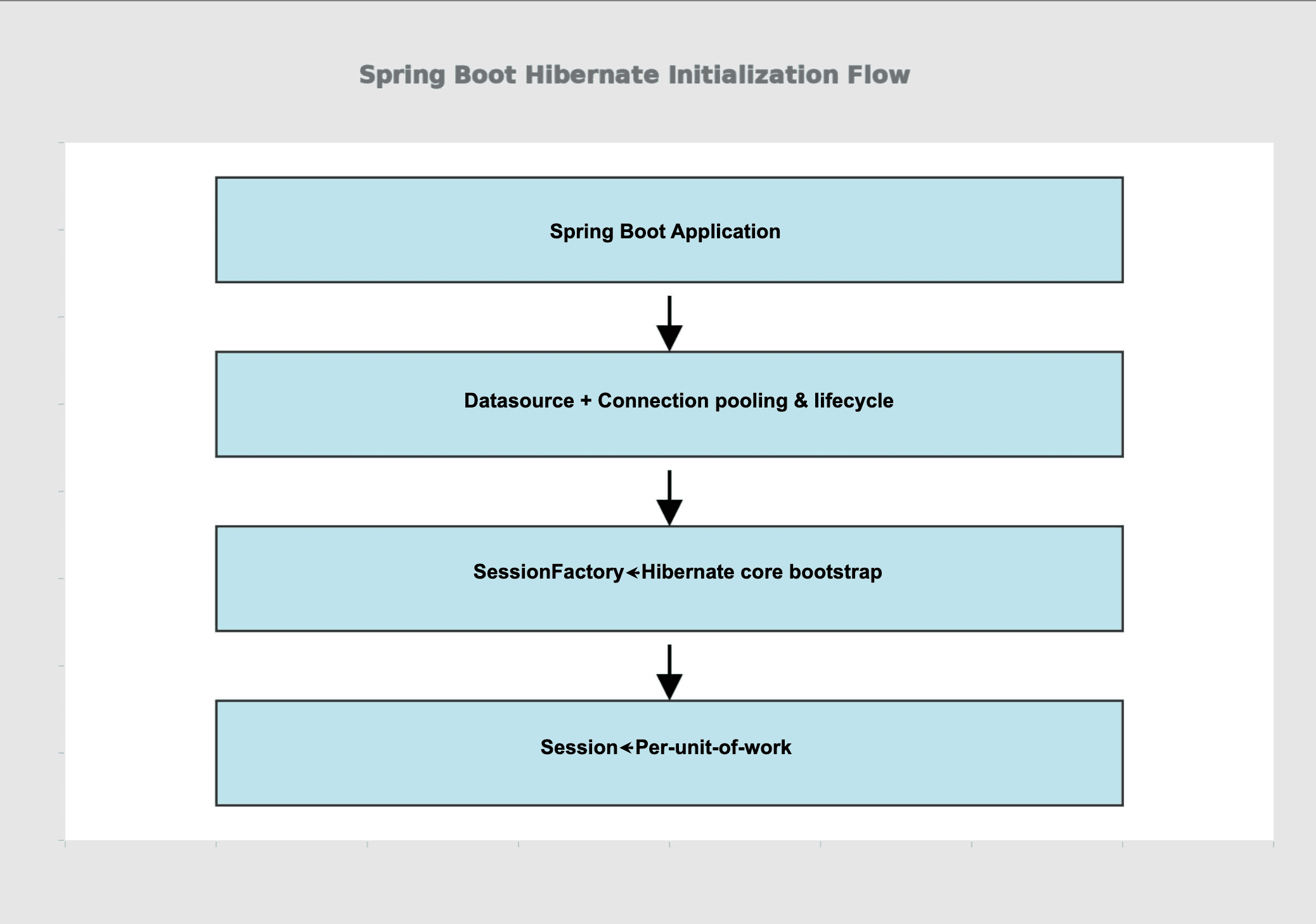
The diagram illustrates Hibernate session management flow in Spring Boot, starting from application bootstrap through layered components for efficient database access. This sequence ensures proper initialization of heavyweight components like SessionFactory while enabling lightweight per-request Sessions.
2.1. The Role of SessionFactory in Hibernate
The SessionFactory is Hibernate’s main entry point. It stores configuration metadata and creates Session instances used to interact with the database. Since it’s expensive to create, we initialize it once at startup and reuse it throughout the application.
When we opt out of JPA auto-configuration, Hibernate no longer builds this component for us. As a result, we must wire the SessionFactory explicitly and provide all required dependencies, including the Datasource.
2.2. Why Datasource Matters?
A Datasource encapsulates JDBC connection management and usually provides connection pooling. Hibernate relies on it to obtain connections instead of managing them directly, which improves stability and scalability.
Spring Boot exposes the Datasource as a managed bean. Once available, Hibernate can consume it directly, regardless of whether the application uses auto-configuration or a fully manual setup.
3. Datasource Handling in Spring Boot
Spring Boot already creates a Datasource if database properties are present. What we’re really controlling is how Hibernate consumes that Datasource when building the SessionFactory.
3.1. Default Behavior Versus Manual Configuration
By default, Spring Boot auto-configures Hibernate using spring.jpa properties and wires the Datasource automatically. This works well for most applications.
When we want full control over Hibernate bootstrapping, however, we can define our own SessionFactory bean and inject the Datasource explicitly. This gives us programmatic control over Hibernate properties and startup behavior. A minimal example of injecting the Datasource looks like this:
@Bean
SessionFactory sessionFactory(DataSource dataSource) {
    StandardServiceRegistry registry =
      new StandardServiceRegistryBuilder()
        .applySetting("hibernate.connection.datasource",dataSource)
        .build();

    Metadata metadata =
      new MetadataSources(registry).buildMetadata();

    return metadata.buildSessionFactory();
}
Here, we explicitly inject the Spring-managed Datasource into Hibernate’s SessionFactory. By defining this bean ourselves, we bypass Spring Boot’s JPA-driven setup and take full control over how Hibernate is initialized, while still benefiting from Spring’s connection management.
3.2. Restricting JPA Auto-Configuration
Spring Boot enables JPA infrastructure automatically. This includes the creation of an EntityManagerFactory and related beans.
Since this article focuses on native Hibernate usage, JPA auto-configuration must be disabled explicitly. Doing so prevents Spring from creating unused infrastructure and avoids conflicts during startup.
4. Spring Boot Configuration Example
Let’s walk through a complete Spring Boot-based example that explicitly sets the Datasource when creating the Hibernate SessionFactory.
4.1. Maven Dependencies
We’ll use spring-boot-starter-jdbc, hibernate-core, H2, and JUnit. The versions below are stable and commonly used:
<dependency>
    <groupId>org.springframework.boot</groupId>
    <artifactId>spring-boot-starter-jdbc</artifactId>
    <version>3.2.4</version>
</dependency>
<dependency>
    <groupId>org.hibernate.orm</groupId>
    <artifactId>hibernate-core</artifactId>
    <version>6.4.4.Final</version>
</dependency>
<dependency>
    <groupId>com.h2database</groupId>
    <artifactId>h2</artifactId>
    <version>2.2.224</version>
    <scope>runtime</scope>
</dependency>
<dependency>
    <groupId>org.springframework.boot</groupId>
    <artifactId>spring-boot-starter-test</artifactId>
    <version>3.2.4</version>
    <scope>test</scope>
</dependency>
At this point, we intentionally avoid Spring Data JPA and rely only on spring-boot-starter-jdbc for Datasource creation. This setup provides everything we need to bootstrap Hibernate, configure a Datasource, and run integration tests.
4.2. Application Properties
Spring Boot creates the Datasource based on standard configuration properties:
spring.datasource.url=jdbc:h2:mem:testdb;DB_CLOSE_DELAY=-1
spring.datasource.username=sa
spring.datasource.password=
spring.datasource.driver-class-name=org.h2.Driver
spring.jpa.hibernate.ddl-auto=create-drop
spring.jpa.show-sql=true
However, in this setup, we don’t need to define the above Datasource configuration explicitly. Spring Boot still auto-creates an in-memory H2 database and provides a usable Datasource for Hibernate. These properties shown here are included only to highlight this distinction.
Since JPA auto-configuration is disabled, JPA-specific properties such as spring.jpa.hibernate.ddl-auto and spring.jpa.show-sql are ignored, and equivalent behavior is configured programmatically instead.
4.3. Disabling JPA Infrastructure
Before defining the Hibernate SessionFactory, we’ll disable JPA and Spring Data JPA auto-configuration. This ensures that Spring Boot does not attempt to create an EntityManagerFactory or related JPA infrastructure beans:
@SpringBootApplication(
    exclude = {
        HibernateJpaAutoConfiguration.class,
        JpaRepositoriesAutoConfiguration.class
    }
)
public class HibernateSessionFactoryDemoApplication {
    public static void main(String[] args) {
        SpringApplication.run(HibernateSessionFactoryDemoApplication.class, args);
    }
}
This configuration preserves Spring Boot’s datasource auto-configuration while preventing the initialization of JPA-specific beans. As a result, Hibernate operates in native mode and relies solely on the explicitly configured SessionFactory.
4.4. Explicit SessionFactory Configuration
Now we’ll define a configuration class that creates the Hibernate SessionFactory using the Spring-managed Datasource:
@Configuration
public class HibernateConfig {

    @Bean
    SessionFactory sessionFactory(DataSource dataSource) {
        StandardServiceRegistry registry =
           new StandardServiceRegistryBuilder()
             .applySetting("hibernate.connection.datasource", dataSource)
             .applySetting("hibernate.hbm2ddl.auto", "create-drop")
             .applySetting("hibernate.show_sql", true)
             .build();

        MetadataSources sources = new MetadataSources(registry);

        return sources.buildMetadata().buildSessionFactory();
    }

}
In this configuration, Spring automatically injects the Datasource bean. We then pass that Datasource to Hibernate using the hibernate.connection.datasource setting. Starting with Hibernate 6, the SQL dialect is automatically detected from the JDBC connection metadata. Explicitly setting the dialect is no longer required. This ensures that all database connections originate from Spring’s connection pool.
5. Validating the Configuration With JUnit
To make sure everything works as expected, we’ll write a Spring Boot test that verifies the SessionFactory can open a Hibernate Session:
@SpringBootTest
public class SessionFactoryUnitTest {

    @Autowired
    private SessionFactory sessionFactory;

    @Test
    void givenSessionFactory_whenOpeningSession_thenSessionIsCreated() {

        try (Session session = sessionFactory.openSession()) {
            assertNotNull(session);
        }
    }
}
This test starts the Spring context, loads our custom SessionFactory bean, and verifies that Hibernate can successfully obtain a database connection through the configured Datasource. If the wiring were incorrect, this test would fail early during context initialization or session creation.
This test succeeds because JPA infrastructure has been explicitly disabled. Spring Boot loads the application context, provides the Datasource, and injects the custom Hibernate SessionFactory without attempting to create an EntityManagerFactory. This confirms that Hibernate is operating in native mode while still benefiting from Spring Boot’s lifecycle and configuration management.
6. Usage Scenarios and Design Considerations
This explicit configuration style is useful when we need tighter control over how Hibernate is initialized and connected to the infrastructure. While Spring Boot’s defaults cover most use cases, certain scenarios benefit from making these relationships explicit.
We commonly apply this approach when customizing Hibernate behavior, working with multiple datasources, or aligning Hibernate startup with other system components:
| Scenario | Preferred Configuration Style | Why This Approach Works Well |
|---|---|---|
| Simple CRUD applications | Spring Boot JPA auto-configuration | Minimizes setup and hides Hibernate internals |
| Custom Hibernate behavior | Explicit SessionFactory configuration | Provides fine-grained control |
| Multiple data sources | Programmatic Hibernate setup | Avoids cross-database coupling |
| Startup or connection debugging | Manual configuration | Makes dependencies visible |
7. Conclusion
Setting a Datasource when creating a Hibernate SessionFactory in Java becomes straightforward once we understand how Spring Boot and Hibernate interact. By allowing Spring to manage the Datasource and explicitly wiring it into Hibernate, we gain clarity, control, and flexibility without sacrificing stability.
In this article, we explored the core concepts behind SessionFactory and Datasource, examined how Spring Boot manages database connectivity, and implemented a complete configuration with integration tests. By disabling JPA auto-configuration and wiring the Datasource directly into Hibernate, we avoid hidden framework behavior and ensure that the application uses exactly the persistence infrastructure we configure.














