


Mocking is an essential part of unit testing, and the Mockito library makes it easy to write clean and intuitive unit tests for your Java code.
Get started with mocking and improve your application tests using our Mockito guide:
Handling concurrency in an application can be a tricky process with many potential pitfalls. A solid grasp of the fundamentals will go a long way to help minimize these issues.
Get started with understanding multi-threaded applications with our Java Concurrency guide:
Spring 5 added support for reactive programming with the Spring WebFlux module, which has been improved upon ever since. Get started with the Reactor project basics and reactive programming in Spring Boot:
Since its introduction in Java 8, the Stream API has become a staple of Java development. The basic operations like iterating, filtering, mapping sequences of elements are deceptively simple to use.
But these can also be overused and fall into some common pitfalls.
To get a better understanding on how Streams work and how to combine them with other language features, check out our guide to Java Streams:
Explore Spring Boot 3 and Spring 6 in-depth through building a full REST API with the framework:
Yes, Spring Security can be complex, from the more advanced functionality within the Core to the deep OAuth support in the framework.
I built the security material as two full courses - Core and OAuth, to get practical with these more complex scenarios. We explore when and how to use each feature and code through it on the backing project.
You can explore the course here:
All Access is finally out, with all of my Spring courses. Learn JUnit is out as well, and Learn Maven is coming fast. And, of course, quite a bit more affordable. Finally.
>> GET THE COURSE
Spring Data JPA is a great way to handle the complexity of JPA with the powerful simplicity of Spring Boot.
Get started with Spring Data JPA through the guided reference course:
Refactor Java code safely — and automatically — with OpenRewrite.
Refactoring big codebases by hand is slow, risky, and easy to put off. That’s where OpenRewrite comes in. The open-source framework for large-scale, automated code transformations helps teams modernize safely and consistently.
Each month, the creators and maintainers of OpenRewrite at Moderne run live, hands-on training sessions — one for newcomers and one for experienced users. You’ll see how recipes work, how to apply them across projects, and how to modernize code with confidence.
Join the next session, bring your questions, and learn how to automate the kind of work that usually eats your sprint time.
The Apache HTTP Client is a very robust library, suitable for both simple and advanced use cases when testing HTTP endpoints. Check out our guide covering basic request and response handling, as well as security, cookies, timeouts, and more:
1. Overview
Feign abstracts the HTTP calls and makes them declarative. By doing so, Feign hides the lower-level details like HTTP connection management, hardcoded-URLs, and other boilerplate code. The significant advantage of using Feign clients is that HTTP calls are made easy and eliminate a lot of code. Typically, we use the Feign for REST APIs application/json media type. However, the Feign clients work well with other media types like text/xml, multipart requests, etc.,
In this tutorial, let’s learn how to invoke a SOAP-based web service (text/xml) using Feign.
2. SOAP Web Service
Let’s assume that there is a SOAP web service with two operations – getUser and createUser.
Let’s use cURL to invoke the operation createUser:
curl -d @request.xml -i -o -X POST --header 'Content-Type: text/xml'
  http://localhost:18080/ws/users
Here, the request.xml contains the SOAP payload:
<soapenv:Envelope xmlns:soapenv="http://schemas.xmlsoap.org/soap/envelope/"
  xmlns:feig="http://www.baeldung.com/springbootsoap/feignclient">
    <soapenv:Header/>
    <soapenv:Body>
         <feig:createUserRequest>
             <feig:user>
                 <feig:id>1</feig:id>
                 <feig:name>john doe</feig:name>
                 <feig:email>[email protected]</feig:email>
            </feig:user>
         </feig:createUserRequest>
    </soapenv:Body>
</soapenv:Envelope>
If all the configurations are correct, we get a successful response:
<SOAP-ENV:Envelope xmlns:SOAP-ENV="http://schemas.xmlsoap.org/soap/envelope/">
    <SOAP-ENV:Header/>
    <SOAP-ENV:Body>
        <ns2:createUserResponse xmlns:ns2="http://www.baeldung.com/springbootsoap/feignclient">
            <ns2:message>Success! Created the user with id - 1</ns2:message>
        </ns2:createUserResponse>
    </SOAP-ENV:Body>
</SOAP-ENV:Envelope>
Similarly, the other operation, getUser can also be invoked using cURL.
3. Dependencies
Next, let’s see how to use Feign to invoke this SOAP web service. Let’s develop two different clients to invoke a SOAP service. Feign supports multiple existing HTTP Clients like Apache HttpComponents, OkHttp, java.net.URL, etc. Let’s use Apache HttpComponents as our underlying HTTP client. First, let’s add dependencies for OpenFeign Apache HttpComponents:
<dependency>
    <groupId>io.github.openfeign</groupId>
    <artifactId>feign-hc5</artifactId>
    <version>11.8</version>
</dependency>
In the next sections, let’s learn a couple of ways to invoke the SOAP web services using Feign.
4. SOAP Object as Plain-Text
We can send the SOAP request as plain text with content-type and accept headers set to text/xml. Let’s now develop a client that demonstrates this approach:
public interface SoapClient {
    @RequestLine("POST")
    @Headers({"SOAPAction: createUser", "Content-Type: text/xml;charset=UTF-8",
      "Accept: text/xml"})
    String createUserWithPlainText(String soapBody);
}
Here, createUserWithPlainText takes a String SOAP payload. Note that we defined the accept and content-type headers explicitly. This is because when sending a SOAP body as text, it is mandatory to mention the Content-Type and Accept headers as text/xml.
One downside of this approach is we should know the SOAP payload beforehand. Fortunately, if the WSDL is available, the payload can be generated using open-source tools like SoapUI. Once the payload is ready, let’s invoke the SOAP web service using Feign:
@Test
void givenSOAPPayload_whenRequest_thenReturnSOAPResponse() throws Exception {
    String successMessage="Success! Created the user with id";
    SoapClient client = Feign.builder()
       .client(new ApacheHttp5Client())
       .target(SoapClient.class, "http://localhost:18080/ws/users/");

    assertDoesNotThrow(() -> client.createUserWithPlainText(soapPayload()));

    String soapResponse= client.createUserWithPlainText(soapPayload());

    assertNotNull(soapResponse);
    assertTrue(soapResponse.contains(successMessage));
}
Feign supports logging of the SOAP messages and other HTTP-related information. This information is critical for debugging. So let’s enable the Feign logging. The logging of these messages requires an additional feign-slf4j dependency:
<dependency>
    <groupId>io.github.openfeign</groupId>
    <artifactId>feign-slf4j</artifactId>
    <version>11.8</version>
</dependency>
Let’s enhance our test case to include the logging information:
SoapClient client = Feign.builder()
  .client(new ApacheHttp5Client())
  .logger(new Slf4jLogger(SoapClient.class))
  .logLevel(Logger.Level.FULL)
  .target(SoapClient.class, "http://localhost:18080/ws/users/");
Now, when we run the test, we have the logs similar to:
18:01:58.295 [main] DEBUG org.apache.hc.client5.http.wire - http-outgoing-0 >> "SOAPAction: createUser[\r][\n]"
18:01:58.295 [main] DEBUG org.apache.hc.client5.http.wire - http-outgoing-0 >> "<soapenv:Envelope xmlns:soapenv="http://schemas.xmlsoap.org/soap/envelope/"
  xmlns:feig="http://www.baeldung.com/springbootsoap/feignclient">[\n]"
18:01:58.295 [main] DEBUG org.apache.hc.client5.http.wire - http-outgoing-0 >> " <soapenv:Header/>[\n]"
18:01:58.295 [main] DEBUG org.apache.hc.client5.http.wire - http-outgoing-0 >> " <soapenv:Body>[\n]"
18:01:58.295 [main] DEBUG org.apache.hc.client5.http.wire - http-outgoing-0 >> " <feig:createUserRequest>[\n]"
18:01:58.295 [main] DEBUG org.apache.hc.client5.http.wire - http-outgoing-0 >> " <feig:user>[\n]"
18:01:58.295 [main] DEBUG org.apache.hc.client5.http.wire - http-outgoing-0 >> " <feig:id>1</feig:id>[\n]"
18:01:58.295 [main] DEBUG org.apache.hc.client5.http.wire - http-outgoing-0 >> " <feig:name>john doe</feig:name>[\n]"
18:01:58.296 [main] DEBUG org.apache.hc.client5.http.wire - http-outgoing-0 >> " <feig:email>[email protected]</feig:email>[\n]"
18:01:58.296 [main] DEBUG org.apache.hc.client5.http.wire - http-outgoing-0 >> " </feig:user>[\n]"
18:01:58.296 [main] DEBUG org.apache.hc.client5.http.wire - http-outgoing-0 >> " </feig:createUserRequest>[\n]"
18:01:58.296 [main] DEBUG org.apache.hc.client5.http.wire - http-outgoing-0 >> " </soapenv:Body>[\n]"
18:01:58.296 [main] DEBUG org.apache.hc.client5.http.wire - http-outgoing-0 >> "</soapenv:Envelope>"
18:01:58.300 [main] DEBUG org.apache.hc.client5.http.wire - http-outgoing-0 << "<SOAP-ENV:Envelope xmlns:SOAP-ENV="http://schemas.xmlsoap.org/soap/envelope/"><SOAP-ENV:Header/><SOAP-ENV:Body><ns2:createUserResponse xmlns:ns2="http://www.baeldung.com/springbootsoap/feignclient"><ns2:message>Success! Created the user with id - 1</ns2:message></ns2:createUserResponse></SOAP-ENV:Body></SOAP-ENV:Envelope>"
5. Feign SOAP Codec
A cleaner and better approach to invoke a SOAP Webservice is using Feign’s SOAP Codec. The codec helps marshal the SOAP messages (Java to SOAP)/unmarshalling (SOAP to Java). However, the codec requires an additional feign-soap dependency. Therefore, let’s declare this dependency:
<dependency>
    <groupId>io.github.openfeign</groupId>
    <artifactId>feign-soap</artifactId>
    <version>11.8</version>
</dependency>
Feign SOAP codec encodes and decodes the SOAP objects using JAXB and SoapMessage and the JAXBContextFactory provides the required marshalers and unmarshalers.
Next, based on the XSD that we created, let’s generate the domain classes. JAXB requires these domain classes to marshal and unmarshal the SOAP messages. First, let’s add a plugin to our pom.xml:
<plugin>
    <groupId>org.jvnet.jaxb2.maven2</groupId>
    <artifactId>maven-jaxb2-plugin</artifactId>
    <version>0.14.0</version>
    <executions>
        <execution>
            <id>feign-soap-stub-generation</id>
            <phase>compile</phase>
            <goals>
                <goal>generate</goal>
            </goals>
            <configuration>
                <schemaDirectory>target/generated-sources/jaxb</schemaDirectory>
                <schemaIncludes>
                    <include>*.xsd</include>
                </schemaIncludes>
                <generatePackage>com.baeldung.feign.soap.client</generatePackage>
                <generateDirectory>target/generated-sources/jaxb</generateDirectory>
            </configuration>
        </execution>
    </executions>
</plugin>
Here, we configured the plugin to run during the compile phase. Now, let’s generate the stubs:
mvn clean compileAfter a successful build, the target folder contains the sources:
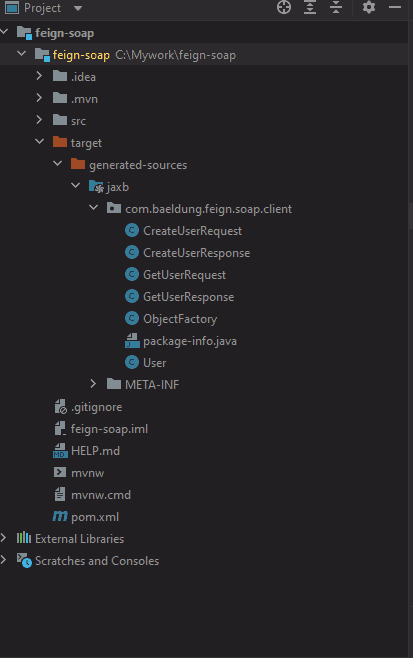
Next, let’s use these stubs and Feign to invoke the SOAP web service. But, first, let’s add a new method to our SoapClient:
@RequestLine("POST")
@Headers({"Content-Type: text/xml;charset=UTF-8"})
CreateUserResponse createUserWithSoap(CreateUserRequest soapBody);
Next, let’s test the SOAP web service:
@Test
void whenSoapRequest_thenReturnSoapResponse() {
    JAXBContextFactory jaxbFactory = new JAXBContextFactory.Builder()
      .withMarshallerJAXBEncoding("UTF-8").build();
    SoapClient client = Feign.builder()
      .encoder(new SOAPEncoder(jaxbFactory))
      .decoder(new SOAPDecoder(jaxbFactory))
      .target(SoapClient.class, "http://localhost:18080/ws/users/");
    CreateUserRequest request = new CreateUserRequest();
    User user = new User();
    user.setId("1");
    user.setName("John Doe");
    user.setEmail("john.doe@gmail");
    request.setUser(user);
    CreateUserResponse response = client.createUserWithSoap(request);

    assertNotNull(response);
    assertNotNull(response.getMessage());
    assertTrue(response.getMessage().contains("Success"));
}
Let’s enhance our test case to log the HTTP and SOAP messages:
SoapClient client = Feign.builder()
  .encoder(new SOAPEncoder(jaxbFactory))
  .errorDecoder(new SOAPErrorDecoder())
  .logger(new Slf4jLogger())
  .logLevel(Logger.Level.FULL)
  .decoder(new SOAPDecoder(jaxbFactory))
  .target(SoapClient.class, "http://localhost:18080/ws/users/");
This code generates similar logs that we saw earlier.
Finally, let’s handle SOAP Faults. Feign provides a SOAPErrorDecoder that returns a SOAP Fault as SOAPFaultException. So, let’s set this SOAPErrorDecoder as a Feign error decoder and handle the SOAP Faults:
SoapClient client = Feign.builder()
  .encoder(new SOAPEncoder(jaxbFactory))
  .errorDecoder(new SOAPErrorDecoder())
  .decoder(new SOAPDecoder(jaxbFactory))
  .target(SoapClient.class, "http://localhost:18080/ws/users/");
try {
    client.createUserWithSoap(request);
} catch (SOAPFaultException soapFaultException) {
    assertNotNull(soapFaultException.getMessage());
    assertTrue(soapFaultException.getMessage().contains("This is a reserved user id"));
}
Here, if the SOAP web service throws a SOAP Fault, it will be handled by the SOAPFaultException.
6. Conclusion
In this article, we learned to invoke a SOAP web service using Feign. Feign is a declarative HTTP client that makes it easy to invoke SOAP/REST web services. The advantage of using Feign is it reduces the lines of code. Lesser lines of code lead to lesser bugs and lesser unit tests.














