


Mocking is an essential part of unit testing, and the Mockito library makes it easy to write clean and intuitive unit tests for your Java code.
Get started with mocking and improve your application tests using our Mockito guide:
Handling concurrency in an application can be a tricky process with many potential pitfalls. A solid grasp of the fundamentals will go a long way to help minimize these issues.
Get started with understanding multi-threaded applications with our Java Concurrency guide:
Spring 5 added support for reactive programming with the Spring WebFlux module, which has been improved upon ever since. Get started with the Reactor project basics and reactive programming in Spring Boot:
Since its introduction in Java 8, the Stream API has become a staple of Java development. The basic operations like iterating, filtering, mapping sequences of elements are deceptively simple to use.
But these can also be overused and fall into some common pitfalls.
To get a better understanding on how Streams work and how to combine them with other language features, check out our guide to Java Streams:
Explore Spring Boot 3 and Spring 6 in-depth through building a full REST API with the framework:
Yes, Spring Security can be complex, from the more advanced functionality within the Core to the deep OAuth support in the framework.
I built the security material as two full courses - Core and OAuth, to get practical with these more complex scenarios. We explore when and how to use each feature and code through it on the backing project.
You can explore the course here:
All Access is finally out, with all of my Spring courses. Learn JUnit is out as well, and Learn Maven is coming fast. And, of course, quite a bit more affordable. Finally.
>> GET THE COURSE
Spring Data JPA is a great way to handle the complexity of JPA with the powerful simplicity of Spring Boot.
Get started with Spring Data JPA through the guided reference course:
Refactor Java code safely — and automatically — with OpenRewrite.
Refactoring big codebases by hand is slow, risky, and easy to put off. That’s where OpenRewrite comes in. The open-source framework for large-scale, automated code transformations helps teams modernize safely and consistently.
Each month, the creators and maintainers of OpenRewrite at Moderne run live, hands-on training sessions — one for newcomers and one for experienced users. You’ll see how recipes work, how to apply them across projects, and how to modernize code with confidence.
Join the next session, bring your questions, and learn how to automate the kind of work that usually eats your sprint time.
1. Overview
Apache POI is a popular Java API to manipulate different kinds of Microsoft Office documents such as Word, Excel, and PowerPoint programmatically.
It’s quite often that we need to expand columns in Excel spreadsheets. This is a common requirement when we produce spreadsheets for people to read. This helps readers to visualize the content in the columns better, which can’t be done with the default column size.
In this tutorial, we’ll learn how to use the API to adjust the column width manually and automatically in Excel spreadsheets.
2. Dependencies
First of all, we’ll need the following Apache POI dependencies in our Maven pom.xml:
<dependency>
    <groupId>org.apache.poi</groupId>
    <artifactId>poi</artifactId>
    <version>5.2.5</version>
</dependency>
<dependency>
    <groupId>org.apache.poi</groupId>
    <artifactId>poi-ooxml</artifactId>
    <version>5.2.5</version>
</dependency>
3. Spreadsheet Preparation
Let’s start by having a quick revision on creating an Excel spreadsheet. We’ll prepare an Excel spreadsheet and populate some data into it for demonstration purposes:
Workbook workbook = new XSSFWorkbook();
Sheet sheet = workbook.createSheet("NewSheet");

Row headerRow = sheet.createRow(0);
Cell headerCell1 = headerRow.createCell(0);
headerCell1.setCellValue("Full Name");
Cell headerCell2 = headerRow.createCell(1);
headerCell2.setCellValue("Abbreviation");

Row dataRow = sheet.createRow(1);
Cell dataCell1 = dataRow.createCell(0);
dataCell1.setCellValue("Java Virtual Machine");
Cell dataCell2 = dataRow.createCell(1);
dataCell2.setCellValue("JVM");

// More data rows created here...
Now, if we open the generated spreadsheet in Excel, we’ll see that every column has the same default width:
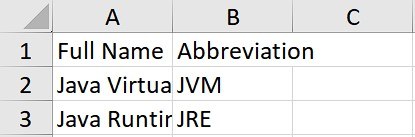
Obviously, the content within the 1st column is too long and truncated due to the limited column width.
4. Width Adjustment
Apache POI offers two different ways to adjust the column width. We can choose either way depending on our own requirements. Let us explore both approaches now.
4.1. Fixed Width Adjustment
We can expand a particular column to a fixed width by calling setColumnWidth() on the target Sheet instance. There are two arguments in this method, which are columnIndex and width, respectively.
It’s complex to manually derive the column width showing all the content, as it depends on various factors such as font type and font size. According to the definition of setColumnWidth() in the API doc, the width argument is in units of 1/256th of a character width.
Given the default font Calibri with font size 11 in Excel, we could use the number of characters in the cell * 256 for the column width as a rough approximation:
String cellValue = row.getCell(0).getStringCellValue();
sheet.setColumnWidth(0, cellValue.length() * 256);
After the adjustment, we’ll see the entire content in the 1st column:
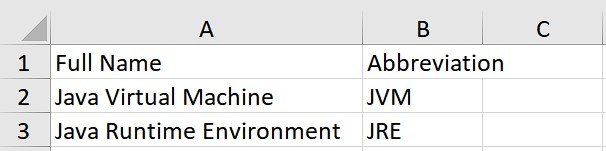
It’s kind of a hassle to derive the column width by ourselves. Especially when we are dealing with spreadsheets containing numerous data rows. We must go through each row to identify the maximum character count. The presence of columns that include different fonts and font sizes adds further complexity to the width calculation.
4.2. Auto Width Adjustment
Fortunately, Apache POI provides a convenient method, autoSizeColumn(), to adjust the column width automatically. This ensures the content of the column can be fully visible to readers.
autoSizeColumn() requires only the column argument, which is a zero-based column index. We can use the following code to auto-adjust the column width on the 1st column:
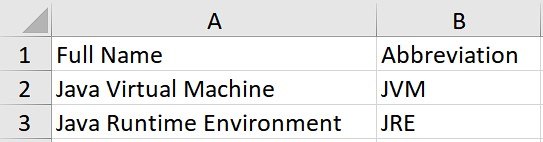
sheet.autoSizeColumn(0);We’ll see the following if we apply autoSizeColumn() to every column. All columns’ content is now fully visible to the readers without any truncation:
5. Conclusion
In this article, we’ve explored two different approaches in Apache POI to adjusting the column width of Excel spreadsheets: Fixed width adjustment and auto width adjustment. Adjusting column widths is essential for improving readability and creating reader-friendly Excel spreadsheets.














