


Mocking is an essential part of unit testing, and the Mockito library makes it easy to write clean and intuitive unit tests for your Java code.
Get started with mocking and improve your application tests using our Mockito guide:
Handling concurrency in an application can be a tricky process with many potential pitfalls. A solid grasp of the fundamentals will go a long way to help minimize these issues.
Get started with understanding multi-threaded applications with our Java Concurrency guide:
Spring 5 added support for reactive programming with the Spring WebFlux module, which has been improved upon ever since. Get started with the Reactor project basics and reactive programming in Spring Boot:
Since its introduction in Java 8, the Stream API has become a staple of Java development. The basic operations like iterating, filtering, mapping sequences of elements are deceptively simple to use.
But these can also be overused and fall into some common pitfalls.
To get a better understanding on how Streams work and how to combine them with other language features, check out our guide to Java Streams:
Explore Spring Boot 3 and Spring 6 in-depth through building a full REST API with the framework:
Yes, Spring Security can be complex, from the more advanced functionality within the Core to the deep OAuth support in the framework.
I built the security material as two full courses - Core and OAuth, to get practical with these more complex scenarios. We explore when and how to use each feature and code through it on the backing project.
You can explore the course here:
All Access is finally out, with all of my Spring courses. Learn JUnit is out as well, and Learn Maven is coming fast. And, of course, quite a bit more affordable. Finally.
>> GET THE COURSE
Spring Data JPA is a great way to handle the complexity of JPA with the powerful simplicity of Spring Boot.
Get started with Spring Data JPA through the guided reference course:
Refactor Java code safely — and automatically — with OpenRewrite.
Refactoring big codebases by hand is slow, risky, and easy to put off. That’s where OpenRewrite comes in. The open-source framework for large-scale, automated code transformations helps teams modernize safely and consistently.
Each month, the creators and maintainers of OpenRewrite at Moderne run live, hands-on training sessions — one for newcomers and one for experienced users. You’ll see how recipes work, how to apply them across projects, and how to modernize code with confidence.
Join the next session, bring your questions, and learn how to automate the kind of work that usually eats your sprint time.
1. Overview
FindBugs is an open source tool used to perform static analysis on Java code.
In this article, we’re going to have a look at setting up FindBugs on a Java project and integrating it into the IDE and the Maven build.
Note: FindBugs project is deprecated and SpotBugs is now actively maintained as its successor which works with the latest versions of Java.
2. FindBugs Maven Plugin
2.1. Maven Configuration
In order to start generating static analysis reports, we first need to add the FindBugs plugin in our pom.xml:
<reporting>
    <plugins>
        <plugin>
            <groupId>org.codehaus.mojo</groupId>
            <artifactId>findbugs-maven-plugin</artifactId>
            <version>3.0.4</version>
        </plugin>
    </plugins>
</reporting>
You can check out the latest version of the plugin on Maven Central.
2.2. Report Generation
Now that we have the Maven plugin properly configured, let’s generate the project documentation using the mvn site command.
The report will be generated in the folder target/site in the project directory under the name findbugsXml.xml.
You can also run the mvn findbugs:gui command to launch the GUI interface to browse the generated reports for the current project.
The FindBugs plugin can also be configured to fail under some circumstances – by adding the execution goal check to our configuration:
<plugin>
    <groupId>org.codehaus.mojo</groupId>
    <artifactId>findbugs-maven-plugin</artifactId>
    <version>3.0.4</version>
    <configuration>
        <effort>Max</effort>
    </configuration>
    <executions>
        <execution>
            <goals>
                <goal>check</goal>
            </goals>
        </execution>
    </executions>
</plugin>
The effort – when maxed out, performs a more complete and precise analysis, revealing more bugs in the code, though, it consumes more resources and takes more time to complete.
You can now run the command mvn verify, to check if the build will succeed or not – depending on the defects detected while running the analysis.
You can also enhance the report generation process and take more control over the analysis, by adding some basic configuration to the plugin declaration:
<configuration>
    <onlyAnalyze>org.baeldung.web.controller.*</onlyAnalyze>
    <omitVisitors>FindNullDeref</omitVisitors>
    <visitors>FindReturnRef</visitors>
</configuration>
The onlyAnalyze option declares a comma separated values of classes/packages eligible for analysis.
The visitors/omitVisitors options are also comma separated values, they are used to specify which detectors should/shouldn’t be run during the analysis – Note that visitors and omitVisitors cannot be used at the same time.
A detector is specified by its class name, without any package qualification. Find the details of all detectors class names available by following this link.
3. FindBugs Eclipse Plugin
3.1. Installation
The IDE installation of the FindBugs Plugin is pretty straightforward – you just need to use the software update feature in Eclipse.
To make sure that FindBugs is properly installed in your Eclipse environment, then, look for the option labeled FindBugs under Windows -> Preferences -> Java.
3.2. Reports Browsing
In order to launch a static analysis on a project using the FindBugs Eclipse plugin, you need to right-click the project in the package explorer, then, click on the option labeled find bugs.
After launch, Eclipse shows the results under the Bug Explorer window as shown in the screenshot below:
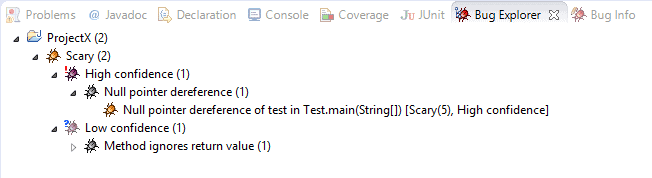
As of version 2, FindBugs started ranking bugs with a scale from 1 to 20 to measure the severity of defects:
- Scariest: ranked between 1 & 4.
- Scary: ranked between 5 & 9.
- Troubling: ranked between 10 & 14.
- Of concern: ranked between 15 & 20.
While the bug rank describes severity, the confidence factor reflects the likelihood of these bugs to be flagged as real ones. The confidence was originally called priority, but it was renamed in the new version.
Of course, some defects can be open to interpretation, and they can even exist without causing any harm to the desired behavior of a software. That’s why, in a real-world situation, we need to properly configure static analysis tools by choosing a limited set of defects to activate in a specific project.
3.3. Eclipse Configuration
FindBugs plugin makes it easy to customize the bugs analysis strategy, by offering various ways to filter warning and limit the strictness of the results. You can check the configuration interface by going to Window -> Preferences -> Java -> FindBugs:
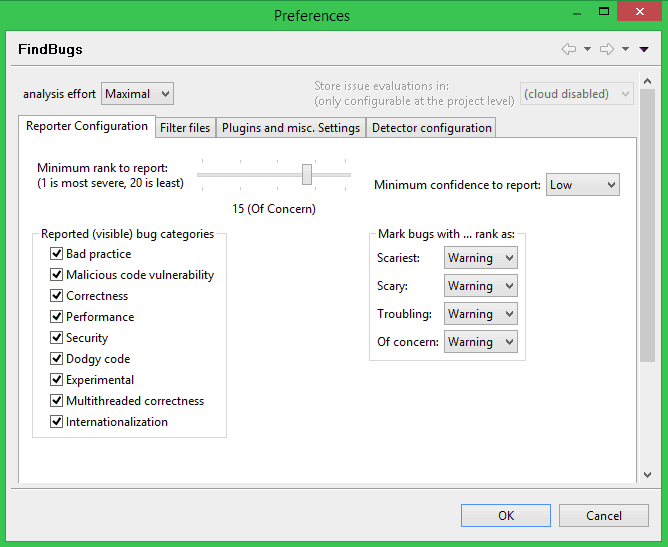
You can freely uncheck unwanted categories, raise the minimum rank to report, specify the minimum confidence to report, and customize markers for bugs ranks – Warning, Info, or Error.
FindBugs divide defects in many categories:
- Correctness – gathers general bugs, e.g. infinite loops, inappropriate use of equals(), etc
- Bad practice, e.g. exceptions handling, opened streams, Strings comparison, etc
- Performance, e.g. idle objects
- Multithreaded correctness – gathers synchronization inconsistencies and various problems in a multi-threaded environment
- Internationalization – gathers problems related to encoding and application’s internationalization
- Malicious code vulnerability – gathers vulnerabilities in code, e.g. code snippets that can be exploited by potential attackers
- Security – gathers security holes related to specific protocols or SQL injections
- Dodgy – gathers code smells, e.g. useless comparisons, null checks, unused variables, etc
Under the Detector configuration tab, you can check the rules you’re supposed to respect in your project:
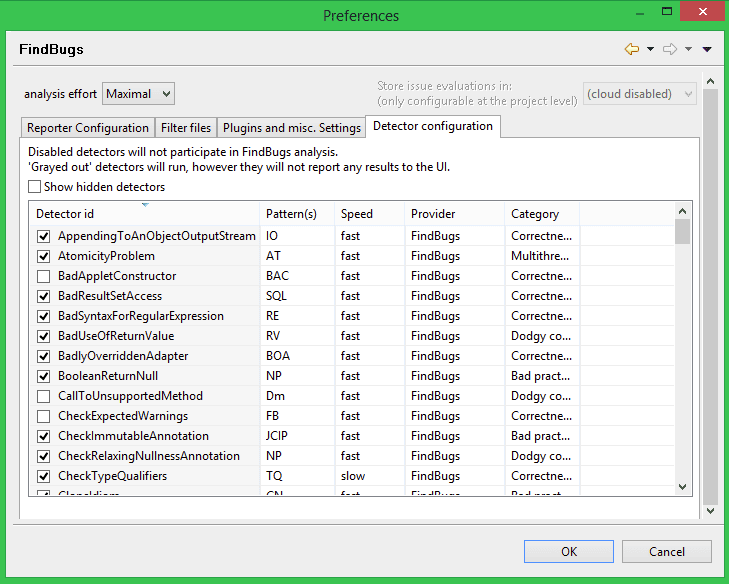
The speed attribute reflects how costly the analysis will be. The fastest the detector, the smallest the resources consumed to perform it.
You can find the exhaustive list of bugs recognized by FindBugs at the official documentation page.
Under the Filter files panel, you can create custom file filters, in order to include/exclude parts of the code-base. This feature is useful – for example – when you want to prevent “unmanaged” or “trash” code, defects to pop up in the reports, or may exclude all classes from the test package for instance.
4. FindBugs IntelliJ IDEA Plugin
4.1. Installation
If you are an IntelliJ IDEA fan, and you want to start inspecting Java code using FindBugs, you can simply grab the plugin installation package from the official JetBrains site, and extract it to the folder %INSTALLATION_DIRECTORY%/plugins. Restart your IDE and you’re good to go.
Alternatively, you can navigate to Settings -> Plugins and search all repositories for FindBugs plugin.
By the time of writing this article, the version 1.0.1 of the IntelliJ IDEA plugin is just out,
To make sure that the FindBugs plugin is properly installed, check for the option labeled “Analyze project code” under Analyze -> FindBugs.
4.2. Reports Browsing
In order to launch static analysis in IDEA, click on “Analyze project code”, under Analyze -> FindBugs, then look for the FindBugs-IDEA panel to inspect the results:

You can use the second column of commands on the left side of the screenshot, to group defects using different factors:
- Group by a bug category.
- Group by a class.
- Group by a package.
- Group by a bug rank.
It is also possible to export the reports in XML/HTML format, by clicking the “export” button in the fourth column of commands.
4.3. Configuration
The FindBugs plugin preferences pages inside IDEA is pretty self-explanatory:

This settings window is quite similar to the one we’ve seen in Eclipse, thus you can perform all kinds of configuration in an analogous fashion, starting from analysis effort level, bugs ranking, confidence, classes filtering, etc.
The preferences panel can be accessed inside IDEA, by clicking the “Plugin preferences” icon under the FindBugs-IDEA panel.
5. Report Analysis for the Spring-Rest Project
In this section, we’re going to shed some light on a static analysis done on the spring-rest project available on GitHub as an example:
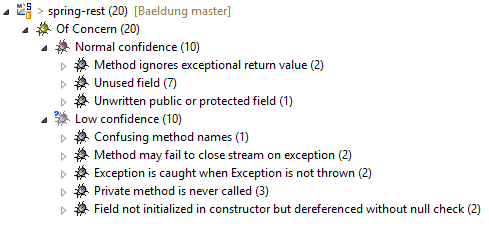
Most of the defects are minor — Of Concern, but let’s see what we can do to fix some of them.
Method ignores exceptional return value:
File fileServer = new File(fileName);
fileServer.createNewFile();
As you can probably guess, FindBugs is complaining about the fact that we’re throwing away the return value of the createNewFile() method. A possible fix would be to store the returned value in a newly declared variable, then, log something meaningful using the DEBUG log level — e.g. “The named file does not exist and was successfully created” if the returned value is true.
The method may fail to close stream on exception: this particular defect illustrates a typical use case for exception handling that suggests to always close streams in a finally block:
try {
    DateFormat dateFormat
      = new SimpleDateFormat("yyyy_MM_dd_HH.mm.ss");
    String fileName = dateFormat.format(new Date());
    File fileServer = new File(fileName);
    fileServer.createNewFile();
    byte[] bytes = file.getBytes();
    BufferedOutputStream stream
      = new BufferedOutputStream(new FileOutputStream(fileServer));
    stream.write(bytes);
    stream.close();
    return "You successfully uploaded " + username;
} catch (Exception e) {
    return "You failed to upload " + e.getMessage();
}
When an exception is thrown before the stream.close() instruction, the stream is never closed, that’s why it’s always preferable to make use of the finally{} block to close streams opened during a try/catch routine.
An Exception is caught when Exception is not thrown: As you may already know, catching Exception is a bad coding practice, FindBugs thinks that you must catch a most specific exception, so you can handle it properly. So basically manipulating streams in a Java class, catching IOException would be more appropriate than catching a more generic Exception.
Field not initialized in the constructor but dereferenced without null check: it always a good idea to initialize fields inside constructors, otherwise, we should live with the possibility that the code will raise an NPE. Thus, it is recommended to perform null checks whenever we’re not sure if the variable is properly initialized or not.
6. Conclusion
In this article, we’ve covered the basic key points to use and customize FindBugs in a Java project.
As you can see, FindBugs is a powerful, yet simple static analysis tool, it helps to detect potential quality holes in your system – if tuned and used correctly.
Finally, it is worth mentioning that FindBugs can also be run as part of a separate continuous automatic code review tool like Sputnik, which can be very helpful to give the reports a lot more visibility.














