


Mocking is an essential part of unit testing, and the Mockito library makes it easy to write clean and intuitive unit tests for your Java code.
Get started with mocking and improve your application tests using our Mockito guide:
Handling concurrency in an application can be a tricky process with many potential pitfalls. A solid grasp of the fundamentals will go a long way to help minimize these issues.
Get started with understanding multi-threaded applications with our Java Concurrency guide:
Spring 5 added support for reactive programming with the Spring WebFlux module, which has been improved upon ever since. Get started with the Reactor project basics and reactive programming in Spring Boot:
Since its introduction in Java 8, the Stream API has become a staple of Java development. The basic operations like iterating, filtering, mapping sequences of elements are deceptively simple to use.
But these can also be overused and fall into some common pitfalls.
To get a better understanding on how Streams work and how to combine them with other language features, check out our guide to Java Streams:
Explore Spring Boot 3 and Spring 6 in-depth through building a full REST API with the framework:
Yes, Spring Security can be complex, from the more advanced functionality within the Core to the deep OAuth support in the framework.
I built the security material as two full courses - Core and OAuth, to get practical with these more complex scenarios. We explore when and how to use each feature and code through it on the backing project.
You can explore the course here:
All Access is finally out, with all of my Spring courses. Learn JUnit is out as well, and Learn Maven is coming fast. And, of course, quite a bit more affordable. Finally.
>> GET THE COURSE
Spring Data JPA is a great way to handle the complexity of JPA with the powerful simplicity of Spring Boot.
Get started with Spring Data JPA through the guided reference course:
Refactor Java code safely — and automatically — with OpenRewrite.
Refactoring big codebases by hand is slow, risky, and easy to put off. That’s where OpenRewrite comes in. The open-source framework for large-scale, automated code transformations helps teams modernize safely and consistently.
Each month, the creators and maintainers of OpenRewrite at Moderne run live, hands-on training sessions — one for newcomers and one for experienced users. You’ll see how recipes work, how to apply them across projects, and how to modernize code with confidence.
Join the next session, bring your questions, and learn how to automate the kind of work that usually eats your sprint time.
1. Introduction
Over the past few years, IntelliJ from JetBrains has quickly become the top IDE for Java developers. In our most recent State of Java report, IntelliJ was the IDE of choice for 55% of respondents, up from 48% the year before.
One feature that makes IntelliJ so appealing to Java developers is the ability to extend and create new functionality using plugins. In this tutorial, we’ll look at writing an IntelliJ plugin to demonstrate a few of the ways of extending the IDE.
And note that while this article is focused on IntelliJ plugins, all of the JetBrains IDEs share common code. Therefore, many of the techniques used here can be applied to other JetBrain’s IDEs such as PyCharm, RubyMine, and more.
2. Plugin Functionality
Plugin functionality for IntelliJ typically falls into one of 4 categories:
- Custom languages: the ability to write, interpret, and compile code written in different languages
- Frameworks: support for 3rd party frameworks such as Spring
- Tools: integration with external tools such as Gradle
- User interface add-ons: new menu items, tool windows and buttons, and more
Plugins will often fall into multiple categories. For example, the Git plugin that ships with IntelliJ, interacts with the git executable installed on the system. The plugin provides its tool window and popup menu items, while also integrating into the project creation workflow, preferences window, and more.
3. Creating a Plugin
The easiest way to get started with IntelliJ plugins is using their Plugin DevKit. This can be accessed from the New > Project menu:
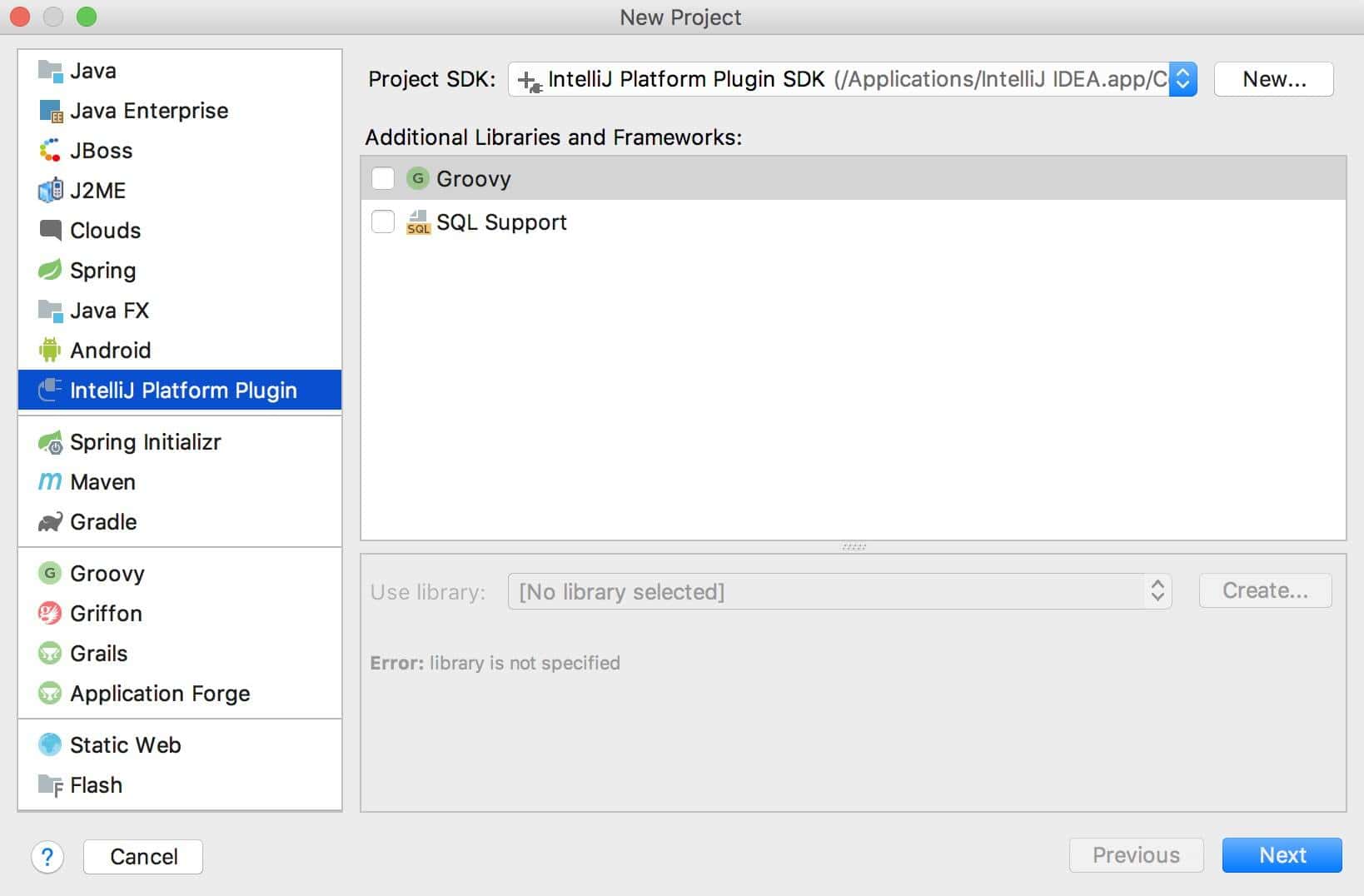
Note we must use a JetBrains JDK to ensure the required plugin classes are available on the classpath. IntelliJ should come with a suitable JDK by default, but if not we can follow the steps listed here.
As of this writing, we can only use Java 8 for writing IntelliJ plugins. This is because JetBrains does not currently provide an official JDK for Java 9 or higher.
4. Example Plugin
To demonstrate writing an IntelliJ plugin, we’ll create a plugin that provides quick access to the popular Stack Overflow website from multiple areas in the IDE. We’ll add:
- A Tools menu item to visit the Ask a Question page
- A popup menu item in both text editor and console output to search Stack Overflow for highlighted text.
4.1. Creating Actions
Actions are the core component used for writing IntelliJ plugins. Actions get triggered by events in the IDE, such as clicking a menu item or toolbar button.
The first step in creating an action is to create a Java class that extends AnAction. For our Stack Overflow plugin, we’ll create 2 actions.
The first action opens the Ask a Question page in a new browser window:
public class AskQuestionAction extends AnAction {
   @Override
   public void actionPerformed(AnActionEvent e) {
       BrowserUtil.browse("https://stackoverflow.com/questions/ask");
   }
}
We use the built-in BrowserUtil class because it handles all the nuances of opening a web page on different operating systems and browsers.
The second action opens the Stack Overflow search page and passes search text as a query string. This time we’ll implement two methods.
The first method we implement is just like our first action and handles opening a web browser.
First, though, we need to collect two values for StackOverflow. One is the language tag, and the other is the text to search for.
To get the language tag, we’ll use the Program Structure Interface. This API parses all the files in a project and provides a programmatic way to inspect them.
In this case, we use the PSI to determine the programming language of a file:
PsiFile file = e.getData(CommonDataKeys.PSI_FILE);
Language lang = e.getData(CommonDataKeys.PSI_FILE).getLanguage();
String languageTag = "+[" + lang.getDisplayName().toLowerCase() + "]";
Note that the PSI also provides language-specific details about a file. For example, we could use the PSI to find all public methods in a Java class.
To get the text to search for, we’ll use the Editor API to retrieve highlighted text on the screen:
final Editor editor = e.getRequiredData(CommonDataKeys.EDITOR);
CaretModel caretModel = editor.getCaretModel();
String selectedText = caretModel.getCurrentCaret().getSelectedText();
Even though this action is the same for both editor and console windows, accessing the selected text works the same way.
Now, we can put this all together in an actionPerformed declaration:
@Override
public void actionPerformed(AnActionEvent e) {

    PsiFile file = e.getData(CommonDataKeys.PSI_FILE);
    Language lang = e.getData(CommonDataKeys.PSI_FILE).getLanguage();
    String languageTag = "+[" + lang.getDisplayName().toLowerCase() + "]";

    Editor editor = e.getRequiredData(CommonDataKeys.EDITOR);
    CaretModel caretModel = editor.getCaretModel();
    String selectedText = caretModel.getCurrentCaret().getSelectedText()

    String query = selectedText.replace(' ', '+') + languageTag;
    BrowserUtil.browse("https://stackoverflow.com/search?q=" + query);
}
This action also overrides a second method named update. This allows us to enable or disable the action under different conditions.
In this case, we disable the search action when there no selected text:
@Override
public void update(AnActionEvent e) {
     Editor editor = e.getRequiredData(CommonDataKeys.EDITOR);
     CaretModel caretModel = editor.getCaretModel();
     e.getPresentation().setEnabledAndVisible(caretModel.getCurrentCaret().hasSelection());
}
4.2. Registering Actions
Once we have our actions written, we need to register them with the IDE. There are two ways to do this.
The first way is using the plugin.xml file, which is created for us when we start a new project.
By default the file will have an empty <actions> element, which is where we will add our actions:
<actions>
    <action
      id="StackOverflow.AskQuestion.ToolsMenu"
      class="com.baeldung.intellij.stackoverflowplugin.AskQuestionAction"
      text="Ask Question on Stack Overflow"
      description="Ask a Question on Stack Overflow">
        <add-to-group group-id="ToolsMenu" anchor="last"/>
    </action>
    <action
      id="StackOverflow.Search.Editor"
      class="com.baeldung.intellij.stackoverflowplugin.SearchAction"
      text="Search on Stack Overflow"
      description="Search on Stack Overflow">
        <add-to-group group-id="EditorPopupMenu" anchor="last"/>
    </action>
    <action
      id="StackOverflow.Search.Console"
      class="com.baeldung.intellij.stackoverflowplugin.SearchAction"
      text="Search on Stack Overflow"
      description="Search on Stack Overflow">
        <add-to-group group-id="ConsoleEditorPopupMenu" anchor="last"/>
    </action>
</actions>
Using the XML file to register actions will ensure they register during IDE startup, which is usually preferable.
The second way to register actions is programmatically using the ActionManager class:
ActionManager.getInstance().registerAction("StackOverflow.SearchAction", new SearchAction());This has the advantage of letting us dynamically register actions. For example, if we write a plugin to integrate with a remote API, we might want to register a different set of actions based on the version of the API that we call.
The disadvantage to this approach is that actions do not register at startup. We have to create an instance of ApplicationComponent to manage actions, which requires more coding and XML configuration.
5. Testing the Plugin
As with any program, writing an IntelliJ plugin requires testing. For a small plugin like the one we have written, it’s sufficient to ensure the plugin compiles and that the actions we created work as expected when we click them.
We can manually test (and debug) our plugin by using a Plugin run configuration:
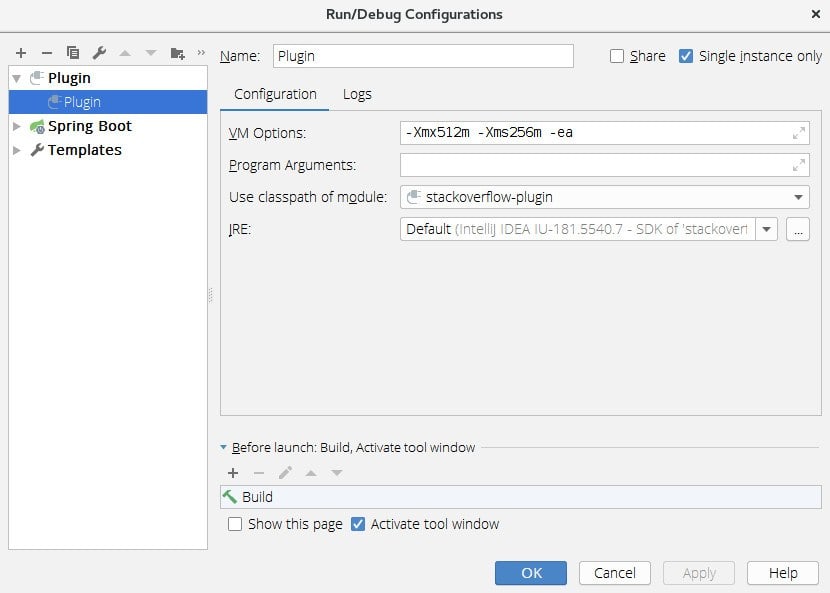
This will launch a new instance of IntelliJ with our plugin activated. This allows us to click the different menu items we created and ensure the proper Stack Overflow pages open up.
If you wish to do more traditional unit testing, IntelliJ provides a headless environment to run unit tests. We can write tests using any test framework we want, and the tests run using real, unmocked components from the IDE.
6. Deploying the Plugin
The plugin DevKit provides a simple way to package plugins so we can install and distribute them. Simply right-click the plugin project and select “Prepare plugin module for Deployment”. This will generate a JAR file inside the project directory.
The generated JAR file contains the code and configuration files needed to load into IntelliJ. You can install it locally, or publish it to a plugin repository for use by others.
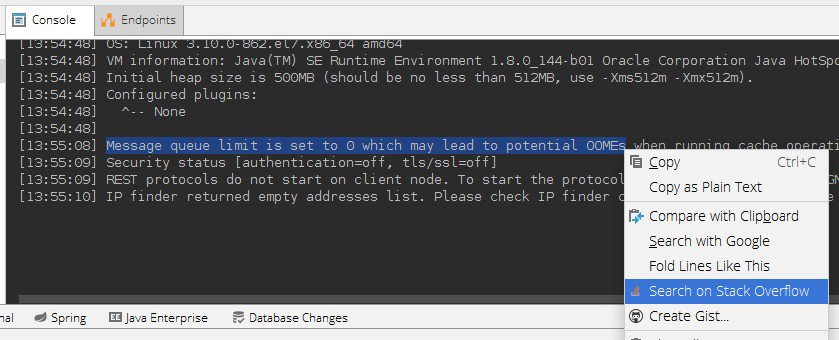
The screenshot below shows one of the new Stack Overflow menu items in action:
7. Conclusion
In this article, we developed a simple plugin that highlights just a few of how we can enhance the IntelliJ IDE.
While we primarily worked with actions, the IntelliJ plugin SDK offers several ways to add new functionality to the IDE. For further reading, check out the official getting started guide.














