


Mocking is an essential part of unit testing, and the Mockito library makes it easy to write clean and intuitive unit tests for your Java code.
Get started with mocking and improve your application tests using our Mockito guide:
Handling concurrency in an application can be a tricky process with many potential pitfalls. A solid grasp of the fundamentals will go a long way to help minimize these issues.
Get started with understanding multi-threaded applications with our Java Concurrency guide:
Spring 5 added support for reactive programming with the Spring WebFlux module, which has been improved upon ever since. Get started with the Reactor project basics and reactive programming in Spring Boot:
Since its introduction in Java 8, the Stream API has become a staple of Java development. The basic operations like iterating, filtering, mapping sequences of elements are deceptively simple to use.
But these can also be overused and fall into some common pitfalls.
To get a better understanding on how Streams work and how to combine them with other language features, check out our guide to Java Streams:
Explore Spring Boot 3 and Spring 6 in-depth through building a full REST API with the framework:
Yes, Spring Security can be complex, from the more advanced functionality within the Core to the deep OAuth support in the framework.
I built the security material as two full courses - Core and OAuth, to get practical with these more complex scenarios. We explore when and how to use each feature and code through it on the backing project.
You can explore the course here:
All Access is finally out, with all of my Spring courses. Learn JUnit is out as well, and Learn Maven is coming fast. And, of course, quite a bit more affordable. Finally.
>> GET THE COURSE
Spring Data JPA is a great way to handle the complexity of JPA with the powerful simplicity of Spring Boot.
Get started with Spring Data JPA through the guided reference course:
Refactor Java code safely — and automatically — with OpenRewrite.
Refactoring big codebases by hand is slow, risky, and easy to put off. That’s where OpenRewrite comes in. The open-source framework for large-scale, automated code transformations helps teams modernize safely and consistently.
Each month, the creators and maintainers of OpenRewrite at Moderne run live, hands-on training sessions — one for newcomers and one for experienced users. You’ll see how recipes work, how to apply them across projects, and how to modernize code with confidence.
Join the next session, bring your questions, and learn how to automate the kind of work that usually eats your sprint time.
1. Overview
Gradle is commonly used by developers to manage their project’s build lifecycle. It’s the default choice of build tool for all new Android projects.
In this tutorial, we’ll learn about Gradle Wrapper, an accompanying utility that makes it easier to distribute projects.
2. Gradle Wrapper
To build a Gradle-based project, we need to have Gradle installed in our machine. However, if our installed version doesn’t match with the project’s version, we’ll probably face many incompatibility problems.
Gradle Wrapper, also called Wrapper in short, solves this problem. It’s a script that runs Gradle tasks with a declared version. If the declared version is not installed, Wrapper installs the required one.
The main benefits of Wrapper are that we can:
- Build a project with Wrapper on any machine without the need to install Gradle first
- Have a fixed Gradle version. This yields reusable and more robust builds on CI pipelines
- Upgrade to a new Gradle version easily by changing the Wrapper definition
In the next sections, we’ll be running Gradle tasks that require Gradle to be installed locally.
2.1. Generating Wrapper Files
To use Wrapper, we need to generate some particular files. We’ll generate these files using the built-in Gradle task called wrapper. Note that we need to generate these files only once.
Now, let’s run the wrapper task in our project directory:
$ gradle wrapper
Let’s see the output of this command:
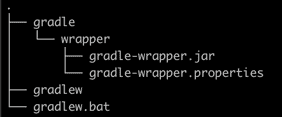
Let’s have a look at what these files are:
- gradle-wrapper.jar contains code for downloading the Gradle distribution specified in the gradle-wrapper.properties file
- gradle-wrapper.properties contains Wrapper runtime properties — most importantly, the version of the Gradle distribution that is compatible with the current project
- gradlew is the script that executes Gradle tasks with the Wrapper
- gradlew.bat is the gradlew equivalent batch script for Windows machines
By default, the wrapper task generates Wrapper files with the Gradle version currently installed on the machine. We can specify another version if needed:
$ gradle wrapper --gradle-version 6.3
We recommended checking the Wrapper files into the source control system like GitHub. This way we ensure that other developers can run the project without the need to install Gradle.
2.2. Running Gradle Commands with Wrapper
We can run any Gradle task with the Wrapper by replacing gradle with gradlew.
To list the available tasks, we can use the gradlew tasks command:
$ gradlew tasksLet’s have a look at the output:
Help tasks
----------
buildEnvironment - Displays all buildscript dependencies declared in root project 'gradle-wrapper'.
components - Displays the components produced by root project 'gradle-wrapper'. [incubating]
dependencies - Displays all dependencies declared in root project 'gradle-wrapper'.
dependencyInsight - Displays the insight into a specific dependency in root project 'gradle-wrapper'.
dependentComponents - Displays the dependent components of components in root project 'gradle-wrapper'. [incubating]
help - Displays a help message.
model - Displays the configuration model of root project 'gradle-wrapper'. [incubating]
outgoingVariants - Displays the outgoing variants of root project 'gradle-wrapper'.
projects - Displays the sub-projects of root project 'gradle-wrapper'.
properties - Displays the properties of root project 'gradle-wrapper'.
tasks - Displays the tasks runnable from root project 'gradle-wrapper'.
As we can see, the output is the same as we would get when running this task with the gradle command.
3. Common Issues
Now, let’s look at some common issues that we may face when working with Wrapper.
3.1. Global .gitignore That Ignores All Jar Files
Some organizations do not allow developers to check jar files into their source control system. Typically, such projects have a rule in the global .gitignore file to ignore all jar files. Therefore, the gradle-wrapper.jar file is not checked into the git repository. For this reason, Wrapper tasks fail to run on other machines. In such cases, we need to add the gradle-wrapper.jar file to git forcefully:
git add -f gradle/wrapper/gradle-wrapper.jarSimilarly, we may have a project-specific .gitignore file that ignores jar files. We can fix it either by relaxing the .gitignore rule or by adding the wrapper jar file forcefully, as shown above.
3.2. Missing Wrapper Folder
When checking in a Wrapper-based project, we may forget to include the wrapper folder that exists inside the gradle folder. But as we have seen above, the wrapper folder contains two critical files: gradle-wrapper.jar and gradle-wrapper.properties.
Without these files, we’ll get errors when running Gradle tasks with the Wrapper. Therefore, we must check the wrapper folder into the source control system.
3.3. Removed Wrapper Files
Gradle-based projects contain a .gradle folder that stores cache to speed up Gradle tasks. Sometimes, we need to clear the cache in order to troubleshoot Gradle build issues. Usually, we remove the entire .gradle folder. But we may mistake the Wrapper gradle folder with the .gradle folder and remove it, too. After that, we’ll definitely face problems when trying to run Gradle tasks with the Wrapper.
We can solve this problem by pulling the latest changes from the source. Alternatively, we can regenerate the Wrapper files.
4. Conclusion
In this tutorial, we learned about Gradle Wrapper and its basic usage. We also learned about some common problems we may face when working with Gradle Wrapper.














