1. Introduction
Docker is the de facto standard for creating self-contained applications. From version 2.3.0, Spring Boot includes several enhancements to help us create efficient Docker Images. Thus, it allows the decomposition of the application into different layers.
In other words, the source code resides in its own layer. Therefore, it can be independently rebuilt, improving efficiency and start-up time. In this tutorial, we’ll see how to exploit the new capabilities of Spring Boot to reuse Docker layers.
2. Layered Jars in Docker
Docker containers consist of a base image and additional layers. Once the layers are built, they’ll remain cached. Therefore, subsequent generations will be much faster:
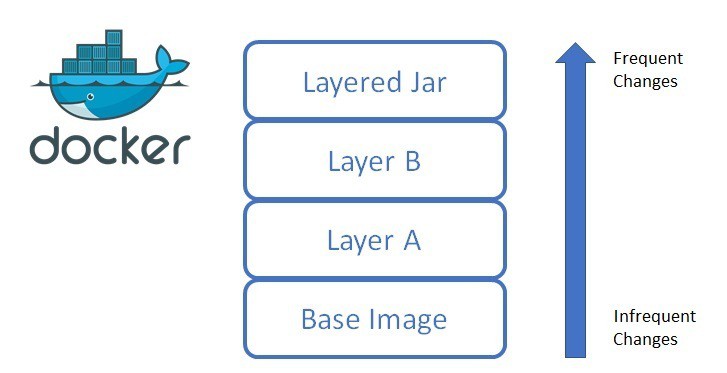
Changes in the lower-level layers also rebuild the upper-level ones. Thus, the infrequently changing layers should remain at the bottom, and the frequently changing ones should be placed on top.
In the same way, Spring Boot allows mapping the content of the artifact into layers. Let’s see the default mapping of layers:
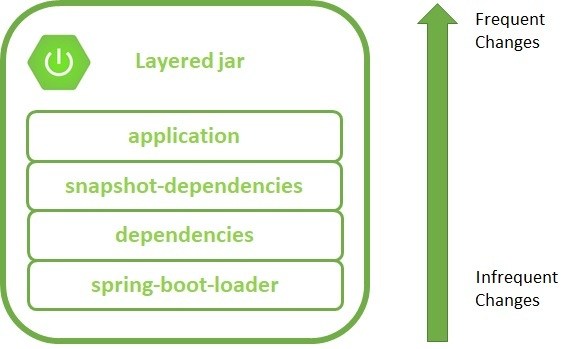
As we can see, the application has its own layer. When modifying the source code, only the independent layer is rebuilt. The loader and the dependencies remain cached, reducing Docker image creation and startup time. Let’s see how to do it with Spring Boot!
3. Creating Efficient Docker Images with Spring Boot
In the traditional way of building Docker images, Spring Boot uses the fat jar approach. As a result, a single artifact embeds all the dependencies and the application source code. So, any change in our source code forces the rebuilding of the entire layer.
3.1. Layers Configuration with Spring Boot
Spring Boot version 2.3.0 introduces two new features to improve the Docker image generation:
- Buildpack support provides the Java runtime for the application, so it’s now possible to skip the Dockerfile and build the Docker image automatically
- Layered jars help us to get the most out of the Docker layer generation
In this tutorial, we’ll extend the layered jar approach.
Initially, we’ll set up the layered jar in Maven. When packaging the artifact, we’ll generate the layers. Let’s inspect the jar file:
jar tf target/spring-boot-docker-0.0.1-SNAPSHOT.jar
As we can see, new layers.idx file in the BOOT-INF folder inside the fat jar is created. Certainly, it maps dependencies, resources, and application source code to independent layers:
BOOT-INF/layers.idx
Likewise, the content of the file breaks down the different layers stored:
- "dependencies":
  - "BOOT-INF/lib/"
- "spring-boot-loader":
  - "org/"
- "snapshot-dependencies":
- "application":
  - "BOOT-INF/classes/"
  - "BOOT-INF/classpath.idx"
  - "BOOT-INF/layers.idx"
  - "META-INF/"
3.2. Interacting with Layers
Let’s list the layers inside the artifact:
java -Djarmode=layertools -jar target/docker-spring-boot-0.0.1.jar list
The result provides a simplistic view of the content of the layers.idx file:
dependencies
spring-boot-loader
snapshot-dependencies
application
We can also extract the layers into folders:
java -Djarmode=layertools -jar target/docker-spring-boot-0.0.1.jar extract
Then, we can reuse the folders inside the Dockerfile as we’ll see in the next section:
$ ls
application/
snapshot-dependencies/
dependencies/
spring-boot-loader/
3.3. Dockerfile Configuration
To get the most out of the Docker capabilities, we need to add the layers to our image.
First, let’s add the fat jar file to the base image:
FROM openjdk:17-jdk-alpine as builder
ARG JAR_FILE=target/*.jar
COPY ${JAR_FILE} application.jar
Second, let’s extract the layers of the artifact:
RUN java -Djarmode=layertools -jar application.jar extract
Finally, let’s copy the extracted folders to add the corresponding Docker layers:
FROM openjdk:17-jdk-alpine
COPY --from=builder dependencies/ ./
COPY --from=builder snapshot-dependencies/ ./
COPY --from=builder spring-boot-loader/ ./
COPY --from=builder application/ ./
ENTRYPOINT ["java", "org.springframework.boot.loader.JarLauncher"]
With this configuration, when we change our source code, we’ll only rebuild the application layer. The rest will remain cached.
4. Custom Layers
It seems everything is working like a charm. But if we look carefully, the dependency layer is not shared between our builds. That is to say, all of them come to a single layer, even the internal ones. Therefore, if we change the class of an internal library, we’ll rebuild again all the dependency layers.
4.1. Custom Layers Configuration with Spring Boot
In Spring Boot, it’s possible to tune custom layers through a separate configuration file:
<layers xmlns="http://www.springframework.org/schema/boot/layers"
    xmlns:xsi="http://www.w3.org/2001/XMLSchema-instance"
    xsi:schemaLocation="http://www.springframework.org/schema/boot/layers
                     https://www.springframework.org/schema/boot/layers/layers-2.3.xsd">
    <application>
        <into layer="spring-boot-loader">
            <include>org/springframework/boot/loader/**</include>
        </into>
        <into layer="application" />
    </application>
    <dependencies>
        <into layer="snapshot-dependencies">
            <include>*:*:*SNAPSHOT</include>
        </into>
        <into layer="dependencies" />
    </dependencies>
    <layerOrder>
        <layer>dependencies</layer>
        <layer>spring-boot-loader</layer>
        <layer>snapshot-dependencies</layer>
        <layer>application</layer>
    </layerOrder>
</layers>
As we can see, we’re mapping and ordering the dependencies and resources into layers. Furthermore, we can add as many custom layers as we want.
Let’s name our file layers.xml. Then, in Maven, we can configure this file to customize the layers:
<plugin>
    <groupId>org.springframework.boot</groupId>
    <artifactId>spring-boot-maven-plugin</artifactId>
    <configuration>
        <layers>
            <enabled>true</enabled>
            <configuration>${project.basedir}/src/layers.xml</configuration>
        </layers>
    </configuration>
</plugin>
If we package the artifact, the result will be similar to the default behavior.
4.2. Adding New Layers
Let’s create an internal dependency adding our application classes:
<into layer="internal-dependencies">
    <include>com.baeldung.docker:*:*</include>
</into>
In addition, we’ll order the new layer:
<layerOrder>
    <layer>internal-dependencies</layer>
</layerOrder>
As a result, if we list the layers inside the fat jar, the new internal dependency appears:
dependencies
spring-boot-loader
internal-dependencies
snapshot-dependencies
application
4.3. Dockerfile Configuration
Once extracted, we can add the new internal layer to our Docker image:
COPY --from=builder internal-dependencies/ ./
So, if we generate the image, we’ll see how Docker builds the internal dependency as a new layer:
$ mvn package
$ docker build -f src/main/docker/Dockerfile . --tag spring-docker-demo
....
Step 8/11 : COPY --from=builder internal-dependencies/ ./
 ---> 0e138e074118
.....
After that, we can check in the history the composition of layers in the Docker image:
$ docker history --format "{{.ID}} {{.CreatedBy}} {{.Size}}" spring-docker-demo
c0d77f6af917 /bin/sh -c #(nop)  ENTRYPOINT ["java" "org.s… 0B
762598a32eb7 /bin/sh -c #(nop) COPY dir:a87b8823d5125bcc4… 7.42kB
80a00930350f /bin/sh -c #(nop) COPY dir:3875f37b8a0ed7494… 0B
0e138e074118 /bin/sh -c #(nop) COPY dir:db6f791338cb4f209… 2.35kB
e079ad66e67b /bin/sh -c #(nop) COPY dir:92a8a991992e9a488… 235kB
77a9401bd813 /bin/sh -c #(nop) COPY dir:f0bcb2a510eef53a7… 16.4MB
2eb37d403188 /bin/sh -c #(nop)  ENV JAVA_HOME=/opt/java/o… 0B
As we can see, the layer now includes the internal dependencies of the project.
5. Conclusion
In this tutorial, we showed how to generate efficient Docker images. In short, we used the new Spring Boot features to create layered jars. For simple projects, we can use the default configuration. We also demonstrated a more advanced configuration to reuse the layers.
The code backing this article is available on GitHub. Once you're
logged in as a Baeldung Pro Member, start learning and coding on the project.


