1. Overview
Apache Avro is a data serialization framework that provides powerful data structures and a lightweight, fast, binary data format.
In this tutorial, we’ll explore how to create an Avro schema which, when transformed into an object, contains a list of other objects.
2. The Objective
Let’s assume we want to develop an Avro schema that represents a parent-child relationship. Therefore, we’ll need a Parent class that contains a list of Child objects.
Here’s how this might look like in Java code:
public class Child {
    String name;
}

public class Parent {
    List<Child> children;
}
Our goal is to create an Avro schema that translates its structure into these objects for us.
Before we take a look at the solution, let’s quickly go over some Avro basics:
- Avro schemas are defined using JSON
- The type field refers to the data type (e.g., record, array, string)
- The fields array defines the structure of a record
3. Creating the Avro Schema
To properly illustrate the Parent-Child relationship in Avro, we’ll need to use a combination of record and array types.
Here’s how the schema looks like:
{
    "namespace": "com.baeldung.apache.avro.generated",
    "type": "record",
    "name": "Parent",
    "fields": [
        {
            "name": "children",
            "type": {
                "type": "array",
                "items": {
                    "type": "record",
                    "name": "Child",
                    "fields": [
                        {"name": "name", "type": "string"}
                    ]
                }
            }
        }
    ]
}
We’ve begun by defining a record of type Parent. Inside the Parent record, we’ve defined a children field. This field is an array type, which lets us store multiple Child objects. The items property of the array type details the structure of each element part of the array. In our case, this is a Child record. As we can see, the Child record has a single property, name, of type string.
4. Using the Schema in Java
Once we’ve defined our Avro schema, we’ll use it to generate the Java classes. We’ll do this, of course, with the Avro Maven plugin. Here’s the configuration in the parent pom file:
<plugin>
    <groupId>org.apache.avro</groupId>
    <artifactId>avro-maven-plugin</artifactId>
    <version>1.11.3</version>
    <executions>
        <execution>
            <phase>generate-sources</phase>
            <goals>
                <goal>schema</goal>
            </goals>
            <configuration>
                <sourceDirectory>src/main/java/com/baeldung/apache/avro/schemas</sourceDirectory>
                <outputDirectory>src/main/java</outputDirectory>
            </configuration>
        </execution>
    </executions>
</plugin>
In order for Avro to generate our classes, we’ll need to run the Maven generate sources command (mvn clean generate-sources) or go to the Plugins section of the Maven tool window and run the avro:schema goal of the avro plugin:
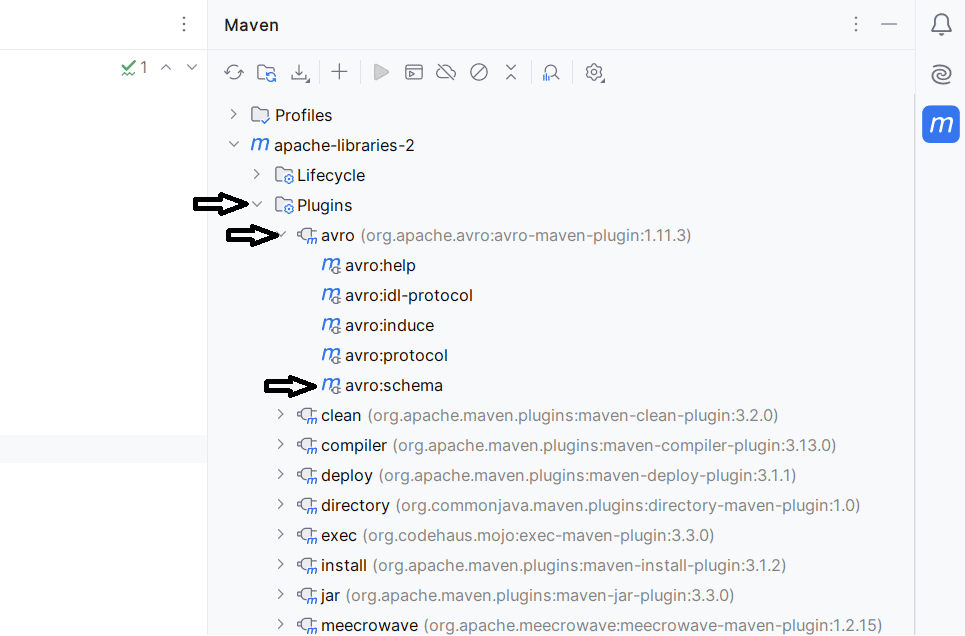
This way, Avro creates Java classes based on the provided schema, in the provided namespace. The namespace property also adds the package name at the top of the generated class.
5. Working With Generated Classes
The newly created classes provide the setup methods, to get and set the children list. Here’s what this looks like:
@Test
public void whenAvroSchemaWithListOfObjectsIsUsed_thenObjectsAreSuccessfullyCreatedAndSerialized() throws IOException {
    Parent parent = new Parent();
    List<Child> children = new ArrayList();

    Child child1 = new Child();
    child1.setName("Alice");
    children.add(child1);

    Child child2 = new Child();
    child2.setName("Bob");
    children.add(child2);

    parent.setChildren(children);

    SerializationDeserializationLogic.serializeParent(parent);
    Parent deserializedParent = SerializationDeserializationLogic.deserializeParent();

    assertEquals("Alice", deserializedParent.getChildren().get(0).getName());
}
We see from the test above that we’ve created a new Parent. We can do it this way, or use the builder() available. This article on Avro default values illustrates how to use the builder() pattern.
Then, we create two Child objects which we add to the Parent’s children property. Finally, we serialize and deserialize the object and compare one of the names.
6. Conclusion
In this article, we looked at how to create an Avro schema that contains a list of objects. Furthermore, we’ve detailed how to define a Parent record with a list property of Child records. This is a way we can represent complex data structures in Avro. Additionally, this is particularly useful when we need to work with collections of objects or hierarchical data.
Finally, Avro schemas are flexible and we can configure them to set up even more complex data structures. We can combine different types and nested structures to replicate our data models.
The code backing this article is available on GitHub. Once you're
logged in as a Baeldung Pro Member, start learning and coding on the project.


