


Mocking is an essential part of unit testing, and the Mockito library makes it easy to write clean and intuitive unit tests for your Java code.
Get started with mocking and improve your application tests using our Mockito guide:
Handling concurrency in an application can be a tricky process with many potential pitfalls. A solid grasp of the fundamentals will go a long way to help minimize these issues.
Get started with understanding multi-threaded applications with our Java Concurrency guide:
Spring 5 added support for reactive programming with the Spring WebFlux module, which has been improved upon ever since. Get started with the Reactor project basics and reactive programming in Spring Boot:
Since its introduction in Java 8, the Stream API has become a staple of Java development. The basic operations like iterating, filtering, mapping sequences of elements are deceptively simple to use.
But these can also be overused and fall into some common pitfalls.
To get a better understanding on how Streams work and how to combine them with other language features, check out our guide to Java Streams:
Explore Spring Boot 3 and Spring 6 in-depth through building a full REST API with the framework:
Yes, Spring Security can be complex, from the more advanced functionality within the Core to the deep OAuth support in the framework.
I built the security material as two full courses - Core and OAuth, to get practical with these more complex scenarios. We explore when and how to use each feature and code through it on the backing project.
You can explore the course here:
All Access is finally out, with all of my Spring courses. Learn JUnit is out as well, and Learn Maven is coming fast. And, of course, quite a bit more affordable. Finally.
>> GET THE COURSE
Spring Data JPA is a great way to handle the complexity of JPA with the powerful simplicity of Spring Boot.
Get started with Spring Data JPA through the guided reference course:
Refactor Java code safely — and automatically — with OpenRewrite.
Refactoring big codebases by hand is slow, risky, and easy to put off. That’s where OpenRewrite comes in. The open-source framework for large-scale, automated code transformations helps teams modernize safely and consistently.
Each month, the creators and maintainers of OpenRewrite at Moderne run live, hands-on training sessions — one for newcomers and one for experienced users. You’ll see how recipes work, how to apply them across projects, and how to modernize code with confidence.
Join the next session, bring your questions, and learn how to automate the kind of work that usually eats your sprint time.
1. Introduction
In this tutorial, we’re going to look at the Resource Description Framework (RDF) standard and Apache Jena for working with RDF in our applications.
2. What Is RDF?
The Resource Description Framework is a W3C recommendation designed for storing and exchanging graph data. This makes it especially useful for any places where we need to describe various pieces of data that are interrelated, as well as the relationships between them. For example, we might use this for a blog system, describing the posts, comments, authors, and the relationships between them.
The RDF specification itself defines how we can describe our data model, as well as ways to serialize these models for real-world usage. This is part of the basis for the W3C work on the Semantic Web.
3. What Is Apache Jena?
Apache Jena is a free and open source Java framework designed for building Semantic Web and Linked Data applications. This provides tools for working with RDF models, both to describe the model itself and to serialize and deserialize them from various formats. It also includes additional tools for building our applications – such as the Fuseki server for exposing our RDF models via HTTP.
3.1. Dependencies
First, we need to include the apache-jena-libs dependency in our pom.xml file:
<dependency>
    <groupId>org.apache.jena</groupId>
    <artifactId>apache-jena-libs</artifactId>
    <type>pom</type>
    <version>5.5.0</version>
</dependency>
At this point, we’re ready to start using it in our application.
4. RDF Models
The core of RDF is in the actual models we use to represent our data. These are comprised of various resources, each with properties that define them, and the relationships between these resources.
For example, we might have a model for a blog post that looks something like this:
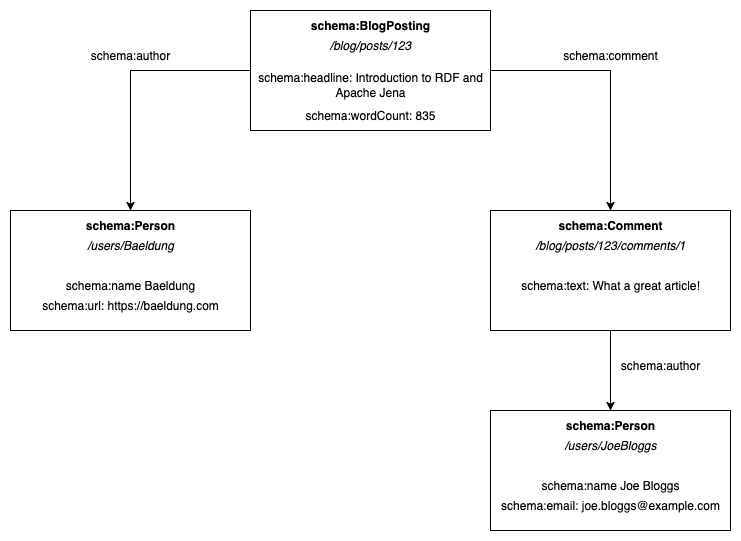
Here, we have four different resources: a blog post, a comment, and two people. Each resource has a few properties that define it, and then we have relationships between them.
4.1. Identities
Each resource in our model must have a unique identifier. Within RDF, these identifiers are provided as URIs – for example, /blog/posts/123 or /users/JoeBloggs. These URIs might be resolvable to the resource itself, but it doesn’t need to be.
The use of URIs ensures that our identities are globally unique and also allows resources controlled by different services to reference each other. This is a key aspect of how Linked Data works within applications.
Slightly less obvious from our diagram is the fact that our properties and relationships also have distinct identities described by URIs. These are often written in a shorthand similar to how XML namespaces work. For example, the resource type schema:Person is actually https://schema.org/Person, and the property schema:name is actually https://schema.org/name.
While we can use any identities for our resources, properties, and relationships, standard vocabularies exist for this purpose. For example, Schema.org or Friend Of A Friend (FOAF) are standard public vocabularies. Using these enables consumers to understand our objects via their public definitions.
4.2. Statements
In RDF, we describe resources using a series of RDF statements, also known as RDF triples. Each of these statements consists of three components:
- The subject – the identity of the resource the statement applies to.
- The predicate – the identity of the statement we’re making.
- The object – either the raw value of the statement, or the identity of some other resource that the statement is referring to.
For example, the RDF statement giving a title to our blog post would be:
- The subject – /blog/posts/123
- The predicate – https://schema.org/headline
- The object – “Introduction to RDF and Apache Jena”
We can include as many of these statements as needed to describe our resources. The full set of these statements across all of our resources defines our model.
5. Building RDF Models with Apache Jena
Now that we know what an RDF model is, we need to be able to build them in our code.
We can create a blank RDF model using the ModelFactory:
Model model = ModelFactory.createDefaultModel();Then, we add resources to our model using createResource():
Resource blogPost = model.createResource("/blog/posts/123");Once we have a resource, we add properties to it using addProperty():
blogPost.addProperty(SchemaDO.headline, "Introduction to RDF and Apache Jena");
blogPost.addProperty(SchemaDO.wordCount, "835");
blogPost.addProperty(SchemaDO.author, model.createResource("/users/Baeldung"));
blogPost.addProperty(SchemaDO.comment, model.createResource("/blog/posts/123/comments/1"));
The first parameter is the predicate defining the property. Jena provides constants for many standard ontologies, or we can write our own if needed. In this case, SchemaDO represents the Schema.org vocabulary. The second parameter is the value of our property – either as a literal value or another Resource instance.
5.1. Extracting Model Values
We can also extract values from our model. If we know the identity of a resource, we can retrieve it using the getResource() method:
Resource blogPost = model.getResource("/blog/posts/123");Additionally, we can get individual properties from a resource using the getProperty() method:
Statement headline = blogPost.getProperty(SchemaDO.headline);This returns a Statement instance representing the RDF statement.
Finally, once we’ve got a Statement instance, we can query different aspects of it:
Resource subject = headline.getSubject()
Property predicate = headline.getPredicate();
RDFNode object = headline.getObject()
The RDFNode returned by getObject() allows us to understand more about this node in our RDF model. For example, we can check if it’s a literal value or another resource:
assertTrue(headline.getObject().isLiteral());
assertFalse(headline.getObject().isResource());
We can get literal values using getString(), or resource references using getResource():
String headline = blogPost.getProperty(SchemaDO.headline).getString();
Resource author = blogPost.getProperty(SchemaDO.author).getResource();
6. Serializing and Deserializing RDF
Representing RDF models in our code is useful. However, we also need to be able to serialize and deserialize them. This then allows us to persist them on disk or transmit them between services.
6.1. N-Triples
We’ll often see RDF models written in N-Triple form. This standard is defined in the RDF Test Cases specification. It involves writing each of our statements on separate lines. When we do so, we write the subject, predicate, and object from the statement separated with whitespace, and then the entire statement is terminated with a single period. When writing our values, URI identities are wrapped in <> and literal values are wrapped in “”.
For example, our entire model would be written as:
</blog/posts/123> <https://schema.org/headline> "Introduction to RDF and Apache Jena" .
</blog/posts/123> <https://schema.org/wordCount> "835" .
</blog/posts/123> <https://schema.org/comment> </blog/posts/123/comments/1> .
</blog/posts/123> <https://schema.org/author> </users/Baeldung> .
</blog/posts/123/comments/1> <https://schema.org/text> "What a great article!" .
</blog/posts/123/comments/1> <https://schema.org/author> </users/JoeBloggs> .
</users/Baeldung> <https://schema.org/name> "Baeldung" .
</users/Baeldung> <https://schema.org/url> "https://baeldung.com" .
</users/JoeBloggs> <https://schema.org/name> "Joe Bloggs" .
</users/JoeBloggs> <https://schema.org/email> "[email protected]" .
This set of statements directly represents our model in a concise form.
We can use Jena to write our model using the RDFDataMgr.write() method:
RDFDataMgr.write(System.out, model, Lang.NTRIPLES);This takes the output stream to write to, the model to write, and the format, and outputs the entire contents of the model.
6.2. RDF-XML
In addition to N-Triple form, we also have RDF-XML. This is less human-readable but is the preferred form for machine use. The W3C maintains a schema that describes how this format works, allowing us to produce and consume it in our applications easily.
For example, our entire model in RDF-XML would be:
<rdf:RDF
    xmlns:rdf="http://www.w3.org/1999/02/22-rdf-syntax-ns#"
    xmlns:schema="https://schema.org/">
  <rdf:Description rdf:about="tag:baeldung:/blog/posts/123">
    <schema:wordCount>835</schema:wordCount>
    <schema:headline>Introduction to RDF and Apache Jena</schema:headline>
    <schema:author>
      <rdf:Description rdf:about="tag:baeldung:/users/Baeldung">
        <schema:url>https://baeldung.com</schema:url>
        <schema:name>Baeldung</schema:name>
      </rdf:Description>
    </schema:author>
    <schema:comment>
      <rdf:Description rdf:about="tag:baeldung:/blog/posts/123/comments/1">
        <schema:text>What a great article!</schema:text>
        <schema:author>
          <rdf:Description rdf:about="tag:baeldung:/users/JoeBloggs">
            <schema:email>[email protected]</schema:email>
            <schema:name>Joe Bloggs</schema:name>
          </rdf:Description>
        </schema:author>
      </rdf:Description>
    </schema:comment>
  </rdf:Description>
</rdf:RDF>
As before, we can use RDFDataMgr.write() to write this, passing in Lang.RDFXML as the format instead:
RDFDataMgr.write(System.out, model, Lang.RDFXML);This writes the entire model to the given output stream, only this time in RDF-XML format. Note that we must use absolute URIs for all identifiers in this format, but we can choose any URI scheme.
Finally, because XML is the standard interchange format, we can also just use Model.write() to achieve the same result:
model.write(System.out);6.3. Parsing RDF-XML
In addition to serializing our model to RDF-XML, we can also parse it back into our Model object using the Model.read() method:
Model model = ModelFactory.createDefaultModel();
model.read(new StringReader(rdfxml), null);
We must provide our XML as either a Reader or an InputStream instance. We also need to provide a base URI for converting relative URIs that may be present in the XML, though this can be null if we don’t have one.
This populates our Model instance with the data from this RDF-XML document.
7. Summary
In this article, we’ve taken a brief look at the RDF format and the Apache Jena library for working with it. There’s a lot more that can be achieved using this, so the next time you need to work with linked data, it’s well worth a look.














