


Mocking is an essential part of unit testing, and the Mockito library makes it easy to write clean and intuitive unit tests for your Java code.
Get started with mocking and improve your application tests using our Mockito guide:
Handling concurrency in an application can be a tricky process with many potential pitfalls. A solid grasp of the fundamentals will go a long way to help minimize these issues.
Get started with understanding multi-threaded applications with our Java Concurrency guide:
Spring 5 added support for reactive programming with the Spring WebFlux module, which has been improved upon ever since. Get started with the Reactor project basics and reactive programming in Spring Boot:
Since its introduction in Java 8, the Stream API has become a staple of Java development. The basic operations like iterating, filtering, mapping sequences of elements are deceptively simple to use.
But these can also be overused and fall into some common pitfalls.
To get a better understanding on how Streams work and how to combine them with other language features, check out our guide to Java Streams:
Explore Spring Boot 3 and Spring 6 in-depth through building a full REST API with the framework:
Yes, Spring Security can be complex, from the more advanced functionality within the Core to the deep OAuth support in the framework.
I built the security material as two full courses - Core and OAuth, to get practical with these more complex scenarios. We explore when and how to use each feature and code through it on the backing project.
You can explore the course here:
All Access is finally out, with all of my Spring courses. Learn JUnit is out as well, and Learn Maven is coming fast. And, of course, quite a bit more affordable. Finally.
>> GET THE COURSE
Spring Data JPA is a great way to handle the complexity of JPA with the powerful simplicity of Spring Boot.
Get started with Spring Data JPA through the guided reference course:
Refactor Java code safely — and automatically — with OpenRewrite.
Refactoring big codebases by hand is slow, risky, and easy to put off. That’s where OpenRewrite comes in. The open-source framework for large-scale, automated code transformations helps teams modernize safely and consistently.
Each month, the creators and maintainers of OpenRewrite at Moderne run live, hands-on training sessions — one for newcomers and one for experienced users. You’ll see how recipes work, how to apply them across projects, and how to modernize code with confidence.
Join the next session, bring your questions, and learn how to automate the kind of work that usually eats your sprint time.
1. Overview
In this article, we’re going to illustrate the Activeweb – a full stack web framework from JavaLite – providing everything necessary for the development of dynamic web applications or REST-ful web services.
2. Basic Concepts and Principles
Activeweb leverages “convention over configuration” – which means it’s configurable, but has sensible defaults and doesn’t require additional configuration. We just need to follow a few predefined conventions, like naming classes, methods, and fields in a certain predefined format.
It also simplifies development by recompiling and reloading the source into the running container (Jetty by default).
For dependency management, it uses Google Guice as the DI framework; to learn more about Guice, have a look at our guide here.
3. Maven Setup
To get started, let’s add the necessary dependencies first:
<dependency>
    <groupId>org.javalite</groupId>
    <artifactId>activeweb</artifactId>
    <version>1.15</version>
</dependency>
The latest version can be found here.
Additionally, for testing the application, we’ll need the activeweb-testing dependency:
<dependency>
    <groupId>org.javalite</groupId>
    <artifactId>activeweb-testing</artifactId>
    <version>1.15</version>
    <scope>test</scope>
</dependency>
Check out the latest version here.
4. Application Structure
As we discussed, the application structure needs to follow a certain convention; here’s what that looks like for a typical MVC application:
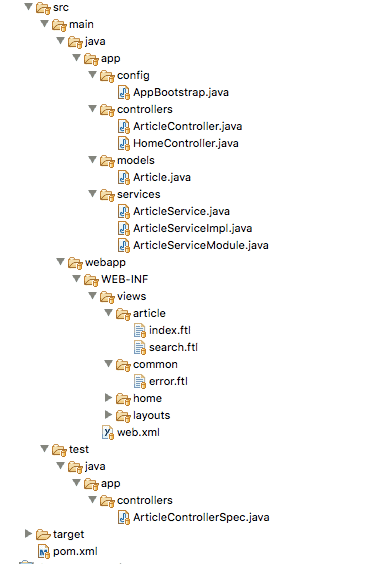
As we can see, controllers, service, config, and models should be located in their own sub-package in the app package.
The views should be located in WEB-INF/views directory, each having is own subdirectory based on the controller name. For example app.controllers.ArticleController should have an article/ sub-directory containing all the view files for that controller.
The deployment descriptor or the web.xml should typically contain a <filter> and the corresponding <filter-mapping>. Since the framework is a servlet filter, instead of a <servlet> configuration there is a filter configuration:
...
<filter>
    <filter-name>dispatcher</filter-name>
    <filter-class>org.javalite.activeweb.RequestDispatcher</filter-class>
...
</filter>
...
We also need an <init-param> root_controller to define the default controller for the application – akin to a home controller:
...
<init-param>
    <param-name>root_controller</param-name>
    <param-value>home</param-value>
</init-param>
...
5. Controllers
Controllers are the primary components of an ActiveWeb Application; and, as mentioned earlier all controllers should be located inside the app.controllers package:
public class ArticleController extends AppController {
    // ...
}
Notice that the controller is extending org.javalite.activeweb.AppController.
5.1. Controller URL Mapping
The controllers are mapped to a URL automatically based on the convention. For example, ArticleController will get mapped to:
http://host:port/contextroot/articleNow, this would be mapped them to the default a default action in the controller. Actions are nothing but methods inside the controller. Name the default method as index():
public class ArticleController extends AppController {
    // ...
    public void index() {
        render("articles");
    }
    // ...
}
For other methods or actions append the method name to the URL:
public class ArticleController extends AppController {
    // ...

    public void search() {
        render("search");
    }
}
The URL:
http://host:port/contextroot/article/searchWe can even have controller actions based on HTTP methods. Just annotate the method with either of @POST, @PUT, @DELETE, @GET, @HEAD. If we don’t annotate an action, it’s considered a GET by default.
5.2. Controller URL Resolution
The framework uses controller name and the sub-package name to generate the controller URL. For example app.controllers.ArticleController.java the URL:
http://host:port/contextroot/articleIf the controller is inside a sub-package, the URL simply becomes:
http://host:port/contextroot/baeldung/articleFor a controller name having more than a single word (for example app.controllers.PublishedArticleController.java), the URL will get separated using an underscore:
http://host:port/contextroot/published_article5.3. Retrieving Request Parameters
Inside a controller, we get access to the request parameters using the param() or params() methods from the AppController class. The first method takes a String argument – the name of the param to retrieve:
public void search() {

    String keyword = param("key");
    view("search",articleService.search(keyword));

}
And we can use the later to get all parameters if we need to:
public void search() {

    Map<String, String[]> criterion = params();
    // ...
}
6. Views
In ActiveWeb terminology, views are often referred as templates; this is mostly because it uses Apache FreeMarker template engine instead of JSPs. You can read more about FreeMarker in our guide, here.
Place the templates in WEB-INF/views directory. Every controller should have a sub-directory by its name holding all templates required by it.
6.1. Controller View Mapping
When a controller is hit, the default action index() gets executed and the framework will choose the WEB-INF/views/article/index.ftl template the from views directory for that controller. Similarly, for any other action, the view would be chosen based on the action name.
This isn’t always what we would like. Sometimes we might want to return some views based on internal business logic. In this scenario, we can control the process with the render() method from the parent org.javalite.activeweb.AppController class:
public void index() {
    render("articles");
}
Note that the location of the custom views should also be in the same view directory for that controller. If it is not the case, prefix the template name with the directory name where the template resides and pass it to the render() method:
render("/common/error");6.3. Views With Data
To send data to the views, the org.javalite.activeweb.AppController provides the view() method:
view("articles", articleService.getArticles());This takes two params. First, the object name used to access the object in the template and second an object containing the data.
We can also use assign() method to pass data to the views. There is absolutely no difference between view() and assign() methods – we may choose any one of them:
assign("article", articleService.search(keyword));Let’s map the data in the template:
<@content for="title">Articles</@content>
...
<#list articles as article>
    <tr>
        <td>${article.title}</td>
        <td>${article.author}</td>
        <td>${article.words}</td>
        <td>${article.date}</td>
    </tr>
</#list>
</table>
7. Managing Dependencies
In order to manage objects and instances, ActiveWeb uses Google Guice as a dependency management framework.
Let’s say we need a service class in our application; this would separate the business logic from the controllers.
Let’s first create a service interface:
public interface ArticleService {

    List<Article> getArticles();
    Article search(String keyword);

}
And the implementation:
public class ArticleServiceImpl implements ArticleService {

    public List<Article> getArticles() {
        return fetchArticles();
    }

    public Article search(String keyword) {
        Article ar = new Article();
        ar.set("title", "Article with "+keyword);
        ar.set("author", "baeldung");
        ar.set("words", "1250");
        ar.setDate("date", Instant.now());
        return ar;
    }
}
Now, let’s bind this service as a Guice module:
public class ArticleServiceModule extends AbstractModule {

    @Override
    protected void configure() {
        bind(ArticleService.class).to(ArticleServiceImpl.class)
          .asEagerSingleton();
    }
}
Finally, register this in the application context and inject it into the controller, as required:
public class AppBootstrap extends Bootstrap {

    public void init(AppContext context) {
    }

    public Injector getInjector() {
        return Guice.createInjector(new ArticleServiceModule());
    }
}
Note that this config class name must be AppBootstrap and it should be located in the app.config package.
Finally, here’s how we inject it into the controller:
@Inject
private ArticleService articleService;
8. Testing
Unit tests for an ActiveWeb application are written using the JSpec library from JavaLite.
We’ll use the org.javalite.activeweb.ControllerSpec class from JSpec to test our controller, and we’ll name the test classes following a similar convention:
public class ArticleControllerSpec extends ControllerSpec {
    // ...
}
Notice, that the name is similar to the controller it is testing with a “Spec” at the end.
Here’s the test case:
@Test
public void whenReturnedArticlesThenCorrect() {
    request().get("index");
    a(responseContent())
      .shouldContain("<td>Introduction to Mule</td>");
}
Notice that the request() method simulates the call to the controller, and the corresponding HTTP method get(), takes the action name as an argument.
We can also pass parameters to the controller using the params() method:
@Test
public void givenKeywordWhenFoundArticleThenCorrect() {
    request().param("key", "Java").get("search");
    a(responseContent())
      .shouldContain("<td>Article with Java</td>");
}
To pass multiple parameters, we can chain method as well, with this fluent API.
9. Deploying the Application
It’s possible to deploy the application in any servlet container like Tomcat, WildFly or Jetty. Of course, the simplest way to deploy and test would be using the Maven Jetty plugin:
...
<plugin>
    <groupId>org.eclipse.jetty</groupId>
    <artifactId>jetty-maven-plugin</artifactId>
    <version>9.4.8.v20171121</version>
    <configuration>
        <reload>manual</reload>
        <scanIntervalSeconds>10000</scanIntervalSeconds>
    </configuration>
</plugin>
...
The latest version of the plugin is here.
Now, finally – we can fire it up:
mvn jetty:run10. Conclusion
In this article, we learned about the basic concepts and conventions of the ActiveWeb framework. In addition to these, the framework has more features and capabilities than what we have discussed in here.
Please refer the official documentation for more details.














