Get Specific Part From SOAP Message in Java
Last updated: January 11, 2024


Mocking is an essential part of unit testing, and the Mockito library makes it easy to write clean and intuitive unit tests for your Java code.
Get started with mocking and improve your application tests using our Mockito guide:
Handling concurrency in an application can be a tricky process with many potential pitfalls. A solid grasp of the fundamentals will go a long way to help minimize these issues.
Get started with understanding multi-threaded applications with our Java Concurrency guide:
Spring 5 added support for reactive programming with the Spring WebFlux module, which has been improved upon ever since. Get started with the Reactor project basics and reactive programming in Spring Boot:
Since its introduction in Java 8, the Stream API has become a staple of Java development. The basic operations like iterating, filtering, mapping sequences of elements are deceptively simple to use.
But these can also be overused and fall into some common pitfalls.
To get a better understanding on how Streams work and how to combine them with other language features, check out our guide to Java Streams:
Explore Spring Boot 3 and Spring 6 in-depth through building a full REST API with the framework:
Yes, Spring Security can be complex, from the more advanced functionality within the Core to the deep OAuth support in the framework.
I built the security material as two full courses - Core and OAuth, to get practical with these more complex scenarios. We explore when and how to use each feature and code through it on the backing project.
You can explore the course here:
All Access is finally out, with all of my Spring courses. Learn JUnit is out as well, and Learn Maven is coming fast. And, of course, quite a bit more affordable. Finally.
>> GET THE COURSE
Spring Data JPA is a great way to handle the complexity of JPA with the powerful simplicity of Spring Boot.
Get started with Spring Data JPA through the guided reference course:
Refactor Java code safely — and automatically — with OpenRewrite.
Refactoring big codebases by hand is slow, risky, and easy to put off. That’s where OpenRewrite comes in. The open-source framework for large-scale, automated code transformations helps teams modernize safely and consistently.
Each month, the creators and maintainers of OpenRewrite at Moderne run live, hands-on training sessions — one for newcomers and one for experienced users. You’ll see how recipes work, how to apply them across projects, and how to modernize code with confidence.
Join the next session, bring your questions, and learn how to automate the kind of work that usually eats your sprint time.
1. Overview
We often employ REST or SOAP architectural approaches when designing API for data exchange. In the case of working with SOAP protocol, there may be situations when we need to extract some specific data from a SOAP message for further processing.
In this tutorial, we’ll learn how to get a specific part of a SOAP Message in Java.
2. The SOAPMessage Class
Before we dive in, let’s briefly examine the structure of the SOAPMessage class, which represents the root class for all SOAP messages:
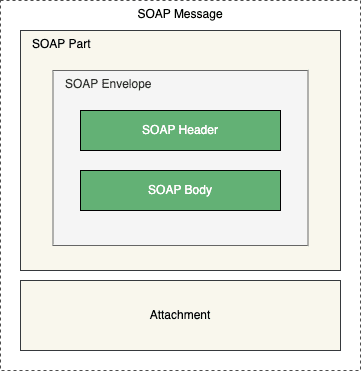
The class consists of two main parts – the SOAP part and the optional attachment part. The former contains the SOAP Envelope, which holds the actual message we received. Additionally, the envelope itself is composed of the header and body elements.
From Java 11, Java EE, including the JAX-WS and SAAJ modules, were removed from the JDK and are no longer part of the standard distribution. To successfully process SOAP messages with Jakarta EE 9 and above, we’ll need to add the Jakarta SOAP with Attachment API and Jakarta SOAP Implementation dependencies in our pom.xml:
<dependency>
    <groupId>jakarta.xml.soap</groupId>
    <artifactId>jakarta.xml.soap-api</artifactId>
    <version>3.0.1</version>
</dependency>

<dependency>
    <groupId>com.sun.xml.messaging.saaj</groupId>
    <artifactId>saaj-impl</artifactId>
    <version>3.0.3</version>
</dependency>
3. Working Example
Next, let’s create an XML message we’ll use through this tutorial:
<soapenv:Envelope xmlns:soapenv="http://schemas.xmlsoap.org/soap/envelope/"
                  xmlns:be="http://www.baeldung.com/soap/">
    <soapenv:Header>
        <be:Username>baeldung</be:Username>
    </soapenv:Header>
    <soapenv:Body>
        <be:ArticleRequest>
            <be:Article>
                <be:Name>Working with JUnit</be:Name>
            </be:Article>
        </be:ArticleRequest>
    </soapenv:Body>
</soapenv:Envelope>
4. Get Header and Body From SOAP Message
Moving forward, let’s see how to extract header and body elements from the SOAP message.
According to the SOAPMessage class hierarchy, to obtain the actual SOAP message, we’ll first need to get the SOAP part and then the envelope:
InputStream inputStream = this.getClass().getClassLoader().getResourceAsStream("soap-message.xml");
SOAPMessage soapMessage = MessageFactory.newInstance().createMessage(new MimeHeaders(), inputStream);
SOAPPart part = soapMessage.getSOAPPart();
SOAPEnvelope soapEnvelope = part.getEnvelope();
Now, to get the header element, we can call the getHeader() method:
SOAPHeader soapHeader = soapEnvelope.getHeader();Similarly, we can extract the body element by calling the getBody() method:
SOAPBody soapBody = soapEnvelope.getBody();5. Get Specific Element From SOAP Message
Now that we’ve discussed retrieving the basic elements, let’s explore how to extract specific parts from the SOAP message.
5.1. Get Elements by Tag Name
We can use the getElementsByTagName() method to get a specific element. The method returns a NodeList. Moreover, the Node is the primary data type for all DOM components. In other words, all the elements, attributes, and text contents are considered to be of the Node type.
Let’s extract the Name element from the XML:
@Test
void whenGetElementsByTagName_thenReturnCorrectBodyElement() throws Exception {
    SOAPEnvelope soapEnvelope = getSoapEnvelope();
    SOAPBody soapBody = soapEnvelope.getBody();
    NodeList nodes = soapBody.getElementsByTagName("be:Name");
    assertNotNull(nodes);

    Node node = nodes.item(0);
    assertNotNull(node);
    assertEquals("Working with JUnit", node.getTextContent());
}
It’s important to note here that we need to pass the namespace prefix to the method for it to work correctly.
Likewise, we can use the same approach to get an element from the SOAP header:
@Test
void whenGetElementsByTagName_thenReturnCorrectHeaderElement() throws Exception {
    SOAPEnvelope soapEnvelope = getSoapEnvelope();
    SOAPHeader soapHeader = soapEnvelope.getHeader();
    NodeList nodes = soapHeader.getElementsByTagName("be:Username");
    assertNotNull(nodes);

    Node node = nodes.item(0);
    assertNotNull(node);
    assertEquals("baeldung", node.getTextContent());
}
5.2. Iterate Over Child Nodes
Another way to get the value from a particular element is by iterating over child nodes.
Let’s see how to iterate over child nodes of a body element:
@Test
void whenGetElementUsingIterator_thenReturnCorrectBodyElement() throws Exception {
    SOAPEnvelope soapEnvelope = getSoapEnvelope();
    SOAPBody soapBody = soapEnvelope.getBody();
    NodeList childNodes = soapBody.getChildNodes();

    for (int i = 0; i < childNodes.getLength(); i++) {
        Node node = childNodes.item(i);
        if ("Name".equals(node.getLocalName())) {
            String name = node.getTextContent();
            assertEquals("Working with JUnit", name);
        }
    }
}
5.3. Using XPath
Next, let’s see how to extract elements using the XPath. Simply put, XPath is the syntax used to describe XML parts. Furthermore, it works with the XPath expressions, which we can use to retrieve elements under certain conditions.
First, let’s create a new XPath instance:
XPathFactory xPathFactory = XPathFactory.newInstance();
XPath xpath = xPathFactory.newXPath();
To effectively handle namespaces, let’s define the namespace context:
xpath.setNamespaceContext(new NamespaceContext() {
    @Override
    public String getNamespaceURI(String prefix) {
        if ("be".equals(prefix)) {
            return "http://www.baeldung.com/soap/";
        }
        return null;
    }

    // other methods
});
This way, XPath knows where to look for our data.
Next, let’s define the XPath expression that retrieves the value of the Name element:
XPathExpression expression = xpath.compile("//be:Name/text()");Here, we created the XPath expression using a combination of the path expression and the text() function that returns the node’s text content.
Lastly, let’s call the evaluate() method to retrieve the result of the matching expression:
String name = (String) expression.evaluate(soapBody, XPathConstants.STRING);
assertEquals("Working with JUnit", name);
Additionally, we can create an expression that ignores the namespaces:
@Test
void whenGetElementUsingXPathAndIgnoreNamespace_thenReturnCorrectResult() throws Exception {
    SOAPBody soapBody = getSoapBody();
    XPathFactory xPathFactory = XPathFactory.newInstance();
    XPath xpath = xPathFactory.newXPath();
    XPathExpression expression = xpath.compile("//*[local-name()='Name']/text()");

    String name = (String) expression.evaluate(soapBody, XPathConstants.STRING);
    assertEquals("Working with JUnit", name);
}
We used the local-name() function in the expression to ignore namespaces. Therefore, the expression selects any element with the local name Name without considering the namespace prefix.
6. Conclusion
In this article, we learned how to get a specific part from a SOAP message in Java.
To sum up, there are various ways to retrieve certain elements from the SOAP message. We explored methods such as searching for an element by its tag name, iterating over child nodes, and using XPath expressions.














