1. Overview
In the Reactor library, the Flux.map() and Flux.doOnNext() operators play different roles in working with stream data elements.
The Flux.map() operator helps to transform each element emitted by the Flux. The Flux.doOnNext() operator is a lifecycle hook that allows us to perform side effects on each element as it’s emitted.
In this tutorial, we’ll dive deep into the details of these operators, exploring their internal implementations and practical use cases. Also, we’ll see how to use the two operators together.
2. Maven Dependencies
To use the Flux publisher and other reactive operators, let’s add the reactor-core dependency to the pom.xml:
<dependency>
    <groupId>io.projectreactor</groupId>
    <artifactId>reactor-core</artifactId>
    <version>3.6.5</version>
</dependency>
This dependency provides the core classes like Flux, Mono, etc.
Also, let’s add the reactor-test dependency to help with our unit tests:
<dependency>
    <groupId>io.projectreactor</groupId>
    <artifactId>reactor-test</artifactId>
    <version>3.6.5</version>
    <scope>test</scope>
</dependency>
The dependency above provides classes like StepVerifier which allow us to create test scenarios and assert the expected behavior of a reactive pipeline.
3. Understanding Flux.map() Operator
The Flux.map() operator works similarly to Java’s built-in Stream.map(), but it operates on reactive streams.
3.1. The Marble Diagram
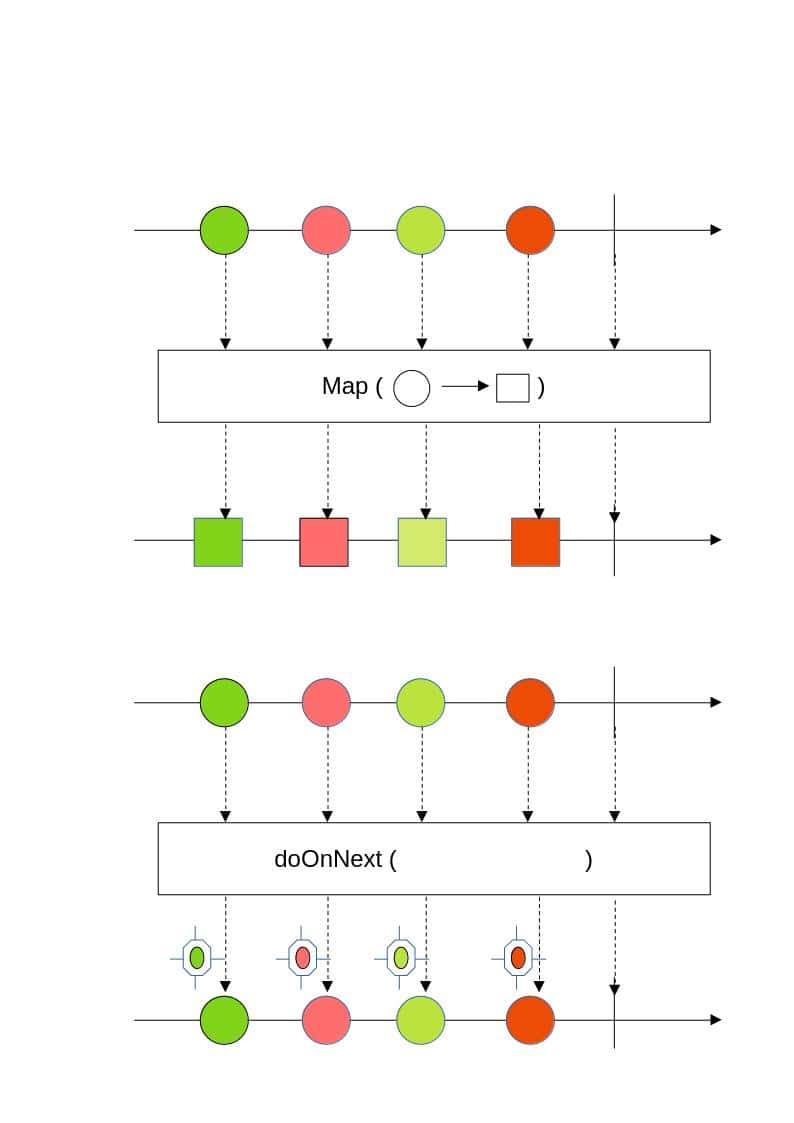
Let’s understand the internals of Flux.map() operator through a marble diagram:

In the diagram above, we have a Flux publisher that emits a stream of data without any errors. Also, it shows the effect of the map() operator on the emitted data. The operator transforms the data from circles to squares and returns the transformed data. Upon subscription, the transform data will be emitted, and not the original data.
3.2. The Method Definition
The Flux.map() operator takes a Function as an argument and returns a new Flux with the transformed elements.
Here’s the method signature:
public final <V> Flux<V> map(Function<? super T,? extends V> mapper)
In this case, the input is the data stream from the Flux publisher. The mapper function is applied synchronously to each element emitted by the Flux. The output is a new Flux containing the transformed elements based on the provided mapper function.
3.3. Example Code
Let’s transform some data into a new sequence by multiplying each value by 10:
Flux<Integer> numbersFlux = Flux.just(50, 51, 52, 53, 54, 55, 56, 57, 58, 59)
  .map(i -> i * 10)
  .onErrorResume(Flux::error);
Then, let’s assert that the emitted new sequence of data is equal to the expected numbers:
StepVerifier.create(numbersFlux)
  .expectNext(500, 510, 520, 530, 540, 550, 560, 570, 580, 590)
  .verifyComplete();
The map() operator acted on the data as described by the marble diagram and the function definition, producing a new output with each value multiplied by 10.
4. Understanding doOnNext() Operator
The Flux.doOnNext() operator is a lifecycle hook that helps to peek into an emitted stream of data. It’s similar to Stream.peek(). It provides a way to perform side effects on each element as emitted without altering the original stream of data.
4.1. The Marble Diagram
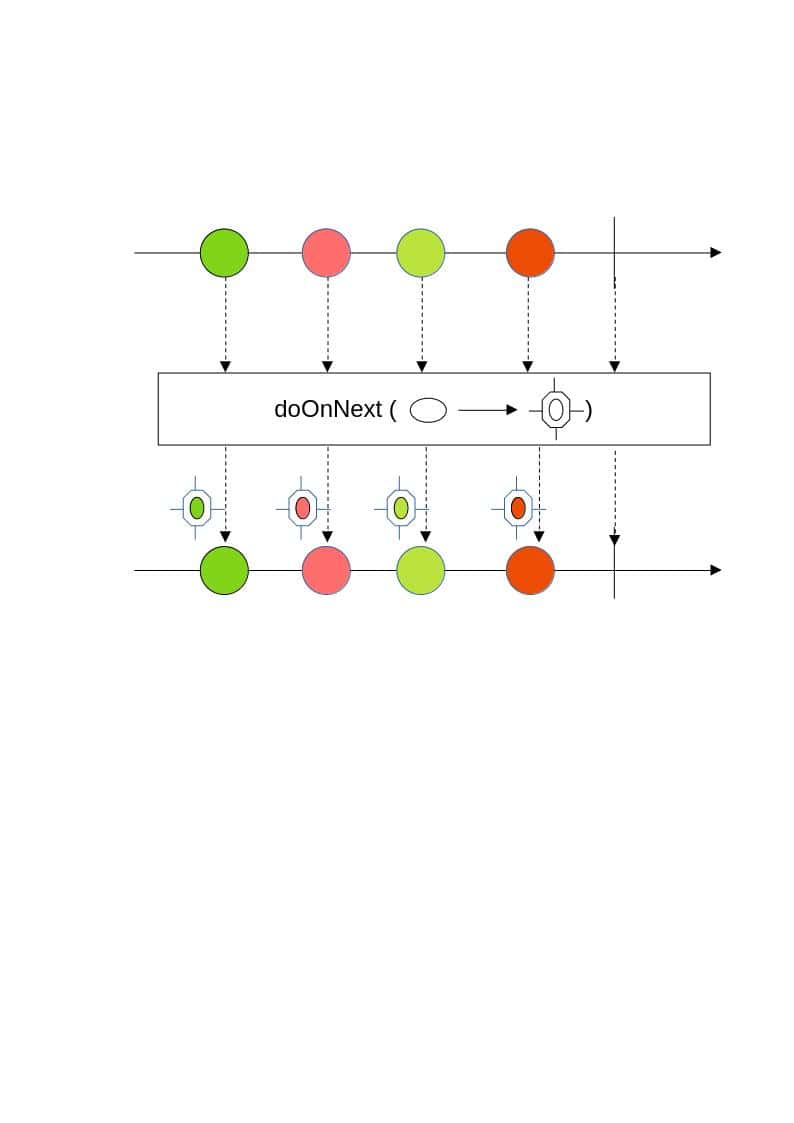
Let’s understand the internals of Flux.doOnNext() method through a marble diagram:

The diagram above shows the emitted stream of data from a Flux and the action of the doOnNext() operator on that data.
4.2. The Method Definition
Let’s look at the method definition of the doOnNext() operator:
public final Flux<T> doOnNext(Consumer<? super T> onNext)
The method accepts a Consumer<T> as an argument. The Consumer is a functional interface that represents a side-effect operation. It consumes the input but doesn’t produce any output, making it suitable for performing side effects operations.
4.3. Example Code
Let’s apply the doOnNext() operator to log items in a data stream to the console on subscription:
Flux<Integer> numberFlux = Flux.just(1, 2, 3, 4, 5)
  .doOnNext(number -> {
      LOGGER.info(String.valueOf(number));
  })
  .onErrorResume(Flux::error);
In the code above, the doOnNext() operator logs each number as it’s emitted by the Flux, without modifying the actual number.
5. Using Both Operators Together
Since Flux.map() and Flux.doOnNext() serve different purposes, they can be combined in a reactive pipeline to achieve data transformation and side effects.
Let’s peek into items of an emitted data stream by logging the items to the console and transforming the original data into a new one:
Flux numbersFlux = Flux.just(10, 11, 12, 13, 14)
  .doOnNext(number -> {
      LOGGER.info("Number: " + number);
  })
  .map(i -> i * 5)
  .doOnNext(number -> {
      LOGGER.info("Transformed Number: " + number);
  })
  .onErrorResume(Flux::error);
In the code above, we first use the doOnNext() operator to log each original number emitted by the Flux. Next, we apply the map() operator to transform each number by multiplying it by 5. Then, we use another doOnNext() operator to log the transformed numbers.
Finally, let’s assert that the emitted data is the expected data:
StepVerifier.create(numbersFlux)
  .expectNext(50, 55, 60, 65, 70)
  .verifyComplete();
This combined usage helps us to transform the data stream while also providing visibility into the original and transformed elements through logging.
6. Key Differences
As we know, the two operators act on emitted data. However, the Flux.map() operator is a transformative operator that alters the original emitted stream of data by applying a provided function to each element. This operator is useful in cases where we want to perform computations, data conversions, or manipulations on the elements of the stream.
On the other hand, the Flux.doOnNext() operator is a lifecycle hook that allows us to inspect and perform operations on each emitted element. It cannot modify the data. This operator is useful in the case of logging, debugging, etc.
7. Conclusion
In this article, we look into the details of the Flux.map() and Flux.doOnNext() operators in the Project Reactor library. We delved into their internal workings by examining marble diagrams, type definitions, and practical examples.
The two operators serve different use cases and can be used together to build powerful and robust reactive systems.
The code backing this article is available on GitHub. Once you're
logged in as a Baeldung Pro Member, start learning and coding on the project.