


Learn through the super-clean Baeldung Pro experience:
>> Membership and Baeldung Pro.
No ads, dark-mode and 6 months free of IntelliJ Idea Ultimate to start with.
Last updated: July 25, 2025
Learn through the super-clean Baeldung Pro experience:
>> Membership and Baeldung Pro.
No ads, dark-mode and 6 months free of IntelliJ Idea Ultimate to start with.
Computers don’t directly understand human language because of its impreciseness. All the Internet and computing devices are built using software languages, from network communication to web pages. Several types of software languages that are understandable and utilized by computers include markup languages, programming languages, and scripting languages.
In this tutorial, we’ll discuss some markup languages and how they work.
A markup language is a collection of rules that specify how text and graphics should be arranged and presented in digital documents. In other words, a markup language is a method for structuring a document in a way that is semantically differentiated from its text alone.
Moreover, it enables document formatting, organization, and the specification of how certain parts are to be seen (or “rendered”) on websites. Also, this structuring improves how search engines, such as Google, interpret the content on webpages. Therefore, it can drive more traffic to websites using the appropriate markup.
Now, let’s discuss the parts that make up different markup languages and how they work. In simple language, a markup language is a computing language that defines document elements using syntax such as tags.
A tag is the most basic formatting tool for any markup language. Moreover, it specifies what should be presented on the screen when a web page loads:
 A tag consists of three main parts:
Here is an output for the above HTML markup script.
 3.2. Attributes
Attributes are additional values in markup languages that may used to customize an element’s properties or change its look and feel to suit your needs. Additionally, an attribute can provide information about a specific element, i.e., size, color, background, height, width, indentation, etc.
Now, let’s explore it with the help of an example:

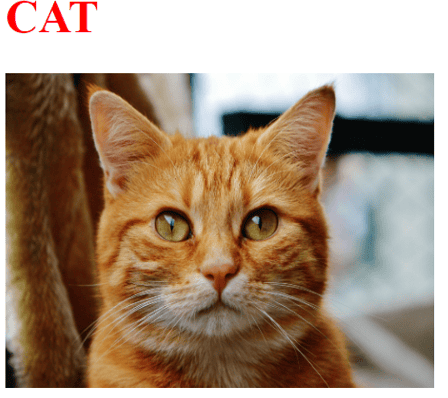
Here is another HTML markup script to create a webpage displaying a heading and an image of a cat.
Here, the output demonstrates that heading 1 is colored red, and an image of a cat is displayed with the set width and height:
A Markup file consists of standard words instead of usual programming code that is human-readable and computer-readable. However, there are many markup languages in computing.
Now, let’s discuss some of the most popular Markup languages here.
Firstly, we’re going to check out the basic functionality of HTML language.
| Feature | Description |
|---|---|
| Abbreviation | HyperText Markup Language |
| Usage | To create and design web pages and web applications |
| Purpose | To structure and present content on web pages |
| Rules | Loose structure and rules |
| Case Sensitive | No |
| Tags | Doesn’t support custom tags i.e. fixed set of tags |
| Validation Method | DTD or browser validation |
| Complexity | Low (Easy to use and learn) |
We can also use HTML to link different documents and embed multimedia.
Here’s an overview of the basic functionality of the LaTeX language.
| Feature | Description |
|---|---|
| Abbreviation | Lamport TeX |
| Usage | Writing structured documents with mathematical equations |
| Purpose | Produce high-quality typesetting |
| Rules | Strict structure and rules |
| Case Sensitive | Yes |
| Tags/Commands | Does support custom tags i.e. users can define their tags/commands |
| Validation Method | Compilation process |
| Complexity | Moderate (Difficult to use and learn) |
Apart from writing structured documents, LaTeX can also be used in research papers, publications and presentations.
Now, here is the basic functionality of the XML language.
| Feature | Description |
|---|---|
| Abbreviation | eXtensible Markup Language |
| Usage | For data trading and data storage |
| Purpose | To encrypt documents in a human-readable and computer-readable format |
| Rules | Strict structure and rules |
| Case Sensitive | Yes |
| Tags | Does support custom tags i.e. users can define their tags |
| Validation Method | DTD or XML Schema validation |
| Complexity | Moderate (Difficult to use and learn) |
Apart from data trading and data storage, XML can also be used to configure files.
Here is a table outlining the basic functionality of XHTML.
| Feature | Description |
|---|---|
| Abbreviation | eXtensible HyperText Markup Language |
| Usage | Formulation of HTML and XML to perform strict syntax rules for web development |
| Purpose | To create well-structured and cleaned files that are easy to process by the XML tools |
| Rules | Strict structure and rules |
| Case Sensitive | Yes |
| Tags | Doesn’t support custom tags |
| Validation Method | DTD or Schema validation |
| Complexity | Moderate (Challenging to use comparable to HTML) |
XHTML can also be used to create web pages, and its syntax makes them consistent.
Now, the table below depicts the functionality of the KML language.
| Feature | Description |
|---|---|
| Abbreviation | Keyhole Markup Language |
| Usage | To perform geographic data visualization on the web |
| Purpose | Present and visualize location-based information on web apps such as Google Earth. |
| Rules | Strict structure and rules |
| Case Sensitive | Yes |
| Tags | Doesn’t support custom tags |
| Validation Method | DTD or Schema validation |
| Complexity | Moderate (Difficult to use and learn with advanced features) |
KML can also map annotations, create time-based animations, and style custom maps.
Here is an overview of the basic functionality of the MathML markup language.
| Feature | Description |
|---|---|
| Abbreviation | Mathematical Markup Language |
| Usage | Mathematical, scientific, and academic publishing |
| Purpose | Focuses on encoding complicated scientific and mathematical data so that it may be understandable by machines and humans, too |
| Rules | Strict structure and rules |
| Case Sensitive | Yes |
| Tags | Doesn’t support custom tags |
| Validation Method | DTD or Schema validation |
| Complexity | High (Difficult to use and learn) |
This language also helps e-learning platforms by representing mathematical formulas on web pages.
This is a summary of the SGML markup language’s fundamental features.
| Feature | Description |
|---|---|
| Abbreviation | Standard Generalized Markup Language |
| Usage | Define document structures for varied applications |
| Purpose | It is XML’s forerunner and offers an architecture for building unique document formats. |
| Rules | Loose structure and rules |
| Case Sensitive | No |
| Tags | Does support custom tags i.e. users can define their tags |
| Validation Method | DTD or Schema validation |
| Complexity | High (Difficult to use and learn) |
We can also create HTML and XML using SGML markup language. So, XML is a subset of SGML.
Now, the Mardown language’s features are displayed in the table below.
| Feature | Description |
|---|---|
| Abbreviation | Markdown |
| Usage | Formatting plain text |
| Purpose | Makes text formatting easier for a variety of uses, with an emphasis on readability and effortless use |
| Rules | Loose structure and rules |
| Case Sensitive | No |
| Tags | Doesn’t support custom tags |
| Validation Method | Not validated |
| Complexity | Low (Easy to use and learn) |
Besides formatting plain text, Markdown can also be used to write blogs, documents, and readme files.
Now, let’s make a detailed comparison of syntax among different markup languages.
Here’s a comparison of syntax among the core components of HTML.
| Component | Syntax description |
|---|---|
| Tags |
|
| Attributes | Attributes are defined within tags – <p style=”color:red” >content</p> |
| Comment Syntax | <!– comment –> |
| Basic Structure | <!DOCTYPE html>
<html> <head> <title> Title</title> </head> <body> Content </body> </html> |
The above-provided data shows HTML’s basic syntax. We’ve added tag information, attributes, comment syntax, and basic structure.
Here’s an overview of the syntax comparison of LaTeX.
| Component | Syntax description |
|---|---|
| Tags |
|
| Attributes | [] brackets are used to define optional attributes |
| Comment Syntax | % comment |
| Basic Structure | \documentclass{article}
\begin{document} \section{Introduction} Content of the example. \end{document} |
In conclusion, LaTeX has structure commands and optional attributes.
Now, let’s look at the syntax comparisons for XML.
| Component | Syntax description |
|---|---|
| Tags |
|
| Attributes | Attributes are defined within tags –<element attribute=”value” >Content </element> |
| Comment Syntax | <!– comment –> |
| Basic Structure | <?xml version=”1.0″ encoding=”UTF-8″?>
<root> <element attribute=”value” > Content </element> </root> |
In XML, there’s no fixed format like HTML.
Moreover, we’re adding the syntax comparison for XHTML.
| Component | Syntax description |
|---|---|
| Tags |
|
| Attributes | Attributes are defined like HTML and should be in lower-case – <img src=“image.jpg” /> |
| Comment Syntax | <!– comment –> |
| Basic Structure | <!DOCTYPE html> <html xmlns=”http://www.w3.org/1999/xhtml” >
<head> </head> <body> Content </body> </html> |
XHTML is a case-sensitive language that makes it a bit difficult in perspective of syntax.
Additionally, the syntax comparison for KML is given in the below table.
| Component | Syntax description |
|---|---|
| Tags |
|
| Attributes | Attributes are defined within tags –
<Placemark id=”placemark1″ > … </Placemark> |
| Comment Syntax | <!– comment –> |
| Basic Structure | <?xml version=”1.0″ encoding=”UTF-8″?> <kml xmlns=”http://www.opengis.net/kml/2.2″ >
<Document><Placemark> <name> Place</name> <Point> <coordinates> coordinates> </Point> </Placemark> </Document> </kml> |
KML has a wide variety of data types and styling capabilities.
Now, this is a comparison of the syntax of the MathML elements.
| Component | Syntax description |
|---|---|
| Tags |
|
| Attributes | Attributes are defined within tags – <mrow><mi>var</mi></mrow> |
| Comment Syntax | <!– comment –> |
| Basic Structure | <?xml version=”1.0″?> <math xmlns=”http://www.w3.org/1998/Math/MathML” >
<mrow> <mi>v1</mi> <mo>*</mo> <mi>v2</mi> </mrow> </math> |
So, MathML is complex in reading and writing because of its inconsistent browser support.
In addition, the table below provides the syntax comparison for SGML.
| Component | Syntax description |
|---|---|
| Tags |
|
| Attributes | Attributes are defined within tags –
<element attribute=”value” > Content </element> |
| Comment Syntax | <!– comment –> |
| Basic Structure | <!DOCTYPE document SYSTEM “document.dtd” >
<document> <section> <title> </title> <p> Content</p> </section> </document> |
SGML language doesn’t have pre-defined standards, so it is challenging to work with it.
Lastly, we’re listing the syntax comparison for the Markdown markup language.
| Component | Syntax description |
|---|---|
| Tags |
# Heading 1 ## Heading 2
|
| Attributes | Attributes are not defined i.e. formatting using special characters – **Bold ** |
| Comment Syntax | Comments are not natively supported – <!– comment –> |
| Basic Structure | [Link text](http://example.com) |
So, Markdown is easy to learn because of its intuitive syntax.
In this article, we’ve elaborated on markup languages, discussing some of the most popular ones and their functionality. Moreover, we’ve explored how markup languages work via tags, elements, and attributes. Meanwhile, we’ve provided detailed syntax comparisons for different markup languages.