


Learn through the super-clean Baeldung Pro experience:
>> Membership and Baeldung Pro.
No ads, dark-mode and 6 months free of IntelliJ Idea Ultimate to start with.
Learn through the super-clean Baeldung Pro experience:
>> Membership and Baeldung Pro.
No ads, dark-mode and 6 months free of IntelliJ Idea Ultimate to start with.
In this tutorial, we’ll study formjacking attacks. With the heterogeneous and multiple uses of the Internet nowadays, we already expected some value-added or sensitive data to be transferred over the network. So, one way to send data from users to service providers is using web forms. But, attackers may exploit these forms to steal information in a formjacking attack.
In the following section, we’ll investigate what a web form really is and how it works. Then, in the third section, we’ll explore formjacking attacks. We’ll focus on how the networked services get infected and the most common consequences. Then, we summarize concepts and present final remarks in a conclusion section.
Web forms allow users to communicate with online-provided services. With these forms, users send data for accessing, requesting, and executing such services. To do that, a user fills a series of fields according to provided instructions.
Several different elements can compose a form. Among the most common elements are the text fields (which enable users to type text), selection boxes (which allow users to choose an option from a list), and checkboxes (which enable users to mark desired options from the provided ones).
Furthermore, web forms commonly provide buttons to trigger some action. Examples are buttons for sending and cleaning data.
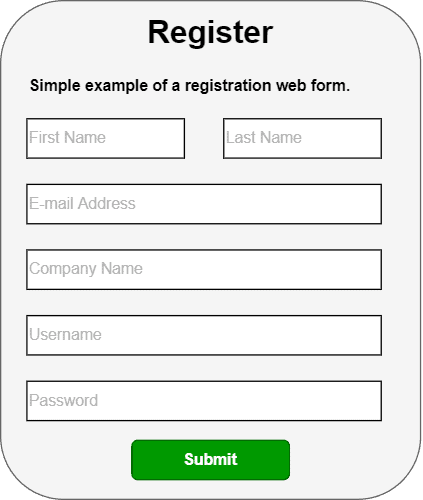
The following image shows a simple example of a usual form:
We should attempt many aspects to develop web forms, from the design of the interaction between humans and computers to the technologies and libraries we’ll use to implement them.
From a business point of view, forms facilitate communication between users and services through simple transactions, straightforward instructions, and clear element headers.
From a technological point of view, in turn, web forms consist of a myriad of libraries (such as for building the graphical interface and communication points), protocols (such as HTTP/REST), and technologies (such as networking, databases, and authentication, among others).
At a high level, formjacking attacks occur just after a user fills a given web form and submits the data to be processed by a system. At this point, the data from the web form is not only sent to the system but also to attackers that previously infected the form with malicious scripts.
However, the described process is only a high-level workflow. There are many things to discuss regarding formjacking. For example, we can discuss the motivation and potential benefits an attacker can get by executing formjacking attacks.
In this context, the first thing we need to know is that “data is always relevant”; With lots of data from the same form, we can find patterns and determine user behaviors. This information, as well as the collected data itself, has a market and monetary value.
So, attackers may offer privileged data and information to competing companies from those they are attacking.
Another motivation for attackers executing formjacking is getting immediate financial benefits by hacking particular categories of web forms. Examples of those forms are the ones that require data on the users’ credit cards.
In such a way, attackers can directly use the collected data to defraud credit cards and use them to make several online purchases.
So, as discussed until now, executing a formjacking attack requires observing three steps:
With the previously presented formjacking attack steps in mind, let’s discuss the most typical ways to infect a web form in this subsection.
At first, we should state that attackers can infect a web form without direct access to the server that hosts it. Of course, having direct access to the server makes the attack much easier. However, it is not what happens in usual scenarios of formjacking.
In summary, we can cite three very relevant infecting scenarios: one closely related to the provided service and its maintainers and two regarding the end users.
So, regarding the service and its maintainers, we have:
On the other hand, we also should pay attention to attackers exploiting the users of a given service, for example:
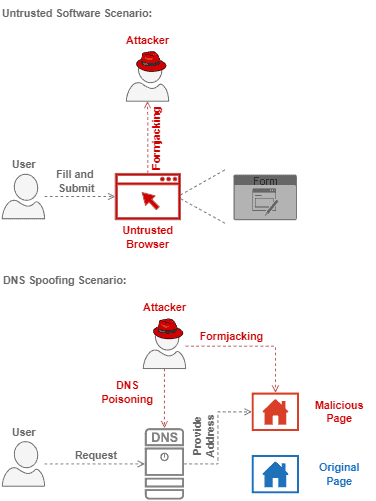
The following image depicts both discussed scenarios of infection which exploit the user to execute a formjacking attack:
We saw multiple forms of being affected by a formjacking attack. But, there are prevention actions and countermeasures against it. Let’s see some of them in the following section.
The first and most relevant prevention action against formjacking attacks is “always use trusted resources”. This is an action for both developers and users.
On the side of developers, using trusted resources means validating every imported code or library. On the users’ side, however, trusted resources mean employing verified browsers, extensions, and any other software running in the background.
Other prevention actions for the service maintainers and providers are using security solutions and running penetration and leaking tests. So, it is possible to detect abnormal system operations and investigate them.
For the users, it is crucial to keep track of personal financial information. Many formjacking attacks aim to steal bakery information and credit card numbers. So, if we detect any strange movement in our bank accounts, we should immediately block them, inform the responsible institutions, and ask them for new credentials.
In this tutorial, we studied formjacking attacks. At first, we reviewed the main concepts of web forms and how they work. Thus, we specifically investigated what are formjacking attacks and how attackers can execute them. Furthermore, we saw potential preventions and countermeasures regarding these attacks.
We can conclude that formjacking attacks do represent a relevant threat in the digital world. So, once lots of sensible data are provided through web forms, avoiding formjacking attacks becomes a priority nowadays.