


Learn through the super-clean Baeldung Pro experience:
>> Membership and Baeldung Pro.
No ads, dark-mode and 6 months free of IntelliJ Idea Ultimate to start with.
Last updated: August 20, 2025
Learn through the super-clean Baeldung Pro experience:
>> Membership and Baeldung Pro.
No ads, dark-mode and 6 months free of IntelliJ Idea Ultimate to start with.
The need for effective time zone management has increased, particularly with the development of systems that operate across multiple time zones. Tasks such as logging events, scheduling jobs, and analyzing data can suffer from inconsistent time handling, leading to bugs, incorrect reports, and confusing user experiences.
At the centre of this challenge is the question: Should we set our MySQL database to use UTC?
In this tutorial, we’ll explore how MySQL handles time zones, why UTC is often the recommended default, and when exceptions may apply, as well as best practices for robust and predictable time zone management in MySQL-backed applications.
Before configuring time zone settings, we must first understand how MySQL processes, stores, and interprets time-related data.
MySQL supports timezone management at multiple levels, including server configuration, session settings, and data types.
MySQL relies on preloaded timezone tables derived from the IANA Time Zone Database to support named time zones, e.g., ‘Europe/Berlin’. These are not always available by default, especially on new installations.
First, we can check if the zoneinfo database exists:
ls /usr/share/zoneinfoThis returns a list of continent folders, such as Africa and America, which confirms that the zoneinfo database is present.
Second, we need to install MySQL Client and Server:
sudo apt update
sudo apt install mysql-client mysql-server
Then, we load the timezone data directory:
sudo mysql_tzinfo_to_sql /usr/share/zoneinfo | sudo mysql -u root mysqlThe first command (mysql_tzinfo_to_sql) reads IANA timezone files while the second (mysql -u root mysql) pipes the data into MySQL’s internal mysql database.
During the load process, we can expect some warnings:
Warning: Unable to load '/usr/share/zoneinfo/iso3166.tab' as time zone. Skipping it.These are safe to ignore.
Finally, we start the MySQL shell to verify that the timezone data was loaded:
sudo mysql -u rootThen check:
SELECT COUNT(*) FROM mysql.time_zone_name;
We would see an import of around 500 rows. If it’s 0, then our import failed:
+----------+
| COUNT(*) |
+----------+
|      499 |
+----------+
Our result checks out fine.
For Windows systems, timezone support depends on the method used for MySQL installation. If timezone tables are missing, we first should download the time zone description tables from MySQL’s official site (timezone_2025b_posix_sql.zip was used here).
Then, we unzip and extract the timezone_posix.sql file, open the Command Prompt, and navigate to the folder where timezone_posix.sql is located (use the ‘cd‘ command to change directories) and run:
"C:\Program Files\MySQL\MySQL Server 8.0\bin\mysql.exe" -u root -p mysql < timezone_posix.sqlWe enter the MySQL root password when prompted to open the MySQL Shell:
"C:\Program Files\MySQL\MySQL Server 8.0\bin\mysql.exe" -u root -pWe can then check the timezone tables:
SELECT COUNT(*) FROM mysql.time_zone_name;After loading the timezone data, we should see approximately 400-600 entries:
+----------+
| COUNT(*) |
+----------+
|      598 |
+----------+
Note that the exact number may vary depending on the operating system and tzdata version.
MySQL provides two levels of timezone configuration: global and session. But first, we can inspect the current timezone settings:
SELECT @@global.time_zone, @@session.time_zone;The output from this code block reveals that our MySQL server’s global timezone and current session’s timezone are set to UTC:
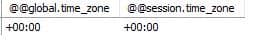
For global session settings, MySQL sets the default timezone for all client connections, unless it is explicitly overridden. It is controlled via the default_time_zone variable. We can set it in the MySQL configuration file (my.cnf or my.ini), typically located at:
Furthermore, we can set it to UTC dynamically at runtime (requires SUPER privilege):
SET GLOBAL time_zone = '+00:00';On the other hand, the session timezone determines the timezone for a specific client connection. It overrides the global setting only for that session:
SET time_zone = 'America/New_York';
SELECT NOW(), CONVERT_TZ(NOW(), 'UTC', 'America/New_York');
This returns a valid timestamp in New York time:
+---------------------+----------------------------------------------+
| NOW()               | CONVERT_TZ(NOW(), 'UTC', 'America/New_York') |
+---------------------+----------------------------------------------+
| 2025-06-27 13:00:16 | 2025-06-27 09:00:16                          |
+---------------------+----------------------------------------------+
This method is helpful when clients from different regions need to connect to the same database server and require timezone-specific behavior.
Furthermore, for Java Developers (JDBC), when connecting to MySQL from a Java application, we explicitly specify the server timezone in the JDBC URL:
jdbc:mysql://localhost:3306/mydb?serverTimezone=UTCThis avoids ambiguity because if omitted, the driver may default to the system timezone.
At the base level, MySQL provides us with two primary data types for working with date and time values.
First, the TIMESTAMP data type always stores values in UTC internally and automatically converts them to and from the current session’s time zone when retrieving or inserting data.
Because of this, it is most suitable for system-generated times where consistency is more important, such as:
For example, if our session timezone is set to ‘America/New_York’, and we insert ‘2025-01-28 10:00:00’ into a TIMESTAMP column, MySQL will store it as UTC ‘2025-01-28 15:00:00’ and convert it back to your session timezone on retrieval.
Second, DATETIME stores values exactly as entered, with no timezone conversion. It’s purely a literal representation of date and time. It is ideal for scenarios where the stored time must reflect local context, such as:
The rule of thumb is to use DATETIME when storing local times that must remain unchanged.
Coordinated Universal Time (UTC) is the de facto standard for representing and storing time in distributed systems and for very good reasons.
Generally, storing data in UTC simplifies operations, prevents ambiguity, and aligns with industry best practices across cloud platforms, APIs, and backend services.
One of the most problematic aspects of the local timezone is Daylight Saving Time (DST) shifts. Many regions move clocks forward or backward during the year, introducing:
UTC avoids all the problems by remaining fixed throughout the year.
In a system with multiple services, servers, or microservices running across regions, having each component write timestamps in local time can lead to hard-to-debug inconsistencies.UTC, therefore, provides a baseline for easily logging events and comparing time-based metrics across systems and regions.
For example, if a system logs an event at ‘2025-01-28 15:00:00 UTC’, it carries the same meaning whether someone reads it from a server in Tokyo or a frontend dashboard in Nigeria.
Additionally, the UTC settings help ensure compatibility and predictability when interacting with third-party systems, as major cloud platforms, such as AWS, GCP, and Azure, log systems and events in UTC.
While we’ve established that storing timestamps in UTC is a strong, general-purpose default, there are legitimate scenarios where using local time or retaining the original time zone context is either necessary or more practical.
In many applications, users interact with time in their own local timezone, and therefore expect the data to reflect that. For instance, a calendar app must display events at the time the user scheduled them, and a reminder set for 8:00 AM should be in the user’s time zone, not in UTC.
In most cases, storing the time as entered, along with a reference to the user’s time zone or offset, may be preferable. Using DATETIME along with an associated timezone column can preserve the intent behind the input.
Certain business processes follow specific regional operating hours:
Storing such times in UTC could introduce complexity during reporting or scheduling, especially around DST changes.
Finally, sometimes it’s important to retain the exact local time and timezone in which an event occurred. In those cases, storing both the local DATETIME and the timezone identifier is best practice.
By now, it is clear that handling timezone requires intentional design, not just default settings.
Always normalize time values at the point of entry, whether from a frontend, API, or integration. This means converting to UTC before writing to the database unless local time is explicitly required.
Then, apply localization only at the presentation layer (frontend or reporting engine). This keeps storage clean and avoids the overhead of timezone logic scattered across your backend.
One subtle pitfall is assuming that the server’s operating system time matches your expectations. Many cloud VMs or container environments default to UTC, but some don’t, which can lead to time drift when logs and data appear mismatched.
Therefore, we must explicitly configure both the MySQL server time zone and the system clock, and refrain from relying on NOW() or CURRENT_TIMESTAMP behaving consistently across environments unless we’ve locked in the timezone.
In teams, especially in early development phases, we need to make a timezone policy part of our engineering documentation:
Furthermore, we must avoid the pitfall of implicit timezone behaviour differing between environments (e.g., dev in local time, prod in UTC). Finally, without a shared agreement, developers may unknowingly introduce inconsistencies.
In this article, we emphasize the foundational role of proper time zone management in maintaining data integrity, delivering a coherent user experience, and ensuring seamless system interoperability.
We also addressed the central question: Should MySQL be set to UTC?, and explored both the strong case for UTC as default and the specific scenarios where local time storage is more appropriate.
Finally, we outlined best practices and common pitfalls to help us build a clear and consistent time zone strategy that minimizes bugs, reduces ambiguity, and supports scalable, global applications.