


Learn through the super-clean Baeldung Pro experience:
>> Membership and Baeldung Pro.
No ads, dark-mode and 6 months free of IntelliJ Idea Ultimate to start with.
Last updated: April 29, 2025
Learn through the super-clean Baeldung Pro experience:
>> Membership and Baeldung Pro.
No ads, dark-mode and 6 months free of IntelliJ Idea Ultimate to start with.
Understanding the layout of a database is crucial for anyone working with data, enabling effective data manipulation and analysis.
In this tutorial, we’ll look at different ways to retrieve the table names within a specific database.
Before we look at solutions, let’s define the problem. We need to get the names of all tables in a specific database. This is useful for tasks such as documenting databases, exploring their structure, or programmatically interacting with them.
Databases are not just about storing data; they also have complex structures that organize and manage information. This structure is stored in a special type of database called a metadata database. By using SQL to query the metadata database, we can retrieve important details about a specific database, such as the names of all its tables.
ANSI SQL establishes standards for relational database management systems. Consequently, these standards ensure consistency and interoperability across different database systems, making it easier for developers to write portable SQL code.
One such standard is the definition of the information schema, which contains metadata about the database objects. Moreover, most modern database systems, including MySQL, PostgreSQL, and MS SQL, adhere to the ANSI SQL standards, making them compatible with querying metadata using the information schema.
Let’s look at the SQL query using the information schema to list the names of all the tables:
SELECT table_name
FROM information_schema.tables
WHERE table_type = 'BASE TABLE'
This query lists all the tables in the current database:
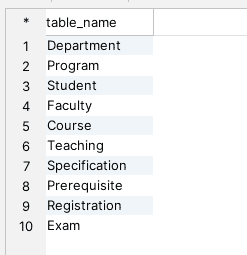
Furthermore, we can refine the results by adding additional WHERE clauses, such as filtering tables based on a specific schema. Because of variations in underlying database structures, there may be slight differences in how certain column names function within the information schema across different databases.
Alternatively, different databases offer specific methods to list table names beyond utilizing the information schema.
In PostgreSQL, we can use the pg_tables table to retrieve the names of tables:
SELECT tablename
FROM pg_catalog.pg_tables
WHERE schemaname = 'public';
In the above query, we utilize the schemaname field to filter the tables only from the public schema.
In MySQL, we can use the show command to list tables:
show tables;This lists all the tables in the current database. Furthermore, this command is handy for quickly inspecting the tables within a database without constructing a formal SQL query.
Similarly, MS SQL also provides an alternative way to list the tables in the current database:
SELECT name
FROM sys.tables;
This lists the names of all tables in the current database.
In this tutorial, we discussed different ways to list the tables in a database.
The ANSI SQL provides a standardized way to get this information. We can create further filtering conditions on the queries to refine the search based on our requirements.
Individual databases offer distinct approaches for accessing this data, providing users flexibility and adaptability in their database management use cases. Whether for documentation, schema exploration, or programmatic interactions, having access to this information helps the users to effectively manage and analyze their data.
Database-specific commands offer simplicity and directness in retrieving information, while ANSI SQL queries use the information schema to provide a standardized approach applicable to most RDBMS databases.