


Learn through the super-clean Baeldung Pro experience:
>> Membership and Baeldung Pro.
No ads, dark-mode and 6 months free of IntelliJ Idea Ultimate to start with.
Learn through the super-clean Baeldung Pro experience:
>> Membership and Baeldung Pro.
No ads, dark-mode and 6 months free of IntelliJ Idea Ultimate to start with.
In this tutorial, we’ll discuss constraint alterations in the following relational databases: MySQL (version 8), PostgreSQL (version 17), and SQLServer 2022.
We’ll use our University Simple schema to define example queries.
In a relational database, constraints are well-defined restrictions on insert, update, and delete operations over a single table or multiple tables.
There are four significant use cases to apply constraints:
Let’s say our university received assurance of government funding to start a new department. So, the administrator created a new department for Social Sciences and Humanities (SSH) in the Department table and added a few courses under SSH in the Course table. However, the government fell short of funds and canceled funding for SSH. Hence, the administrator had to delete the SSH from the Department table and all its courses in the Course table.
However, he can’t delete the entry for SSH in the Department table before deleting the entries from the Course table. This is because of the existing constraint that prevents this. Hence, our administrator needs to alter the existing constraint. This example highlights that we must alter a constraint as we may have made an error in its definition or the business rules have changed.
We’ll use the tables Department, Student, and Course from our Simple schema. Each table above has a primary key, and the Course is related to the Department via a foreign key.
For our university use case, once we delete SSH from the Department table, the corresponding entries in the Course must also be deleted. However, we didn’t specify the option ON DELETE CASCADE in the foreign key constraint of the Course table. Consequently, we can’t delete an entry in the parent table (Department) before deleting the entries from the child table (Course):
This is what happens when we try to delete the department SSH:
DELETE
FROM Department
WHERE id=6;
We get the error along these lines:
ERROR 1451 (23000): Cannot delete or update a parent row: a foreign key constraint fails (`university`.`course`, CONSTRAINT `course_department_id_fkey` FOREIGN KEY (`department_id`) REFERENCES `department` (`id`))Our foreign key constraint on department_id prevents the deletion of departments with courses.
Once we set a constraint in SQL, we can’t alter it. However, we can replace it with a constraint with different options. So, we first drop the old constraint and add a new one:
ALTER TABLE <table_name>
ADD CONSTRAINT <constraint_name> <constraint_definition>;
To drop a constraint, we first need to find its name. Here’s how we can list all constraints for a table:
SELECT CONSTRAINT_NAME, CONSTRAINT_TYPE
FROM INFORMATION_SCHEMA.TABLE_CONSTRAINTS
WHERE TABLE_NAME = <table_name>;
Let’s find constraints on the Course table:
SELECT CONSTRAINT_NAME, CONSTRAINT_TYPE
FROM INFORMATION_SCHEMA.TABLE_CONSTRAINTS
WHERE TABLE_NAME = 'Course';
Here’s the output:
+---------------------------+-----------------+
| CONSTRAINT_NAME           | CONSTRAINT_TYPE |
+---------------------------+-----------------+
| id                        | UNIQUE          |
| PRIMARY                   | PRIMARY KEY     |
| course_department_id_fkey | FOREIGN KEY     |
+---------------------------+-----------------+
In our example, we want to activate the ‘ON DELETE CASCADE’ option in the existing constraint course_department_id_fkey on the Course table. Since we can’t alter the constraint, we drop it and recreate it. Since we are using the same name, we can’t do it in a single query:
--Drop the old constraint

ALTER TABLE Course

DROP CONSTRAINT course_department_id_fkey;
--Recreate a new constraint with the same name and ON DELETE CASCADE

ALTER TABLE Course

ADD CONSTRAINT course_department_id_fkey

FOREIGN KEY (department_id) REFERENCES Department(id)

ON DELETE CASCADE;
Here’s the output:
Query OK, 4 rows affected (0.02 sec)
Records: 4  Duplicates: 0  Warnings: 0
Let’s rerun our delete query to remove the SSH department from the Department table:
DELETE
FROM Department
WHERE id=6;
Let’s check the Course table for courses under the SSH department:
SELECT *
FROM COURSE
WHERE department_id=6;
As expected, we get an empty set:
Empty set (0.00 sec)
PostgreSQL uses the same syntax as MySQL. It also doesn’t allow for the dropping and adding constraints to the same table within the same query.
However, we can change some options for an existing constraint without deleting it first:
ALTER TABLE <table_name>
ALTER CONSTRAINT <constraint_name> [ DEFERRABLE | NOT DEFERRABLE ] [ INITIALLY DEFERRED | INITIALLY IMMEDIATE ]
We can only change these options for the foreign key constraints with PostgreSQL’s ALTER CONSTRAINT.
SQL Server allows for dropping an old constraint and adding a new one using the same name within a single query. The NO_CHECK modifier tells the database not to put the constraint variable under lock and allow all operations:
ALTER TABLE Course
NO CHECK CONSTRAINT course_department_id_fkey,
DROP CONSTRAINT course_department_id_fkey,
ADD CONSTRAINT course_department_id_fkey
FOREIGN KEY (department_id) REFERENCES Department(id)
ON DELETE CASCADE;The typical constraints that work across the majority of relational databases are:
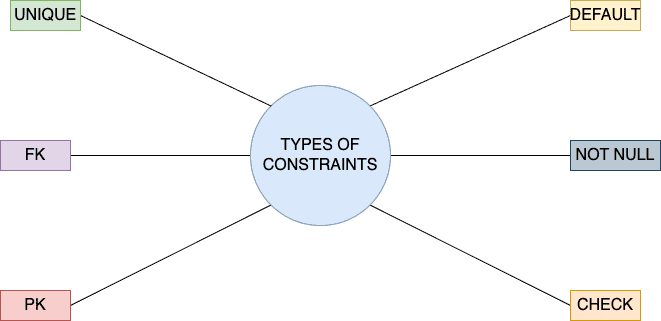
The approach we showed (deleting and recreating the old constraint with different settings) works for all constraint types in all SQL dialects. The only thing that might change is the syntax. For example, MySQL and PostgreSQL don’t allow dropping and creating a constraint in the same statement, whereas SQL Server allows it.
What would happen if the data didn’t satisfy new constraints? For example, what if the university decides not to enroll any student whose GPA is below 3.0? Let’s try to add the constraint:
ALTER TABLE Student
ADD CONSTRAINT CHK_GPA CHECK (gpa BETWEEN 3.0 AND 5.0);
This alter will fail since existing data doesn’t conform to it:
ERROR 3819 (HY000): Check constraint 'CHK_GPA' is violated.PostgreSQL and SQL Server 2022 react in the same way as MySQL.
So, we can’t change a constraint if the data are already inconsistent with the changes.
In this article, we discussed how to alter database constraints.
We may have to alter some constraints if our business requirements and data schema change.
However, direct alteration is currently impossible. Instead, we must delete and recreate the old constraints with the new options.