


Learn through the super-clean Baeldung Pro experience:
>> Membership and Baeldung Pro.
No ads, dark-mode and 6 months free of IntelliJ Idea Ultimate to start with.
Last updated: October 15, 2024
Learn through the super-clean Baeldung Pro experience:
>> Membership and Baeldung Pro.
No ads, dark-mode and 6 months free of IntelliJ Idea Ultimate to start with.
Jenkins pipeline provides a flexible structure where we can integrate with many other tools and platforms to execute our workflow. One common example for this is when we need to run native operating system commands. Jenkins provides an easy syntax to write our commands inline with our pipeline code.
In this tutorial, we’re going to explain the fundamentals of Linux standard streams and how they relate to the shell commands. We’ll show how to execute our commands inside a Jenkins pipeline and return the output of these streams to the pipeline code.
Linux standard streams are communication channels that connect a program to its environment. They provide a means of transferring data to and from this program. The stdout and stderr are types of these standard streams.
Status codes are numerical values produced as a result of executing commands or programs to indicate whether the execution was successful or not.
Let’s check how each of these work.
The standard output stream, or stdout, is responsible for capturing the output that comes from a command execution. It’s usually connected to the terminal and sends the output from this command to be displayed on the terminal. For example, when we use echo, it’s actually connected to the stdout:
$ echo "this is coming from stdout"
this is coming from stdout
Here, the stdout captured the message from echo and sent it to the terminal.
Standard error, or stderr, is also an output stream, but the difference is that it captures the errors produced from a command execution. So when a command fails, the error message is sent to the stderr stream, which usually also sends it to the terminal:
$ ls noSuchFile
ls: cannot access 'noSuchFile': No such file or directory
Here we’re trying to list a file that doesn’t exist, so an error message is displayed. This message is actually captured from the command by stderr, which sent it to the terminal.
When a command or a program finishes, it needs a way to report if its execution was successful or not. This way is the status code, or exit code. It’s simply a number between 0 and 255 that represents the execution status. A zero status code means success, and any non-zero code means failure.
To check the status code of a command, we use the $? special variable. This variable displays the status code of the last executed command:
$ echo "this is a successful command"
this is a successful command
$ echo $?
0
$ ls unsuccessful
ls: cannot access 'unsuccessful': No such file or directory
$ echo $?
2
In the above snippet, the first echo command was successful, so when we printed the $? variable, we got a zero status code. However, after the ls command failed, the $? variable printed 2, which is a non-zero code.
We can use Jenkins to execute native operating system commands as part of our pipeline code. To achieve this on Linux, we use the sh step. The sh step takes a command and executes it on the agent node where the pipeline is running.
Let’s check this with an example:
pipeline {
    agent any
    stages {
        stage("use Linux commands"){
            steps {
                script {
                  sh "echo successful command"
                  sh "ls noSuchFile"
                }
            }
        }
    }
}
In the above snippet, we have a pipeline code that executes two Linux commands. The first command is echo, which should complete successfully, and the other is ls, which should fail.
Now, if we run our pipeline, we should see the output in the console logs:

As we can see, the two commands produced the expected output in the pipeline logs. We can also note that the exit code of the failed command is shown at the end of the pipeline. In other words, the stdout, stderr, and status code are displayed in the logs.
Instead of just printing the standard streams and status code to the console logs, we can make more use of them. For example, we might save their values in a pipeline variable to further control the pipeline flow. In order to do this, we need to return their values from the sh step.
To return the stdout of a command, the sh step provides a longer format that contains a returnStdout flag. We can set this flag to return the stdout:
pipeline {
    agent any
    stages {
        stage("use Linux commands"){
            steps {
                script {
                def stdout = sh script: "echo returned output", returnStdout: true
                print "The stdout is:\n ${stdout}"
                }
            }
        }
    }
}
Here, we passed two parameters to the sh step: the script parameter, which contains the command, and returnStdout, which returns the stdout of the command. Finally, we print the variable in which we saved the return value.
Let’s run our pipeline:

As we can see in the above image, our variable contained the stdout, which the sh step returned.
The sh step also has a returnStatus flag for returning the status code of a command. We can set this flag to get the status code value:
pipeline {
    agent any
    stages {
        stage("use Linux commands"){
            steps {
                script {
                def status = sh script: "echo returned output", returnStatus: true
                print "The status code is:\n ${status}"
                status = sh script: "ls noSuchFile", returnStatus: true
                print "The status code is:\n ${status}"
                }
            }
        }
    }
}
In the above snippet, we used the sh step twice: once for a successful command, and a second time for a command that will fail. In both commands, we return the status code using the returnStdout flag into a variable that we print.
Let’s check the output of the pipeline:

We can see that after the first successful echo command, the variable value was 0. However, as the ls command failed, the variable value was 2.
There’s no explicit flag in the sh step for returning the stderr; however, we can manipulate our command by using file descriptors. File descriptors are numbers that represent the contents of a data stream. So, we can get the number that represents the stderr and redirect its contents to the stdout.
The file descriptors for stderr and stdout are reserved. The numbers 1 and 2 are associated with stdout and stderr, respectively. Let’s check how we can make use of this in our pipeline:
pipeline {
    agent any
    stages{
        stage("use Linux commands"){
            steps{
                script{
                    def stderr = sh script:"ls noSuchFile 2>&1 || true", returnStdout: true
                    print "The stderr is:\n ${stderr}"
                }
            }
        }
    }
}
Let’s break down the above snippet. First, we use an ls command that will fail in order to get the error message into stderr. After that, we use 2>$1 to redirect the stderr file descriptor to the stdout file descriptor. The || true is to force the command to exit with success in order not to abort the pipeline. Finally, we return the stdout, which now contains the stderr contents.
Let’s run our pipeline:

So, as we can see, our variable displayed the error message from the stderr, which returned from the sh step through the stdout.
We can also return stdout or stderr, along with their status code, in a single command. This removes the repetition and makes the code cleaner.
Let’s manipulate our stdout example command:
pipeline {
    agent any
    stages{
        stage("use Linux commands"){
            steps{
                script{
                    def stdout_status = sh script:'echo "this is stdout" && echo "$?" ', returnStdout: true
                    print "The stdout and status is:\n ${stdout_status}"
                }
            }
        }
    }
}
Again we use the returnStdout flag from the sh step. The && operator will merge the output from both echo commands into the stdout. So, we’ll have our output message along with the status code returned:

As we can see here, the variable contained both the stdout and the status code.
And we can do the same with the stderr:
pipeline {
    agent any
    stages{
        stage("use Linux commands"){
            steps{
                script{
                    def stderr_status = sh script:'ls noSuchFile 2>&1 || true && echo "$?" ', returnStdout: true
                    print "The stderr and status is:\n ${stderr_status}"
                }
            }
        }
    }
}
In the above snippet, we redirected the file descriptor of the stderr to the stdout and also used the || true to force a successful exit. Now, the stdout should contain the stderr and the status code:
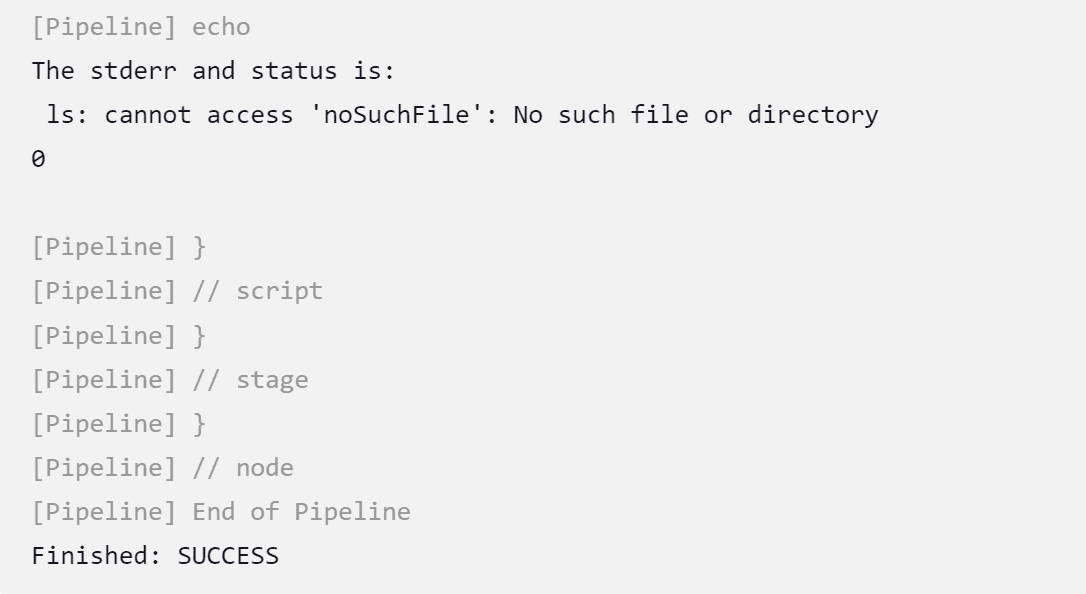
Here, we can see that our variable contained the stderr and status code together.
In this article, we’ve covered the basics of Linux standard streams and how they work as a communication channel between commands and the environment. We also explained how to use the Jenkins sh step to execute Linux commands through a pipeline. Finally, we used the sh step to return the stdout, stderr, and status code of a command to our pipeline.