1. Overview
Code formatting debates can consume a surprising amount of engineering time during reviews and even before starting a project. An automatic formatter applying a standardized set of rules across the codebase reduces nitpicking in code reviews, keeps repositories consistent, and helps new developers get up to speed.
In this tutorial, we’ll explore palantir-java-format. It’s a modern and lambda-friendly Java formatter with a 120-character line limit. We’ll look at how it differs from google-java-format, show how to integrate it into Gradle and Maven builds, and finally, we’ll wire it into IntelliJ IDEA.
Palantir Technologies maintains palantir-java-format, an opinionated Java formatter. It’s a fork of google-java-format and ships under the Apache 2.0 license. However, its default style differs from its ancestor in three ways:
- It raises the line limit from 100 to 120 characters, so less code needs wrapping.
- Indents use four spaces instead of Google style’s two.
- Perhaps most importantly, it keeps lambdas and method chains compact. Whereas google-java-format indents each nested lambda further to the right, palantir-java-format places lambdas inline, so the code takes fewer lines and stays closer to the left margin.
Let’s start with the project’s own example. Here’s how google-java-format lays out a Gradle configuration method with nested lambdas:
private static void configureResolvedVersionsWithVersionMapping(Project project) {
    project.getPluginManager()
            .withPlugin(
                    "maven-publish",
                    plugin -> {
                        project.getExtensions()
                                .getByType(PublishingExtension.class)
                                .getPublications()
                                .withType(MavenPublication.class)
                                .configureEach(
                                        publication ->
                                                publication.versionMapping(
                                                        mapping -> {
                                                            mapping.allVariants(
                                                                    VariantVersionMappingStrategy
                                                                            ::fromResolutionResult);
                                                        }));
                    });
}
In contrast, palantir-java-format places the lambdas inline and removes most of the indentation:
private static void configureResolvedVersionsWithVersionMapping(Project project) {
    project.getPluginManager().withPlugin("maven-publish", plugin -> {
        project.getExtensions()
                .getByType(PublishingExtension.class)
                .getPublications()
                .withType(MavenPublication.class)
                .configureEach(publication -> publication.versionMapping(mapping -> {
                    mapping.allVariants(VariantVersionMappingStrategy::fromResolutionResult);
                }));
    });
}
The Palantir version needs 11 lines instead of 19, and its deepest indentation drops from 76 spaces to 20.
4. Setup
palantir-java-format doesn’t ship a task that formats a whole project. Instead, we run it through Spotless in the build and through a plugin in the IDE.
4.1. Spotless Plugin
Spotless is a general-purpose formatting plugin for Gradle, Maven, and sbt. Rather than formatting code itself, it runs a chain of formatter steps, and palantir-java-format plugs in as one of them.
Spotless offers two operations: the check operation, which fails the build when a file differs from the formatter’s output, and the apply operation, which rewrites the file to match. Typically, CI runs the check, and developers run apply before committing. Note that Spotless needs Java 17 or newer.
4.2. Gradle
In a Gradle project, we apply Palantir’s plugin alongside Spotless:
plugins {
    id 'java'
    id 'com.diffplug.spotless' version '8.10.4'
    id 'com.palantir.java-format' version '2.102.0'
}
That’s the whole configuration. The Palantir plugin adds its formatter to Spotless as a step and skips generated sources, so we don’t add a palantirJavaFormat() step ourselves. Then, ./gradlew spotlessApply formats the code, and ./gradlew spotlessCheck reports violations. Since Spotless also hooks its check into Gradle’s check task, ./gradlew build fails on unformatted code too.
Additionally, the plugin adds a formatDiff task, which formats only uncommitted changes.
4.3. Maven
Maven has no Palantir plugin, so we configure Spotless directly:
<plugin>
    <groupId>com.diffplug.spotless</groupId>
    <artifactId>spotless-maven-plugin</artifactId>
    <version>3.10.4</version>
    <configuration>
        <java>
            <palantirJavaFormat>
                <version>2.102.0</version>
            </palantirJavaFormat>
        </java>
    </configuration>
    <executions>
        <execution>
            <goals>
                <goal>check</goal>
            </goals>
        </execution>
    </executions>
</plugin>
Here, the palantirJavaFormat element adds the formatter step, and pinning its version keeps every machine on the same output. Because Spotless binds the check goal to the verify phase, mvn verify now fails on unformatted code, while mvn spotless:apply fixes it.
4.4. IntelliJ
Next, we install the palantir-java-format plugin from the JetBrains Marketplace.
In a Gradle project, IntelliJ recommends the plugin and configures it on import, thanks to Palantir’s Gradle plugin. On Maven, we enable it under File – Plugins:
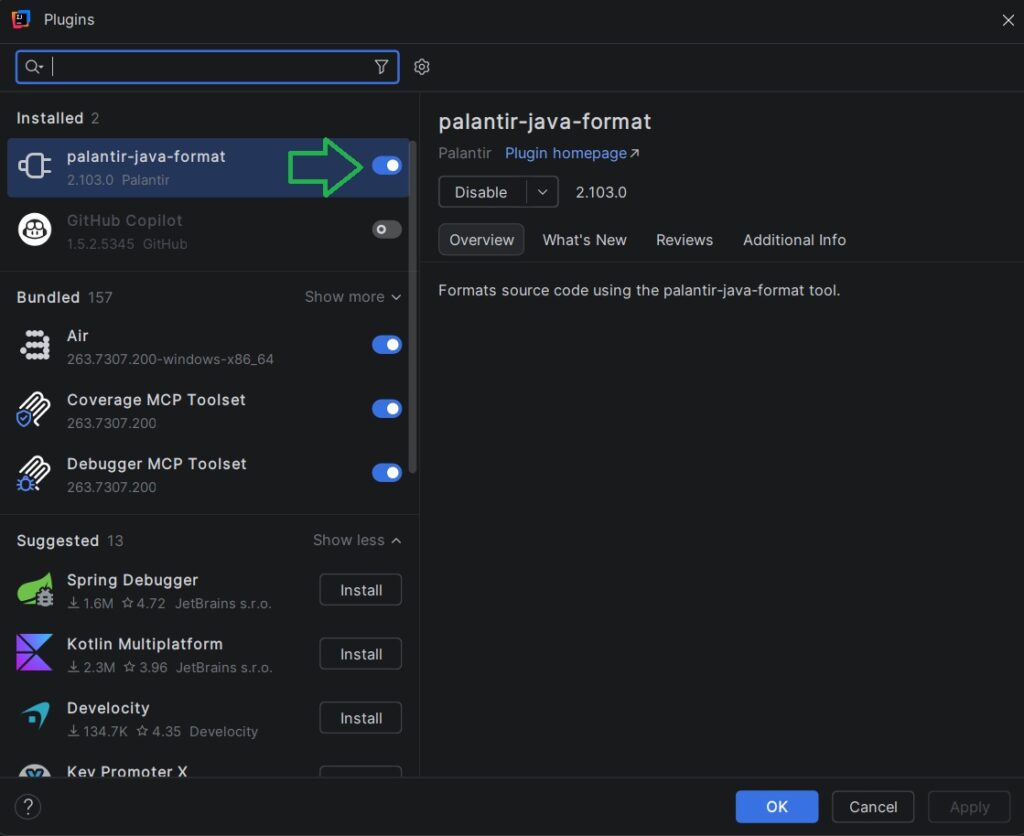
Either way, Reformat Code (Ctrl+Alt+L) now matches the build’s output.
4.5. Java 21
Finally, formatting Java 21 code requires Java 21 wherever the formatter runs: the Gradle daemon and IntelliJ project SDK, or the JDK that runs Maven.
Alternatively, Gradle users can set palantir.native.formatter=true in gradle.properties for a native image that starts over ten times faster. However, it’s slower on large batches, so spotlessApply sticks with the Java implementation on Java 21 or newer.
palantir-java-format ignores our existing layout and rebuilds every line from scratch:
- First, it parses the file with javac‘s own parser and keeps track of every comment.
- Next, it turns the syntax tree into nested levels, which are groups of code with optional line breaks inside them.
- Finally, it fits those levels into 120 columns, keeping a level on one line when it fits and breaking it when it doesn’t.
Before breaking a whole level, Palantir tries to break only its last part, such as a trailing lambda, as long as everything before it stays on one line. That’s what produces the compact lambdas we saw in chapter 3.
As a result, the formatter behaves predictably. It changes only the layout, apart from reordering modifiers to match the Java Language Specification and, through Spotless, sorting imports and removing unused ones. It also collapses consecutive blank lines; a second run changes nothing, and code that doesn’t parse throws a FormatterException.
Now, let’s see these rules in action. For each case, we’ll state the rule, look at code that breaks it, and check the formatted result.
6.1. Indentation and Spacing
The formatter indents each level with four spaces, puts single spaces around operators and arrows, and gives each statement in a block its own line.
Let’s take a look at a method that decides how many lives a player gets:
int startingLives(int level) {
  return switch (level) {
    case 1  -> 5;
    case 2  -> 3;
    default -> { int bonus = level/10; return 1 + bonus; }
  };
}
This snippet breaks all three rules. It indents with two spaces, pads the arrows, squeezes level/10 together, and puts two statements onto one line. After formatting, each level sits four spaces deeper, the spacing is uniform, and each statement has its own line:
int startingLives(int level) {
    return switch (level) {
        case 1 -> 5;
        case 2 -> 3;
        default -> {
            int bonus = level / 10;
            return 1 + bonus;
        }
    };
}
6.2. Short Method Chains
When a method chain fits on one line and its last dot starts before column 80, the formatter puts the whole chain on one line. Here, we split a short chain by hand:
Quest recruit() {
    return party
        .join(npc -> isFriendly())
        .startQuest();
}
The statement fits, yet it spreads across three lines, which breaks the rule. So, the formatter joins it back into a single 56-character line, with its last dot at column 43:
Quest recruit() {
    return party.join(npc -> isFriendly()).startQuest();
}
6.3. Long Method Chains
However, if the last dot would start after column 80, the formatter puts each call on its own line, even when the statement fits within 120 characters. Let’s look at this chain:
void buildDesertLevel() {
    new LevelBuilder().withBackground(new DesertSand()).spawnMobs(wave, Skeletons.class).buildRoom();
}
At 101 characters, the line fits, but its last dot starts at column 89, which breaks the rule. As a result, the formatter splits the chain into one call per line, and every dot now starts at column 13:
void buildDesertLevel() {
    new LevelBuilder()
            .withBackground(new DesertSand())
            .spawnMobs(wave, Skeletons.class)
            .buildRoom();
}
This way, extra calls like buildRoom() can’t hide at the end of a long line.
6.4. Block Lambdas
When a block lambda is the last argument, the formatter keeps the opening brace next to the call and indents the body one step deeper than the statement. Consider this over-indented game loop:
World update() {
    return world.step(now -> {
                moveHeroes();
                checkCollision();
            });
}
Here, the body sits twelve spaces deeper than return, and the closing }); doesn’t line up with the statement, which breaks the rule. After formatting, the brace still follows the call, the body sits four spaces past return, and }); lines up with the statement:
World update() {
    return world.step(now -> {
        moveHeroes();
        checkCollision();
    });
}
6.5. Expression Lambdas
Expression lambdas, on the other hand, behave differently. Rather than leave () -> dangling at the end of a line, the formatter puts each argument on its own line and keeps the lambda in one piece. Let’s check out this snippet:
class WaveSpawner {
    Wave nextWave() {
        return spawnEnemyWave(player, config, heroStats, gameEventsSink, monsterClass, HARD_MODE, formation, () ->
                new RevivalTimerConfig(config.maxNumRevives(), config.reviveDelayInMs()));
    }
}
Because the call is too long for one line, this snippet ends the first line with () -> and pushes the lambda’s body to the next one, which breaks the rule. After formatting, every argument has its own line, and the lambda stays in one piece on the last one:
class WaveSpawner {
    Wave nextWave() {
        return spawnEnemyWave(
                player,
                config,
                heroStats,
                gameEventsSink,
                monsterClass,
                HARD_MODE,
                formation,
                () -> new RevivalTimerConfig(config.maxNumRevives(), config.reviveDelayInMs()));
    }
}
6.6. Annotated Records
Finally, records that map JSON game data often carry long annotations. If a component’s type would start past column 60, the formatter moves its annotations onto their own line and separates the component from its neighbors with blank lines. Let’s take this record as an example:
public record Item(
    @JsonProperty("inventory_weight") @JsonPropertyDescription("How heavy the item is in the bag.")
        Double inventoryWeight,
    @JsonProperty("stackable") @JsonPropertyDescription("Items that share a single slot.") Boolean canStack,
    @JsonProperty("hp") @JsonPropertyDescription("Health restored.") Integer hp) {}
Here, Boolean starts at column 92 and Integer at column 70, both past the limit, even though both lines fit within 120 characters. Also, no blank lines separate the components.
public record Item(
        @JsonProperty("inventory_weight") @JsonPropertyDescription("How heavy the item is in the bag.")
        Double inventoryWeight,

        @JsonProperty("stackable") @JsonPropertyDescription("Items that share a single slot.")
        Boolean canStack,

        @JsonProperty("hp") @JsonPropertyDescription("Health restored.")
        Integer hp) {}
7. Cheat Sheet
Let’s put the main rules side by side. The following table contrasts palantir-java-format with google-java-format’s default style:
| Feature |
palantir-java-format |
google-java-format |
| Max line length |
120 characters |
100 characters |
| Block indentation |
4 spaces |
2 spaces |
| Continuation indentation |
8 spaces |
4 spaces |
| Method chains |
One call per line if the last dot starts past column 80, even when the chain fits |
Breaks a chain only when it exceeds the line limit |
| Nested lambdas |
Compact: lambdas stay inline with shallow indentation |
Expanded: each level moves further to the right |
| Trailing block lambda |
Keeps x -> { on the same line as the call |
Moves the lambda onto its own line |
| Long expression lambda body |
Keeps the body on the same line as -> |
Can break after -> and move the body to the next line |
| Annotated record components |
Annotations on their own line if the type would start past column 60, plus blank lines between components |
Annotations on their own line only when the line is too long, with no blank lines |
| Imports and modifiers |
Sorted imports, modifiers in JLS order |
Same |
As we can see, both formatters share the same foundation, such as sorted imports and the standard modifier order. However, palantir-java-format allows longer lines, keeps lambdas compact, and adds its own rules for method chains and annotated records.
8. Conclusion
In this article, we explored palantir-java-format, a google-java-format fork built for modern, lambda-heavy Java.
Before breaking a whole line of code, it tries to break only the last part, so trailing lambdas stay next to their calls instead of moving into deeply indented blocks. As a result, the same code takes fewer lines and less indentation than with google-java-format, which makes it easier to read and review.
Moreover, the formatter makes every layout decision for us. It rebuilds each line from the code structure. So, it tidies up switches, chains, lambdas, and records the same way every time, both in the build with Spotless and in the IDE.