


Learn through the super-clean Baeldung Pro experience:
>> Membership and Baeldung Pro.
No ads, dark-mode and 6 months free of IntelliJ Idea Ultimate to start with.
Last updated: February 12, 2025
Learn through the super-clean Baeldung Pro experience:
>> Membership and Baeldung Pro.
No ads, dark-mode and 6 months free of IntelliJ Idea Ultimate to start with.
In this tutorial, we’ll talk about the Gabor filters, a classic tool in image processing.
First, we’ll explain how to compute them. Then we’ll illustrate how to generate features for machine learning using Gabor filters.
A Gabor filter is a linear filter used in image processing for edge detection, texture classification, feature extraction and disparity estimation. It is a bandpass filter, i.e. it passes frequencies in a certain band and attenuates the other frequencies outside such band. A Gabor filter is a Gaussian modulated by a plane wave.
The convolution kernel can be expressed as:
(1) ![\begin{equation*} g(x, y ; \lambda, \theta, \psi, \sigma, \gamma)=\exp \left(-\frac{x^{\prime 2}+\gamma^{2} y^{\prime 2}}{2 \sigma^{2}}\right) \exp \left[i\left(2 \pi \frac{x^{\prime}}{\lambda}+\psi\right)\right] \end{equation*}](/wp-content/ql-cache/quicklatex.com-121bbaa242a4bf697f17b73d17b5897c_l3.svg "Rendered by QuickLaTeX.com")
where  and
and  . In Eq. 1
  is the wavelength of the plane wave,
  represents the orientation of the parallel stripes of the filter,
  is the standard deviation of the Gaussian component,
  is the aspect ratio that defines the ellipticity of the function support,
  is the phase of the plane wave.
The response matrix  is obtained by convolving the original image
  with the Gabor filter
  :
:
(2) 
Several filters can be defined by changing the parameters , , , and . A Gabor filter bank is a set of Gabor filters with different parameters.
Different low-level features can be extracted from the original image via the convolution operation by varying the Gabor parameters. The following figure shows several filtered images obtained using the real parts of Gabor filters with different orientations and wavelength :
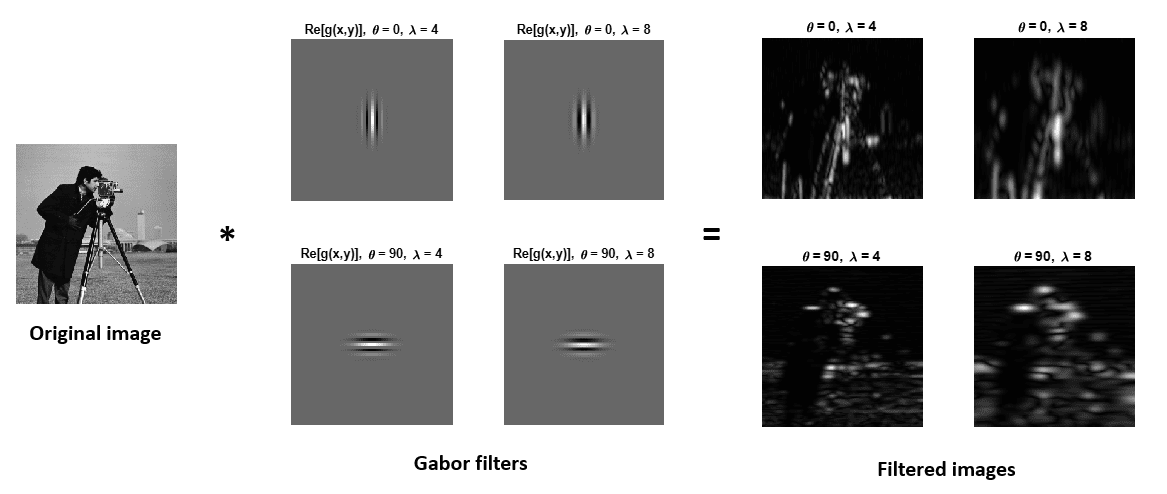
We can see that horizontal and vertical features are extracted with  and
and  , respectively. Furthermore, we can extract finer details with lower wavelength values.
The image analysis with Gabor filters well represents the perception in the human visual system.
There are several ways to extract features with Gabor filters. The most relevant ones are discussed below:
In this article, we reviewed the Gabor convolution filters, commonly used in image processing. Finally, we illustrated how to extract features from images using Gabor filters.