


Learn through the super-clean Baeldung Pro experience:
>> Membership and Baeldung Pro.
No ads, dark-mode and 6 months free of IntelliJ Idea Ultimate to start with.
Learn through the super-clean Baeldung Pro experience:
>> Membership and Baeldung Pro.
No ads, dark-mode and 6 months free of IntelliJ Idea Ultimate to start with.
Continuous integration and continuous development (CICD) is a standard practice in modern software development. Many different tools supporting CICD are available on the market – free, open-source, proprietary, subscription-based, and others. Choosing one can mean the difference between an easy-to-use and long-supported, stable product, in contrast to a tedious integration process.
In this tutorial, we’ll discuss the fundamentals, architecture, and ways of modeling pipelines of the GoCD open-source CICD server.
GoCD is an open-source tool by ThoughtWorks. Its task is to support programming teams in automating processes related to building, testing, and implementing applications.
As already mentioned, pipelines are the central concept of GoCD. Pipelines are defined as chains of steps that open the way to streamlined development. For instance, each pipeline may include subsequent stages:
Thanks to this, the whole process is more organized and easier to recreate.
Another important aspect is the emphasis on the visualization of the flow of work. The graphical interface clearly shows how each pipeline is connected to the others and which tasks have already been completed, as well as which tasks are still pending. This approach makes the tool work well in complex projects.
The next important feature of GoCD is the support for the pipeline-as-code approach. The definition of pipelines can be written in JSON files and stored in the repository next to the source code. Thanks to this, CICD processes can have versions like the application, which makes it easier to maintain and transfer between environments.
In effect, GoCD is a tool that works well wherever the process of providing programming is deployed and requires clear modeling and full transparency.
GoCD is based on a client-server architecture, where GoCD serves as the central component. It’s responsible for storing configurations, managing pipelines, and visualizing the entire delivery process. The users interact with the server using a web panel, where they can define stages, monitor progress, and diagnose possible problems.
Further, GoCD agents are responsible for performing specific tasks. These are light processes that run on many machines, both local and in the cloud. The agent collects orders from the server and executes them.
Thus, users can scale the environment simply and perform tests or the process of building an application simultaneously.
As already mentioned, the central element of the GoCD work is pipelines. They are divided into stages, which, in turn, consist of jobs, the smallest units of work. Thus, such a hierarchy enables users to model even complex processes transparently.
Pipelines rely on so-called materials, i.e., sources from which input data is collected. Most often, this is a Git repository, but it’s also possible to use other version control systems, artifact archives, or even external resources.
Thanks to this, GoCD can respond to changes in many sources at the same time:
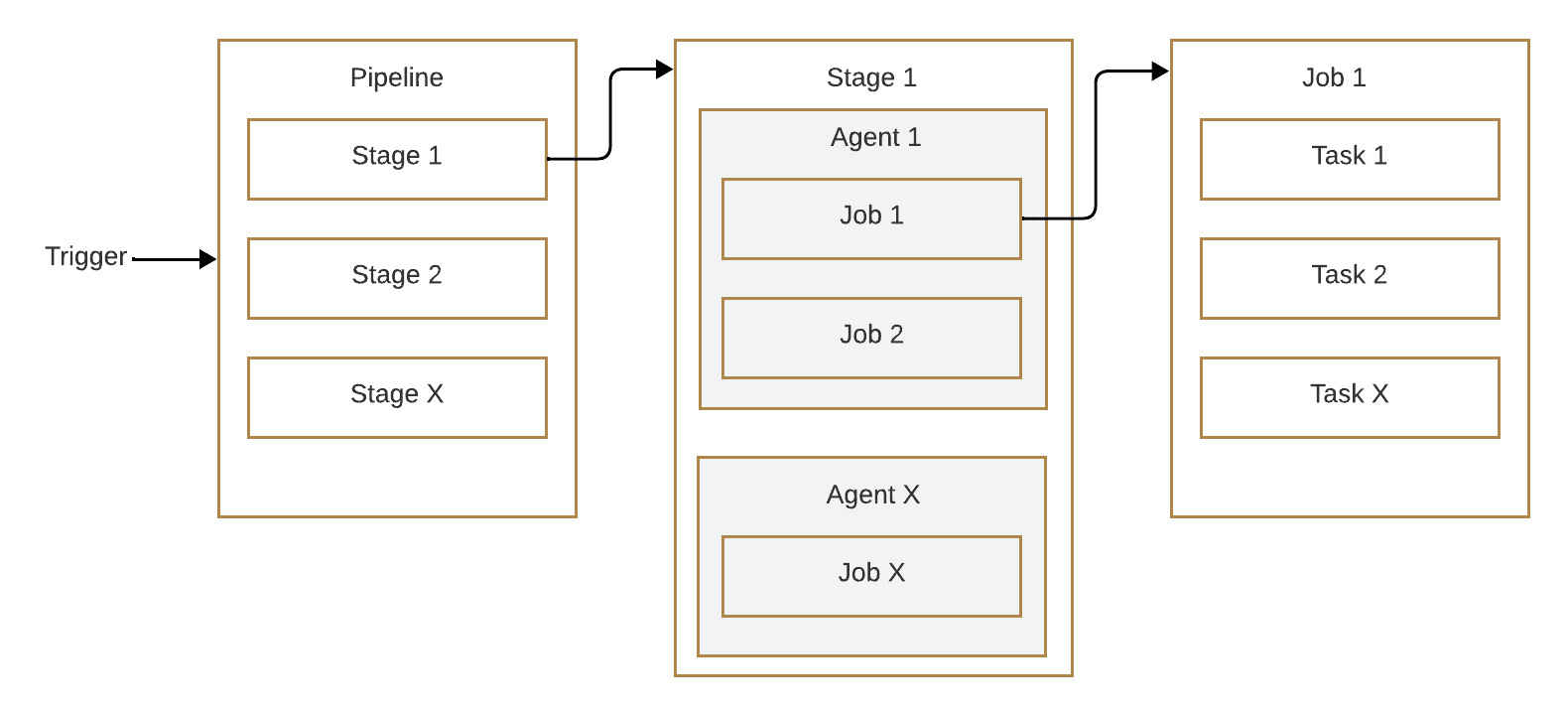
Notably, all these elements are closely related. The server manages the flow of data and dependencies, agents perform tasks, and pipelines organize logical stages.
Thanks to this, the GoCD architecture remains fairly simple to understand and at the same time provides a lot of flexibility even when modeling very extensive flows.
Pipeline in GoCD is the fundamental element of working with the tool. Using pipelines, we can define the full process of building, testing, and deploying the application.
The basic organizational unit is the stage. It’s a group of tasks that run sequentially. The stage contains one or more jobs, and each job consists of specific tasks, such as running compilations, performing tests, or building a container image.
This division enables precise control of the process and clearly separates individual steps. The definition of a pipeline can be created directly in the GoCD web panel. This approach is convenient at the beginning of the work because it enables users to quickly understand the structure and mechanisms of the tool.
In practice, however, the pipeline-as-code approach is increasingly used, in which the configuration is saved in a YAML or JSON file and stored in the repository along with the source code. Thanks to this, it’s easier to version it and also transfer it between different environments.
Let’s see an example fragment of the pipeline definition in YAML format:
pipelines:
  sample-app:
    group: ExampleGroup
    materials:
      git:
        url: https://github.com/example/app.git
    stages:
      - build:
          jobs:
            compile:
              tasks:
                - exec:
                    command: ./gradlew build
In this example, a simple pipeline called sample-app was defined. It uses a Git repository as input material. Through that, it runs a single-stage build, in which the task is to execute the commands compiling the project. Although it’s a minimal configuration, it shows the basic rules for defining processes in GoCD well.
Expanded pipelines can take many stages and use various sources of materials. It’s also possible to create dependencies between pipelines, which enables building entire supply chains, including unit tests, integration tests, and production deployment.
GoCD has many features that distinguish it from other CICD tools.
The most often weighted advantage is the transparent visualization of pipelines, thanks to which even complex delivery processes are often easier to understand and monitor.
Next, support for dependency between pipelines makes the tool useful in large projects, where it is necessary to strictly control subsequent actions. Further, the pipeline as a code approach enables versioning the configuration and maintaining its consistency in all environments.
Scalability is achieved through the GoCD agents and the ability to integrate with numerous external systems, also playing a pivotal role.
On the other hand, GoCD isn’t without limitations. Compared to tools such as Jenkins or GitLab CI, it has a less active community and a poorer plugin system. The result may mean that unusual scenarios can make it difficult to find a ready-made solution or documentation support.
Another barrier is the learning curve, i.e., the entry threshold. Especially for teams coming from simpler CICD systems, the implementation and understanding of GoCD architecture may be time-consuming. Some functions may also seem less intuitive.
In summary, GoCD is a tool with great possibilities and unique advantages, but at the same time requires a larger team to invest in learning and maintenance. It does best in environments where transparency and control over the deployment process are more important than the availability of ready-made plugins or a quick start.
In this article, we discussed GoCD. GoCD is a well-developed and transparent tool supporting CICD processes. Thanks to its model based on pipelines, it naturally visualizes the next stages of application development, from building and testing to production deployment. Its flexibility makes it work well in both small projects and large organizations, where the ability to control and visualize the entire process is important.
Although GoCD requires some initial configuration and learning of specific terminology, in return, it offers a lot of transparency, integration with other tools, and stability. It’s worth considering GoCD as an alternative to other CICD systems, especially when the key is a readable and graphical representation of flows and easy management of expanded pipelines.