
1. Overview
In a previous lesson, we wrote a deliberately naive controller that returned a hard-coded Project.
In this lesson, we’ll take that naive controller and turn it into a small read and create CRUD surface. We’ll call the service layer, read projects by id using a path variable, return the right HTTP status when a project isn’t found, and add a write endpoint for creation.
The relevant module we need to import when starting this lesson is: expanding-our-first-controller-start.
If we want to reference the fully implemented lesson, we can import: expanding-our-first-controller-end.
2. Wiring the Service Layer
Let’s open up ProjectController and look at the findOne() method we left behind:
@GetMapping(path = "/1")
public Project findOne() {
    return new Project("testName", LocalDate.of(2050, 12, 31));
}
The method returns a hard-coded stub with a fixed date and never touches the service layer. Whatever projects we’ve persisted, the controller doesn’t know about them. Our first step is to route the call through IProjectService so we read from the actual data store.
Let’s inject the service via the constructor:
@RestController
@RequestMapping(value = "/projects")
public class ProjectController {

    private IProjectService projectService;

    public ProjectController(IProjectService projectService) {
        this.projectService = projectService;
    }

    // ...
}
Now we can replace the stub body with a call to findById(). That method returns an Optional<Project>, so for the moment we’ll unwrap it with .get():
@GetMapping(path = "/1")
public Project findOne(Long id) {
    return this.projectService.findById(id).get();
}
The .get() call is a temporary shortcut that will throw an exception if the Optional is empty. We’ll come back and improve it once we have the read flow wired up.
Calling findById() also forces us to introduce an id parameter on findOne(), since the service needs an id to look up the project.
At this point, id has no value yet. The mapping is still hard-coded to /1, and the id parameter on the method isn’t bound to anything, so a request to /projects/1 would simply pass null into the service. The mapping and the method signature aren’t talking to each other yet, and we’ll fix that in the next section.
3. Binding the URL with @PathVariable
We want a single controller method that can serve /projects/1, /projects/2, /projects/3, and so on, without writing one method per id. The id has to travel as part of the URL itself, and Spring MVC has to know which segment to read it from.
The mechanism that makes this work is the @PathVariable annotation, paired with a URI template in the mapping. Let’s change the mapping to use a {id} placeholder and mark the parameter with @PathVariable:
@GetMapping(value = "/{id}")
public Project findOne(@PathVariable Long id) {
    return this.projectService.findById(id).get();
}
The {id} segment in the URI template is the variable part of the URL, and @PathVariable tells Spring MVC to bind it to the id method parameter. By default, Spring matches by name, so the placeholder name and the parameter name need to line up. Spring also takes care of converting the String from the URL into a Long, so the controller method receives a real Long and not a raw String.
Let’s verify this by running the application and sending a GET request to http://localhost:8080/projects/1 using either a browser or Postman. The application returns the data initialized at startup, mapped to a Project object and serialized as JSON:
{
  "id": 1,
  "name": "Project 1",
  "dateCreated": "2019-06-13",
  "tasks": [
    {
      "id": 1,
      "name": "Task 1",
      "description": "Task 1 Description",
      "dateCreated": "2019-06-13",
      "dueDate": "2019-07-13",
      "status": null
    },
    {
      "id": 2,
      "name": "Task 2",
      "description": "Task 2 Description",
      "dateCreated": "2019-06-13",
      "dueDate": "2019-06-15",
      "status": null
    },
    {
      "id": 3,
      "name": "Task 3",
      "description": "Task 3 Description",
      "dateCreated": "2019-06-13",
      "dueDate": "2019-07-13",
      "status": null
    }
  ]
}
Changing the id to /projects/2 returns Project 2, and so on for the other seeded projects. With one mapping covering all ids, the happy path is working.
4. Handling Invalid ID
Let’s now try an id that doesn’t exist, such as GET /projects/20. The seed data only loads projects with ids 1, 2, and 3, so this request has nowhere to land.
Instead of a clean error, we get back HTTP 500 Internal Server Error, with the raw exception leaking through the response. That’s wrong on several levels:
- The raw exception is exposed to the client instead of a controlled error response.
- The status code is 500, but semantically the resource simply isn’t found. The right answer is 404 Not Found.
- We’re letting Optional.get() blow up reactively when the Optional is empty, instead of proactively handling the missing-value case.
We’ll dedicate a full lesson to error handling later on, so we won’t fix everything here. For now, let’s apply a small, targeted fix: replace .get() with .orElseThrow(), and have it throw a ResponseStatusException with HttpStatus.NOT_FOUND:
@GetMapping(value = "/{id}")
public Project findOne(@PathVariable Long id) {
    return projectService.findById(id)
                    .orElseThrow(() -> new ResponseStatusException(HttpStatus.NOT_FOUND));
}
ResponseStatusException is a Spring MVC exception that carries an HTTP status. When it propagates out of a handler, the framework translates it into a response with that status code. So when findById() comes back empty, we throw an exception that maps directly to a 404 Not Found response.
Let’s start the application with these new changes and hit GET /projects/20 again. This time, we get a clean HTTP 404 Not Found response, with no internal exception leaking out. The read side of our controller is now well-behaved and properly handles the case of a missing resource:
{
  "timestamp": "",
  "status": 404,
  "error": "Not Found",
  "trace": "org.springframework.web.server.ResponseStatusException: 404 NOT_FOUND",
  "message": "404 NOT_FOUND",
  "path": "/projects/20"
}
5. Adding a Create Endpoint
With the read side covered, let’s now add a write endpoint that brings in two more pieces of Spring MVC: mapping to HTTP POST and binding the request body to a Java object.
We’ll start by defining a plain create() method inside ProjectController, alongside findOne(), with no annotations yet:
public void create(Project newProject) {
    this.projectService.save(newProject);
}
This is just a method on the controller right now, so Spring MVC has no reason to route any request to it. To make it answer HTTP POST requests on /projects, we add @PostMapping:
@PostMapping
public void create(Project newProject) {
    this.projectService.save(newProject);
}
We still need the incoming JSON body to be deserialized into a Project instance. @RequestBody handles exactly that. It tells Spring MVC to read the HTTP request body, run it through the configured message converters (Jackson, in our case), and pass the result as the method argument:
@PostMapping
public void create(@RequestBody Project newProject) {
    this.projectService.save(newProject);
}
Let’s verify the full surface end-to-end. We can send a POST request from Postman to http://localhost:8080/projects with the header Content-Type: application/json and a small project body:
{
  "name": "new project",
  "dateCreated": "2050-12-31"
}
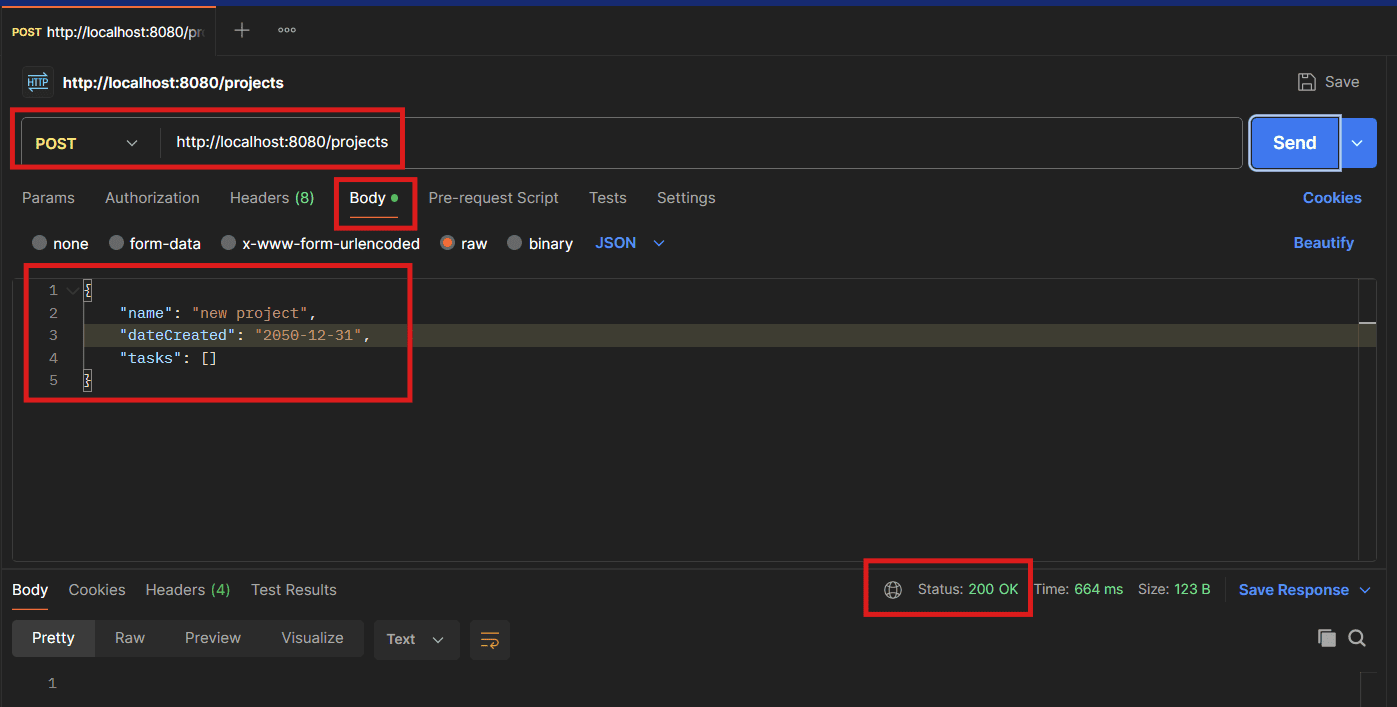
Note: Postman must be installed before running this request. Download it from postman.com/downloads.
We get back HTTP 200 OK. Because our seed data loads ids 1 through 3, the new project lands at id 4. A follow-up GET /projects/4 returns it:
{
  "id": 4,
  "name": "new project",
  "dateCreated": "2050-12-31",
  "tasks": []
}
The end project also includes a ProjectControllerIntegrationTest that covers this whole flow. It verifies that GET /projects/1..3 returns 200 with the seeded data, that GET /projects/4 returns 404 before the POST, that the POST returns 200, and that a subsequent GET /projects/4 returns the just-created project, giving us a quick way to confirm the controller behaves end-to-end.
6. Conclusion
Our controller has come a long way from the stub we started with. A handful of Spring MVC annotations was enough to turn it into a small but complete read and create surface, where the URL drives the work and the framework wires the request to a method.
The 404 handling we added is deliberately minimal: a small point fix that keeps the read path well-behaved without leaking implementation details to the client. In a later lesson, we’ll come back to error handling and replace this point fix with a more structured, application-wide approach.