
1. Overview
While the standard providers cover many scenarios, there are cases where we need to interact with a third-party identity management system, a legacy database, or a custom authentication protocol. In these situations, we need to implement our own AuthenticationProvider.
In this lesson, we explore how to implement a custom AuthenticationProvider in Spring Security. The lesson explains where a custom provider fits into the authentication process, how it participates in credential validation, and how it interacts with the existing authentication infrastructure.
The relevant module we need to import when starting with this lesson is: custom-authentication-provider-start.
If you want to skip and see the complete implementation, feel free to jump ahead and import: custom-authentication-provider-end.
2. The Custom Authentication Provider
Let’s start by defining our new provider. We’ll create a class named CustomAuthenticationProvider that implements the standard AuthenticationProvider interface.
The most critical part of this implementation is the authenticate() method. This method must adhere to a specific contract required by the Spring Security framework:
- A successful authentication results in a fully populated Authentication object containing the authenticated principal and granted authorities.
- Unsupported Authentication types cause the provider to return null, allowing the next provider in the chain to handle the request.
- Supported Authentication types that fail authentication trigger an AuthenticationException.
For our example, we’ll implement a simple provider that delegates to a hypothetical third-party system:
@Component
public class CustomAuthenticationProvider implements AuthenticationProvider {

    @Override
    public Authentication authenticate(Authentication authentication) throws AuthenticationException {
        String name = authentication.getName();
        String password = authentication.getCredentials().toString();

        if (!supportsAuthentication(authentication)) {
            return null;
        }

        if (doAuthenticationAgainstThirdPartySystem()) {
            return new UsernamePasswordAuthenticationToken(name, password, new ArrayList<>());
        } else {
            throw new BadCredentialsException("Authentication against the third party system failed");
        }
    }

    @Override
    public boolean supports(Class<?> authentication) {
        return authentication.equals(UsernamePasswordAuthenticationToken.class);
    }

    private boolean doAuthenticationAgainstThirdPartySystem() {
        return true;
    }

    private boolean supportsAuthentication(Authentication authentication) {
        return true;
    }
}
When we talk about the exception that authenticate() throws, it’s important to understand that AuthenticationException is the abstract base class for a large hierarchy of specific exceptions. In a production implementation, especially when integrating with a third-party service that provides detailed failure information, we should throw very specific exceptions (such as BadCredentialsException, LockedException, etc.) based on the actual problem.
In the supports() method, we check if the provider can handle the specific type of authentication token. Since we are handling standard username/password logins, we check against the UsernamePasswordAuthenticationToken class.
In a real-world scenario, the doAuthenticationAgainstThirdPartySystem() method would contain the actual logic to call an external API. Here, we return true to simulate a successful authentication.
3. Configuring the Provider
Now that we have our provider, we need to wire it into the Spring Security configuration.
Let’s open LssSecurityConfig and inject our new component:
@Autowired
private CustomAuthenticationProvider customAuthenticationProvider;
Next, we need to register this provider with the AuthenticationManagerBuilder. We’ll update the configureGlobal method:
@Autowired
public void configureGlobal(AuthenticationManagerBuilder auth) throws Exception {
    auth.authenticationProvider(customAuthenticationProvider);
}
By explicitly registering our custom AuthenticationProvider, we effectively replace the default authentication mechanism with our custom logic. When the system starts, the parent authentication manager will now delegate authentication requests to our new provider.
Starting with Spring Security 4.1, defining the custom provider as a bean is often sufficient for it to be picked up, but explicit wiring ensures the configuration is clear and deterministic.
4. Testing the Logic
With the configuration in place, let’s run the application.
We can log in using the credentials defined in our custom provider ([email protected] / pass). If we place a breakpoint inside the authenticate method of our CustomAuthenticationProvider, we will see the execution flow:
- The AuthenticationManager calls our custom provider first, and we will see the new structure of our manager.
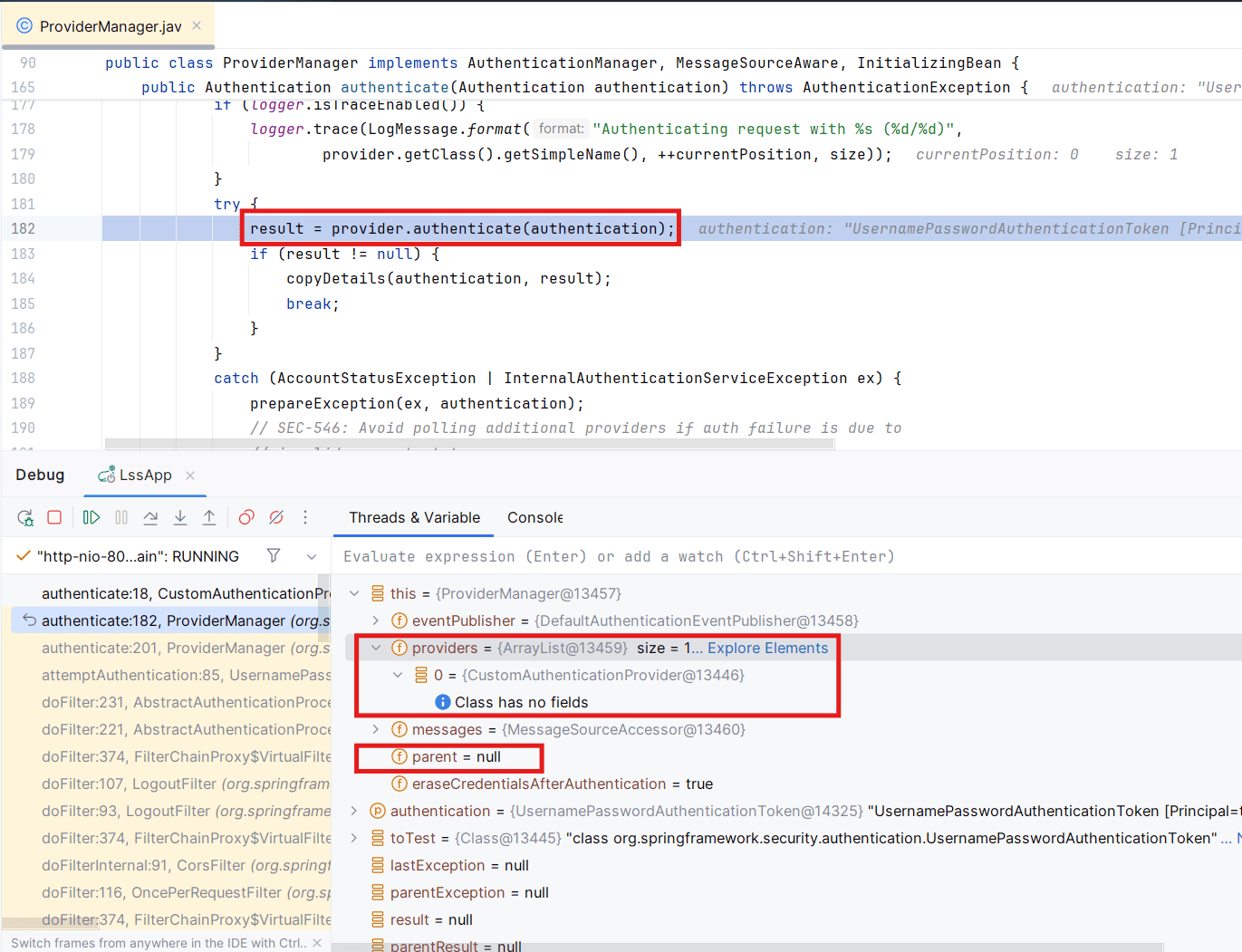
We can see that this is the parent manager, as the parent reference is null. The providers list includes the custom provider we registered, CustomAuthenticationProvider. - Our logic checks the credentials, the username, and the password.
- If the credentials match, we return a valid token, and the user is authenticated.
This setup provides a flexible way to integrate any external authentication mechanism while still keeping the standard Spring Security flows intact.
5. Conclusion
In this lesson, we implemented a custom AuthenticationProvider, focusing on authentication logic, proper handling of success and failure, and integration with the existing security configuration alongside the standard mechanisms.