
1. Overview
Our config-server is now set up and serving properties from our local Git repository. However, our microservices are still oblivious to its existence. They are currently relying on their local configuration files.
In this lesson, we’ll connect our services to the config-server. We’ll focus on the task-service in the following sections, as the steps for the notification-service will be the same. In the end project of the lesson, you’ll find both services configured.
We’ll configure the service to externalize its configuration, fetching the required settings from the config-server during the startup process. This allows us to maintain a single, versioned source of truth for our settings outside of the application artifact.
The relevant module we need to import when starting this lesson is: config-server-clients-start.
If we want to reference the fully implemented lesson, we can import: config-server-clients-end.
2. The Client Dependency
To enable our Spring Boot application to speak with the config-server, we need to add the specific client library.
In the task-service module, open its pom.xml file and add the spring-cloud-starter-config dependency.
We can find the latest version of spring-cloud-starter-config in the Maven Central repository. However, since we configured the Spring Cloud BOM in our parent project, we don’t need to specify the version here:
<dependencies>
    <!-- existing dependencies -->

    <dependency>
        <groupId>org.springframework.cloud</groupId>
        <artifactId>spring-cloud-starter-config</artifactId>
    </dependency>
</dependencies>
3. Configuring the Import
The application.properties we’re editing in this section is the task-service‘s own local file, not the application.properties in the Git config repository. We’ll update files in the Git repository in Section 4.
While these configurations enable Spring Cloud features, they’re actually powered by Spring Boot’s Config Data API. This system allows Spring Boot to look beyond local files and import configuration from external sources during the early stages of the startup process.
Update the local application.properties in the task-service module:
spring.application.name=task-service
spring.config.import=configserver:http://localhost:8888
server.port=8080
# existing properties
Let’s break down the first two critical properties.
The spring.application.name property serves as the unique identifier for our service. While it tells the config-server which file to look for (e.g., task-service.properties), its role is much broader. Several Spring Cloud projects rely on this property for features like service discovery, distributed tracing, and security.
Defining this name is considered a best practice whenever introducing Spring Cloud functionality to ensure all components can identify the service correctly.
The spring.config.import property tells Spring Boot where to find additional configuration data. The string configserver: is a Spring Cloud Config-specific prefix that plugs into the standard Spring Boot Config Data API.
Spring Cloud also supports an optional:configserver: variant, which is useful in local development scenarios where we want the service to start even if the config-server is temporarily unavailable.
It’s worth noting that spring.config.import is the standard approach introduced in Spring Boot 2.4, powered by the Config Data API. In older tutorials or pre-2.4 versions of Spring Cloud, you may encounter a bootstrap.properties file using the spring.cloud.config.uri property instead. This bootstrap mechanism has been superseded by spring.config.import.
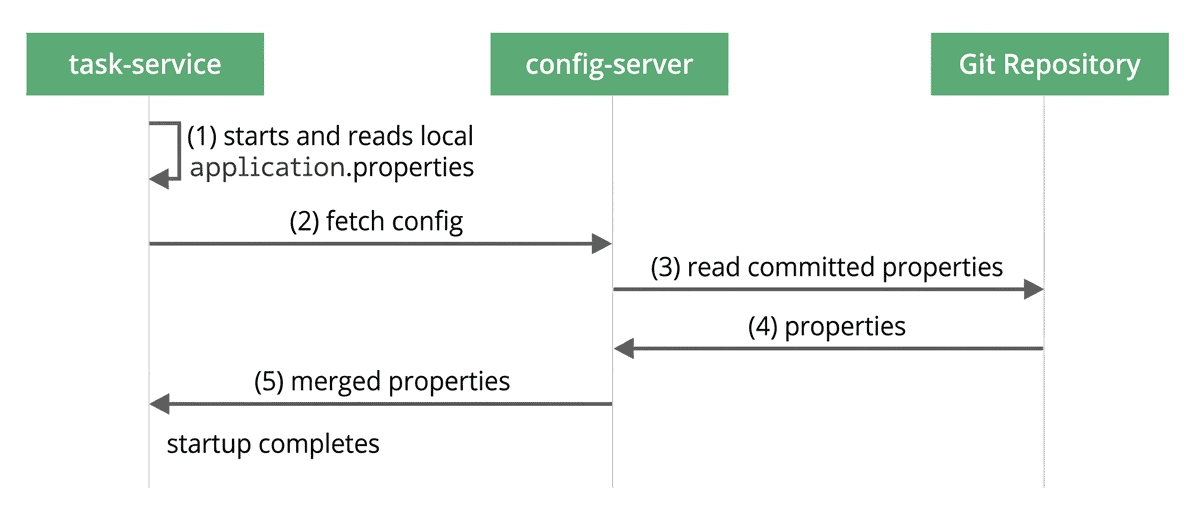
4. Defining Configuration in Git
As we established when setting up our server, we can manage configuration at both a global and a service-specific level. Let’s update our Git repository to see how these properties are merged into the task-service.
4.1. Updating the Git Repository
Let’s navigate to ~/config-repo, the local Git repository we set up in a previous lesson, where we store configuration properties for our services. We’ll ensure both the global and service-specific files are updated to provide meaningful data.
First, let’s verify a global property exists in application.properties:
global.message=Hello from the central config repo!Next, edit task-service.properties in ~/config-repo to include a service-specific property and a logging override:
custom.property=Hello from Git!
logging.level.com.baeldung=DEBUG
Remember to commit these changes to Git. The config-server reads from the committed state, not the working directory:
$ git add .
$ git commit -m "Add global and service-specific configuration"
Files that are untracked or have unstaged changes won’t be served, only committed content is visible to the config-server.
4.2. Understanding Configuration Lifecycle
While the config-server always serves the latest committed properties via its REST API, the Spring Cloud Config Client plugs into Spring Boot’s Config Data loading lifecycle, meaning configuration is fetched once at startup. There is no polling or re-loading at runtime.
By default, if we change a property in Git while the task-service is already running, the service won’t see the update until it’s restarted. Spring Cloud does provide mechanisms to update configuration at runtime without a full restart, but this topic deserves dedicated coverage and won’t be explored in this lesson.
5. Verifying the Connection
To test our setup, let’s first add a CommandLineRunner bean to the task-service‘s main application class. This will allow us to see the properties in the console immediately upon startup:
@Bean
public CommandLineRunner logProperties(@Value("${global.message:}") String globalMsg,
        @Value("${custom.property:}") String customProp) {
    return args -> {
        System.out.println("Global Property: " + globalMsg);
        System.out.println("Service Property: " + customProp);
    };
}
This CommandLineRunner is purely for verification, so remember to remove it once we’ve confirmed the properties are being fetched correctly.
Now, start the config-server, followed by the task-service. Watch the console logs of the task-service. We should first see the fetch confirmation:
INFO ... o.s.c.c.c.ConfigServerConfigDataLoader : Fetching config from server at : http://localhost:8888Following the startup logs, we should see our custom print statements:
Global Property: Hello from the central config repo!
Service Property: Hello from Git!
Additionally, we set the logging level for Baeldung components to DEBUG. None of the current task-service classes log at that level yet, so this particular setting won’t produce visible output on its own, but it’s still merged correctly into the environment. Adding a debug log statement to any com.baeldung class would immediately start printing at that verbosity, with no further configuration needed. Together with the CommandLineRunner output above, this confirms that the task-service successfully merged its local configuration with the remote configuration from the config-server.
6. Conclusion
We’ve successfully decoupled the configuration from our application code. Our services now boot up, reach out to the config-server, and download their settings before initializing their beans.
We can now modify properties such as database URLs, credentials, or feature flags in the Git repository without ever touching the compiled JAR files for our services.