
1. Overview
So far, every client of our system has had to know exactly where each microservice lives. In this lesson, we’ll show how to avoid this by using a gateway in front of our backends and letting it forward each request to the right service based on the URL.
The relevant module we need to import when starting this lesson is: routing-start.
If we want to reference the fully implemented lesson, we can import: routing-end.
The start project already includes two working services: the task service (port 8080) and the notification service (port 8081). In this lesson, we’ll build the gateway (port 8888) in front of them. Before running the demos, make sure all three are up and running.
2. The Edge Server and the BFF Pattern
Let’s say clients (browser, mobile apps, APIs) communicate with our microservices directly. As a result, they take on the integration burden. They have to know the host and port of each service to call them directly. That couples every client to the internal topology, which means that moving, renaming, or splitting a service on the server side forces a change on the client side.
In this lesson, we’ll cover two approaches addressing these issues: the edge server and the backend-for-frontend (BFF) pattern.
2.1. The Edge Server
An edge server acts as a single-entry point, taking clients’ requests, forwarding them to microservices, and sending the services’ responses back to the clients. The internal services stay hidden, and clients only ever talk to one address:
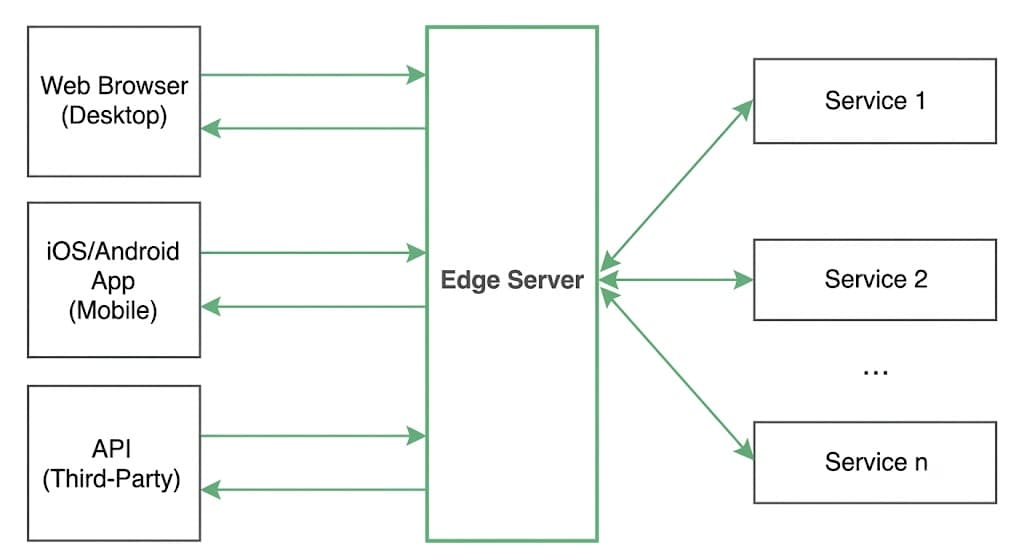
Because all requests flow through the edge server, it should have routines for dealing with common tasks, that would otherwise be duplicated in each service. For example, this includes routing, authentication, and rate limiting. Centralizing them here keeps the backends focused on their own logic. In this lesson, we’ll focus on the routing aspect.
Spring Cloud Gateway is Spring’s reactive, WebFlux-based implementation of the edge server.
2.2. The Backend-for-Frontend Pattern
A related idea is the Backend for Frontend (BFF) pattern. Instead of one general-purpose gateway, we run a dedicated gateway per client type. For example, one backend for mobile apps, another for browsers, and the third one for APIs:
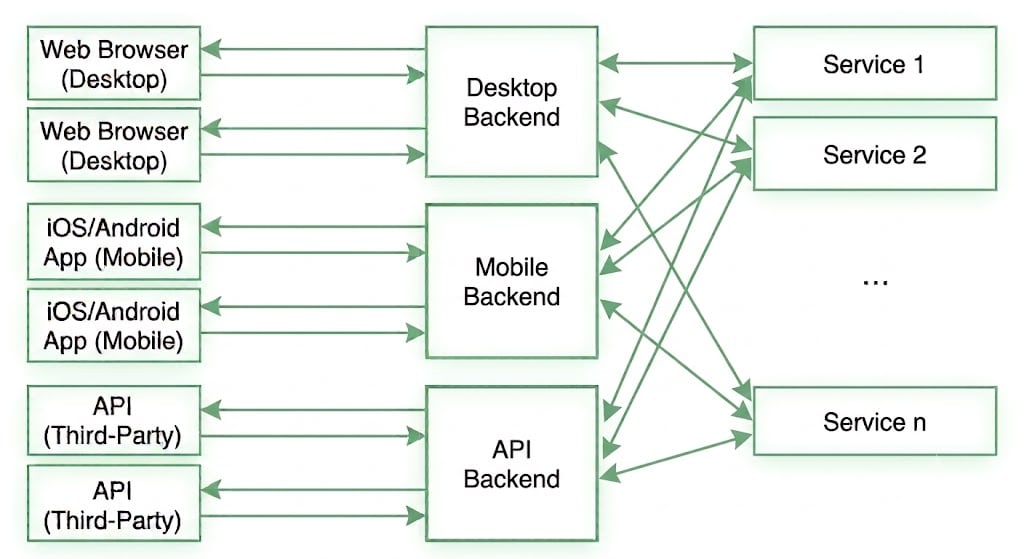
Each backend aggregates and formats responses for exactly what that frontend needs. It’s the same edge-server concept, specialized for one consumer rather than shared across all of them.
3. The Topology of Our Example
We’ll implement the edge server topology, in which a client communicates with the gateway which fans out to two backends:
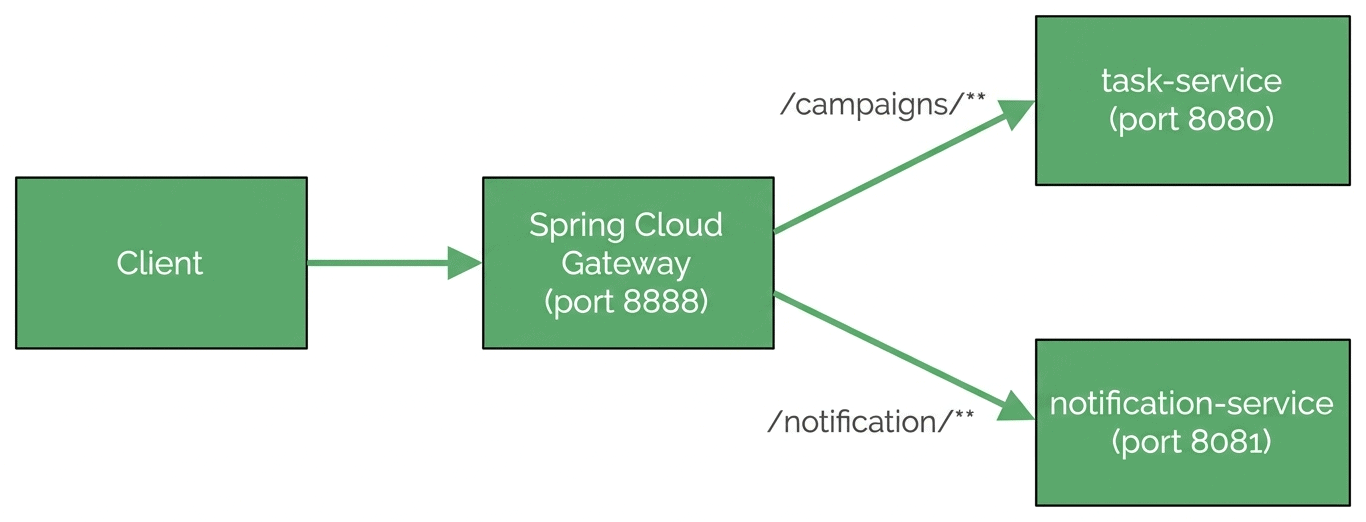
Upon receiving a client request, the gateway uses routing rules to choose the target service.
4. Adding Spring Cloud Gateway
Our starting point is a bare Spring Boot application – routing-gateway-service-start. The gateway module currently pulls in only spring-boot-starter and has server.port=8888 configured. However, it doesn’t expose an HTTP server yet and has nothing that knows how to route.
To turn it into a gateway, let’s add the gateway starter to the module’s pom.xml:
<dependency>
    <groupId>org.springframework.cloud</groupId>
    <artifactId>spring-cloud-starter-gateway-server-webflux</artifactId>
</dependency>
This is the WebFlux server artifact, and it’s the one we want for a standard reactive gateway. The older single-name spring-cloud-starter-gateway has been superseded on the current Spring Cloud line. We don’t need a <version> on the starter either, since the Spring Cloud BOM inherits from the parent already managing it.
With the starter on the classpath, the application becomes a reactive gateway. On startup, it now boots as a WebFlux server on 8888 and can receive HTTP traffic.
However, our gateway has no routes. If we start it now and send a request through 8888, the gateway has no rule that matches and returns a 404. Let’s give it some routes.
5. Configuring Routes in YAML
The routing rules we specify on a gateway that executes them are called routes. Each route has three components:
- An id that names it
- A uri that says where to forward matching traffic
- One or more predicates that decide which requests match
5.1. Defining the Route Table
The gateway module currently configures its port in application.properties. Once we have a list of routes to declare, and in a production environment we can have many, YAML reads much better than a .properties file. So, let’s replace application.properties with an application.yml file, in which we define the server port and routes:
server:
  port: 8888

spring:
  cloud:
    gateway:
      server:
        webflux:
          routes:
            - id: task-service
              uri: http://localhost:8080
              predicates:
                - Path=/campaigns/**
            - id: notification-service
              uri: http://localhost:8081
              predicates:
                - Path=/notification/**
We declared two routes:
- The first forwards anything under /campaigns to the task service on 8080
- The second sends anything under /notification to the notification service on 8081
The Path predicate distinguishes them. It’s a path pattern that the route matches against the request’s URL, proceeding with routing only if there’s a match. The /** wildcard means “this prefix and everything beneath it”, so /campaigns, /campaigns/1, and /campaigns?name=foo all match the first route. For a route to apply, all its predicates must evaluate to true.
Notice the prefix spring.cloud.gateway.server.webflux.routes in our YAML. This nesting mirrors the spring-cloud-starter-gateway-server-webflux dependency we added earlier.
In our example, each route points at a fixed http://localhost:port address, which is all we need while every service runs on the same machine. Once the gateway can look services up in a registry, a route can target lb://SERVICE-ID instead of a fixed host. The lb scheme tells the gateway to resolve that service id through the registry and load-balance across its instances.
Path is only one of several predicate factories the gateway offers. We’ll look at a few more later in this lesson.
5.2. Verifying the Routes
At this point, the gateway compiles and boots with a real route table. Let’s verify the routing end to end by running all three services: the task service on 8080, the notification service on 8081, and our gateway on 8888. Each one is a separate module of the project we already imported, so we can start them independently, either from our IDE or with mvn spring-boot:run from each module’s directory.
First, a read through the gateway. A GET to the gateway’s /campaigns path should come back with the task service’s campaign list, exactly as if we’d called 8080 directly:
curl http://localhost:8888/campaigns[
{"id":1,"code":"C1","name":"Campaign 1","description":"Description of Campaign 1","tasks":[ ... ]},
{"id":2,"code":"C2","name":"Campaign 2","description":"About Campaign 2","tasks":[ ... ]},
{"id":3,"code":"C3","name":"Campaign 3","description":"About Campaign 3","tasks":[]}
]Each campaign also carries its tasks array, trimmed here for readability. What happened here? The gateway matched the /campaigns/** path, forwarded the request to 8080, and returned us the response it got. We say it’s a transparent proxy because it doesn’t change clients’ requests, and clients don’t have to configure anything for its routing to work.
Next, a write to the other service. A POST to /notification/send should reach the notification service on 8081:
curl -X POST http://localhost:8888/notification/send \
  -H "Content-Type: application/json" \
  -d '{"sender":"[email protected]","recipient":"[email protected]","subject":"Welcome","content":"Hello"}'
The notification service receives the request through the gateway and echoes the notification back:
{"sender":"[email protected]","recipient":"[email protected]","subject":"Welcome","content":"Hello"}Both routes resolve and proxy correctly, which confirms our server is working.
5.3. Combining Predicates with AND
Our task service route currently forwards every method under /campaigns. But that controller exposes more than reads: alongside the GET endpoints, it handles POST, PUT, and DELETE for creating, updating, and deleting campaigns. Suppose we want this route to carry only reads. We add a second predicate so it matches Path=/campaigns/** AND Method=GET:
- id: task-service
  uri: http://localhost:8080
  predicates:
    - Path=/campaigns/**
    - Method=GET
Now a request matches this route only if both conditions hold: the path is under /campaigns and the HTTP method is GET. A POST, PUT, and DELETE to /campaigns will find no match since no other route covers them. In such cases, with no match, the gateway answers with a 404.
We can confirm the composed predicate directly. With all three services running, a POST to /campaigns through the gateway no longer matches the route, so it comes back as a 404:
curl -X POST http://localhost:8888/campaigns \
  -H "Content-Type: application/json" \
  -d '{"code":"C9","name":"Campaign 9","description":"A new campaign"}'

# Response:
{"path":"/campaigns","status":404,"error":"Not Found"}
The response is trimmed here for readability. The gateway has no route that accepts a write to /campaigns, so it has nothing to forward the request to. A plain GET to the same path still proxies through cleanly, confirming the composed predicate is doing its job.
6. Configuring Routes with the Java DSL
Sometimes, a route needs to accept requests that satisfy either one condition or another, or every condition except one. YAML has no syntax for that. Its predicate list is always ANDed. The Java DSL fills this gap with .or() and .negate() on the same PredicateSpec/BooleanSpec chain we’ve already used for AND.
First, we define the GatewayRoutesConfig class in the com.baeldung.lsc.config package. We use a RouteLocatorBuilder in a RouteLocator @Bean:
//@Configuration
public class GatewayRoutesConfig {

    //@Bean
    public RouteLocator routes(RouteLocatorBuilder builder) {
        return builder.routes()
            .route("task-service", r -> r
                .path("/campaigns/**")
                .and().method(HttpMethod.GET)
                .uri("http://localhost:8080"))
            .route("notification-service", r -> r.path("/notification/**").uri("http://localhost:8081"))
            .build();
    }
}
Note that the YAML table and this bean both define the same two routes, so we use one or the other, not both at once. If both were active, the gateway would register duplicate route definitions.
In our project, we use the YAML as the live configuration, so the end project keeps GatewayRoutesConfig inactive by commenting out its @Configuration and @Bean annotations. To switch to the Java DSL, we uncomment those annotations and remove or comment out the routes: block from application.yml.
When might we need this? Suppose some older clients don’t send requests under /campaigns, but instead send a legacy header. We can route them to the task service the same way, by OR-ing a header check onto the path check:
.route("task-service-legacy", r -> r
    .path("/campaigns/**")
    .or().header("X-Legacy-Client", "true")
    .uri("http://localhost:8080"))
Or suppose we want to keep internal monitoring traffic out of a public-facing route. We can negate a header check instead of matching on it:
.route("task-service-external", r -> r
    .header("X-Internal", "true")
    .negate().and().path("/campaigns/**")
    .uri("http://localhost:8080"))
Notice the negated condition comes first, before the .and(). The DSL composes strictly in the order we write it, left to right, with no parentheses to group sub-expressions. .negate() inverts everything composed so far, so if we’d written .path(…).and().header(…).negate() instead, we’d have inverted the whole combined condition (path AND header), not just the header check.
That’s the DSL’s main disadvantage compared to writing out a boolean expression by hand: order matters, and there’s no way to express nested grouping directly. Its advantage is that we get OR and NOT without writing a custom predicate class. For anything more elaborate than two or three conditions, a dedicated predicate() implementation is usually clearer.
7. Common Predicate Types
Beyond matching on the path or the method, real gateways often need to route on other information a request carries. This might be a header identifying an API version, or a cookie marking a canary release, for example. Path and Method are only two of several predicate factories the gateway ships:
| Predicate | Matches On | Example Use Case |
|---|---|---|
| Path | The request’s URL path | Routing by resource, e.g. /campaigns/** |
| Method | The HTTP method | Restricting a route to reads or writes |
| Header | A header name and value | Routing by API version or client type |
| Query | A query parameter name and value | Routing an A/B test variant by a flag |
| Cookie | A cookie name and value | Routing based on a feature-flag cookie |
| Weight | A percentage-based traffic split | Canary releases across route groups |
These combine the same way Path and Method do, with AND, OR, or NOT in the DSL. The predicate factories reference covers the complete list.
8. Conclusion
In this lesson, we put a Spring Cloud Gateway in front of two backend services and gave it a route table, first in YAML and then as the same routes in Java. Clients now hit a single entry point instead of reaching into each service directly. We then sharpened our routing with composed predicates, combining conditions with AND, OR, and NOT.
One heads-up is worth keeping in mind. In current gateway versions, X-Forwarded-* and Forwarded headers are off by default, so backends see the gateway as the originator unless we declare trusted upstreams via spring.cloud.gateway.server.webflux.trusted-proxies. We didn’t need it here, but it’s good to know it’s there.