
1. Overview
In this lesson, we’ll simplify mock creation and injection using Mockito annotations. We’ll initialize annotation support manually or automatically, reducing the setup code in our tests.
The relevant module we need to import when starting this lesson is: mock-with-annotations-start.
If we want to reference the fully implemented lesson, we can import: mock-with-annotations-end.
The starting project already configures the explicit Mockito startup agent introduced earlier in the course.
2. Mockito Annotations Overview
Mockito provides annotations that simplify the creation and management of mock objects. Here, we’ll focus on the core annotations used in most tests:
- @Mock – defines a mock object for a given test class field
- @InjectMocks – creates an instance (a real one, not mocked) of the given class test field and injects mock dependencies into it
Mockito also provides other annotations, such as @Spy, @MockitoSettings and @Captor, which will be covered in separate lessons.
The @Mock, @InjectMocks, @Spy and @Captor annotations are included in the mockito-core dependency. @MockitoSettings belongs to the separate mockito-junit-jupiter module, which we’ll add when introducing MockitoExtension.
The main advantage of using those annotations is to reduce the boilerplate code needed when manually creating mocks, which also makes the test class more readable.
Instead of writing multiple mock() calls and passing them into a constructor, we can define fields at the class level and let Mockito automatically create the associated object.
We need to initialize Mockito annotations before using the annotated fields. We’ll look at manual and automatic initialization later in this lesson.
3. Using @Mock
This annotation, when applied to a class-level field, tells Mockito to create a mock object that matches the field’s type.
Our codebase has a CampaignRepository interface. To create its mock for our tests, we declare a field with the corresponding type:
@Mock
private CampaignRepository campaignRepo;
We’ll use a mutable instance field so each test instance owns its mock.
The @Mock annotation supports optional attributes for customizing the mock. Two examples are:
- name – mock name, used in error/warning messages. Defaults to the field name
- extraInterfaces – a list of interfaces implemented by the created mock instance
For instance, we can use extraInterfaces to instruct Mockito to create a mock that implements Closeable in addition to the mocked class:
@Mock(extraInterfaces = Closeable.class)
CampaignRepository campaignRepository;
Now, we can use campaignRepository in our test code as a Closeable whenever needed:
@Test
void givenCampaignRepository_whenInitialized_thenMockImplementsCloseable() {
    assertInstanceOf(Closeable.class, campaignRepository);
}
@Mock‘s other attributes, such as strictness and mockMaker, are more advanced topics that we won’t be covering here.
4. Using @InjectMocks
The @InjectMocks annotation creates an instance of the class under test (not a mock) if the annotated field hasn’t already been initialized, and tries to inject any dependencies using the available mocks.
The strategy Mockito uses to perform this injection is as follows:
- Firstly, if there are constructors with parameters, Mockito will choose the one with the most parameters. Mockito will then try to match the available mock/spy instances with the constructor parameters
- If constructor injection doesn’t create the object, Mockito tries setter injection, matching dependencies by type and, when needed, by name. An uninitialized field can be constructed using a no-args constructor
- Finally, Mockito will attempt field injection by matching mock or spy instances to fields with compatible types
If constructor injection creates the object, Mockito doesn’t try setter or field injection afterward, even if some dependencies remain unsatisfied. For example, if a constructor is selected but some dependencies are only satisfied by setters, they will be left uninitialized.
Mockito isn’t a full dependency injection framework such as Spring or CDI. Missing dependencies don’t necessarily raise an error.
Unmatched constructor arguments can receive null, while unsuccessful setter or field matching can leave dependencies untouched. We need to supply any remaining dependencies ourselves.
4.1. Injecting Mocks
Let’s see how @InjectMocks works with a simple example. We know our DefaultCampaignService depends on CampaignRepository. So, let’s create a new DefaultCampaignServiceTest class and add:
@Mock
private CampaignRepository campaignRepo;

@InjectMocks
private DefaultCampaignService service;
Once we initialize the annotations, Mockito finds the DefaultCampaignService constructor’s CampaignRepository parameter and injects our mock. This avoids manually constructing the service in our test setup.
If the service has multiple dependencies, each can be declared with @Mock, and Mockito will inject them all, provided the class under test satisfies @InjectMocks‘ requirements.
5. Enabling Mockito Annotations
To enable Mockito’s annotation support in our JUnit tests, we can use either of these techniques:
- Manually calling MockitoAnnotations.openMocks(), typically in a @BeforeEach setup method
- Using a Mockito JUnit extension, which initializes the annotations automatically on our behalf
5.1. Using MockitoAnnotations.openMocks()
This method takes the test class instance as an argument and processes all Mockito-annotated fields, including those inherited from parent classes. We need to initialize the annotations before running a test. Otherwise, these uninitialized fields remain unset.
We should save the returned AutoCloseable handle in an instance variable and call close() after the test to release its resources.
Closing the returned handle is required when static mocks are used. Custom mock makers can also depend on this initialization-and-release lifecycle.
Pairing initialization with cleanup after each test releases the resources managed by annotation processing.
When using Mockito with JUnit, we’ll typically put this call in a @BeforeEach method and release the mock resources in an @AfterEach method:
class DefaultCampaignServiceTest {

    private AutoCloseable closeable;

    @Mock(extraInterfaces = Closeable.class)
    CampaignRepository campaignRepository;
    @InjectMocks
    DefaultCampaignService defaultCampaignService;

    @BeforeEach
    void openMocks() {
        closeable = MockitoAnnotations.openMocks(this);
    }

    @AfterEach
    void closeMocks() throws Exception {
        closeable.close();
    }
    // ... tests
}
As a rule of thumb, we should favor the use of the MockitoExtension, which we’ll introduce in the next section, as it automatically adds those calls.
On the other hand, using openMocks() directly might be necessary in some scenarios, such as when we’re creating or extending a testing framework.
5.2. Using MockitoExtension
The MockitoExtension class is a JUnit Jupiter extension that automatically initializes any Mockito-annotated field, thus saving us the burden of calling openMocks() directly.
This class is not part of the mockito-core module, so we must add the following dependency to our project:
<dependency>
    <groupId>org.mockito</groupId>
    <artifactId>mockito-junit-jupiter</artifactId>
    <version>${mockito.version}</version>
    <scope>test</scope>
</dependency>
We can find the latest version of this library on Maven Central. We use the same version as mockito-core to keep the Mockito modules compatible.
This outline shows how an annotated test uses MockitoExtension. The dependency and service names stand for our test’s types:
@ExtendWith(MockitoExtension.class)
class SomeTest {

    @Mock
    SomeDependency dependency;
    @InjectMocks
    SomeService service;

    // tests...
}
There’s a difference between manual initialization and the extension. By default, mocks initialized using MockitoExtension enable strict stubbing, while those created with openMocks() do not.
6. Practical Example from Our Codebase
Let’s see a full test class showing how we might set up DefaultCampaignService with a mocked CampaignRepository:
@ExtendWith(MockitoExtension.class)
class DefaultCampaignServiceAnnotationTest {

    @Mock
    CampaignRepository campaignRepo;

    @InjectMocks
    DefaultCampaignService campaignService;

    @Test
    void givenAnnotatedMocks_whenInitialized_thenTheyAreNotNull() {
        assertNotNull(campaignRepo);
        assertNotNull(campaignService);
    }
}
The assertions confirm that the repository mock and service are initialized. To inspect these objects, we can set a breakpoint in an assertNotNull() call and run the test in our IDE’s debugger:
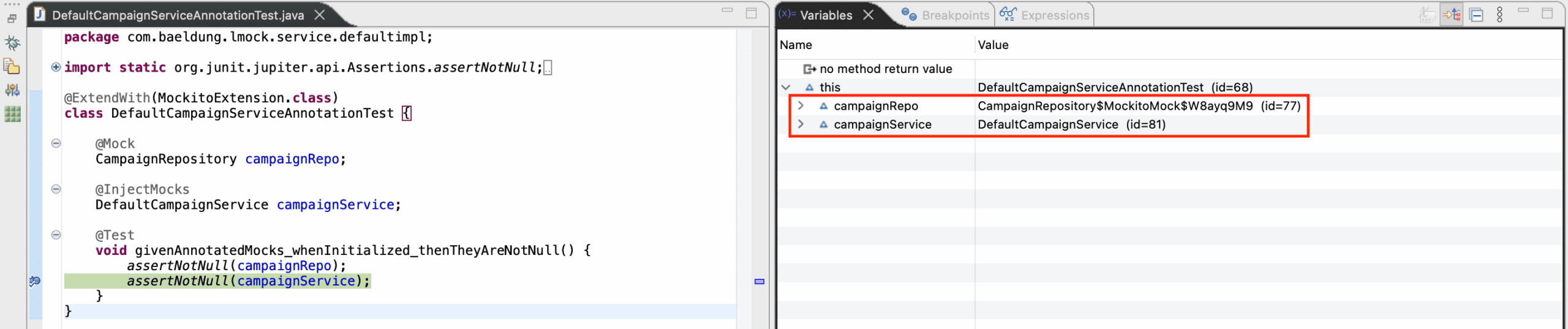
Now, if we take a look at the variables view, we can see that the campaignRepo instance variable was initialized with a mock instance, while campaignService has an instance of the actual class. The service receives this repository mock through its constructor.
This alone significantly reduces the boilerplate compared to manually creating mocks and passing them into the constructor.
However, Mockito doesn’t recursively assemble dependencies from objects created with @InjectMocks. For example, the following test will result in a NullPointerException:
@ExtendWith(MockitoExtension.class)
class DefaultReportsServiceTest {

    @Mock
    TaskService taskService;
    @Mock
    WorkerRepository workerRepository;

    @InjectMocks
    DefaultWorkerService workerService;
    @InjectMocks
    private DefaultReportsService reportsService;

    @Test
    void givenWorkerIdAndReportBuilder_whenGenerateWorkerReport_thenNPE() {
        var builder = new SimpleMapReportBuilder();

        // ... stubbing omitted

        // Mockito won't inject workerService into the reportsService, so
        // we get an exception here
        assertThrows(NullPointerException.class, () -> reportsService.generateWorkerReport(builder, 1L));
    }
}
In this case, workerService is a real object created with @InjectMocks, rather than an annotated mock or spy available for injection into reportsService. Instead, we can explicitly construct the reports service using the real worker service. With this unstubbed repository, the missing worker still causes a NoSuchElementException, which is separate from the injection problem:
@Test
void givenWorkerIdAndReportBuilder_whenGenerateWorkerReport_thenReportNotFound() {
    var builder = new SimpleMapReportBuilder();
    var rs = new DefaultReportsService(taskService, workerService);

    // The unstubbed worker repository returns an empty Optional
    assertThrows(NoSuchElementException.class, () -> rs.generateWorkerReport(builder, 1L));
}
Using real collaborators can make a test cover interactions across several classes; whether we call it an integration test depends on its scope and boundaries. We can still test this class with mocked dependencies, or choose explicit construction when we want to include the real collaborator.
7. Annotated Fields Lifecycle
A question that may arise when dealing with Mockito annotations is about the lifecycle of the created objects. If a test class has multiple test methods, is it safe to reuse them? What if the methods from the class under test have side effects?
Let’s consider this test class:
@ExtendWith(MockitoExtension.class)
class DefaultCampaignServiceAnnotationTest {

    @Mock
    CampaignRepository campaignRepo;
    @InjectMocks
    DefaultCampaignService campaignService;

    @Test
    void givenValidId_whenCloseCampaign_thenValidResult() {
        System.out.println("running test: givenValidId_whenCloseCampaign_thenValidResult");
        System.out.println("campaignService.hashCode() = " + campaignService.hashCode());
        System.out.println("campaignRepo.hashCode() = " + campaignRepo.hashCode());
        var result = campaignService.closeCampaign(1L);
        // ... assertions omitted
    }

    @Test
    void givenInvalidId_whenFindById_thenEmptyResult() {
        System.out.println("running test: givenInvalidId_whenFindById_thenEmptyResult");
        System.out.println("campaignService.hashCode() = " + campaignService.hashCode());
        System.out.println("campaignRepo.hashCode() = " + campaignRepo.hashCode());

        var result = campaignService.findById(1L);
        // ... assertions omitted
    }
}
Here, closeCampaign() would update a campaign and its tasks if the repository returned a campaign. Our unstubbed mock returns an empty Optional, so this example performs no entity mutation. Do these tests share their mock and service instances?
With the default test-instance lifecycle used here, they don’t share these instances.
With JUnit Jupiter’s default per-method lifecycle, each test method runs on a new test-class instance. MockitoExtension initializes its mocks before the test, and these initially empty @InjectMocks fields receive newly constructed objects. This doesn’t mean that an already initialized @InjectMocks field is always replaced, or that the same isolation follows when we choose a shared test instance.
The following output comes from the verified lifecycle run. The hashCode() values illustrate that run; they aren’t guaranteed to be unique and will vary between runs:
running test: givenValidId_whenCloseCampaign_thenValidResult
campaignService.hashCode() = 169049466
campaignRepo.hashCode() = 905650857
running test: givenInvalidId_whenFindById_thenEmptyResult
campaignService.hashCode() = 204568533
campaignRepo.hashCode() = 1286134778
8. Conclusion
Mockito annotations reduce the code needed to create mocks and supply them to the object under test. They still need initialization, and automatic injection doesn’t replace explicit construction when the dependency relationships exceed its supported strategies.
The default per-method test lifecycle gives this example separate mocks and services for each test. That isolation depends on the test-instance lifecycle and how the fields are initialized; it isn’t a guarantee that every existing annotated object is replaced.